Streamline your planning process with our free Planner Template.
Fully editable and organized, it’s ideal for managing tasks, appointments, and deadlines efficiently.
What Is a Planner Template?
A planner template is a pre-designed framework that helps organize tasks, schedules, goals, and other information in a structured format.
It provides a ready-made layout that can be customized and reused, saving time compared to creating planning pages from scratch.
Download Spreadsheet Daddy’s Free Planner Template
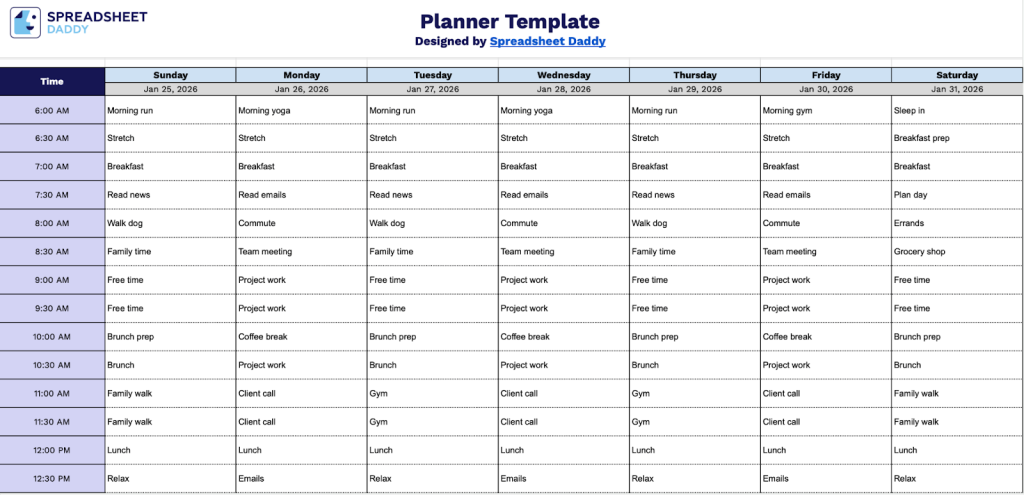
Our Planner Template helps you organize your daily schedule with time slots from 6:00 AM to 9:00 PM.
What’s included
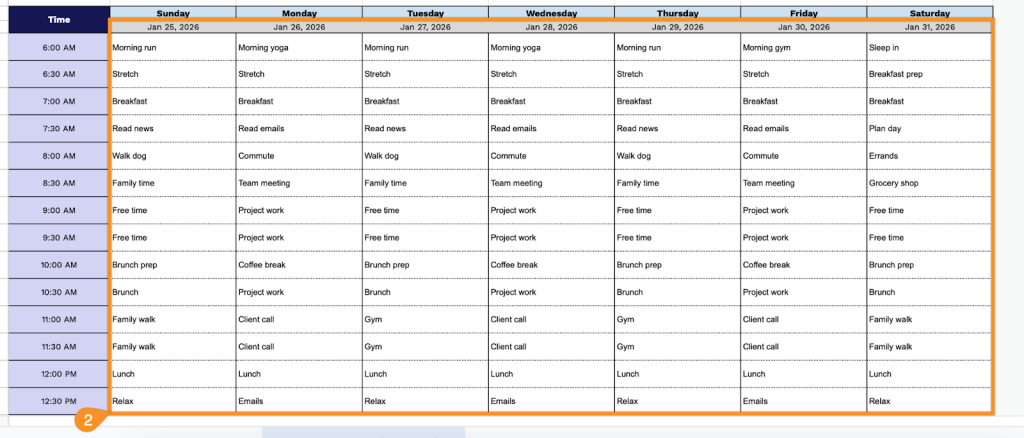
- Comprehensive weekly time-block layout: The template features a full 7-day week view spanning Sunday through Saturday, with each day broken down into 30-minute intervals from 6:00 AM to 9:00 PM, providing 30 time slots per day for detailed scheduling and allowing you to plan activities down to the half-hour across all 168 hours of your week.
- Customizable date headers: Each day column includes an editable date placeholder field at the top, enabling you to quickly input specific dates for any week of the year and maintain clear temporal context throughout your planning process.
- Structured time column organization: The leftmost column displays all time slots in a clear 12-hour format with AM/PM designations, making it easy to scan your schedule vertically and identify available time blocks or scheduling conflicts at a glance.
- Spacious planning cells: Each intersection of time slot and day provides ample white space for writing appointments, tasks, meetings, and personal commitments, with consistent cell sizing that accommodates brief notes or detailed activity descriptions.
The template includes a full week layout that you can easily customize by adding or removing columns as needed.
Download a customizable blank planner template in your preferred file type from the links below:
How to Use Our Planner Template
1. Download the planner in Excel or PDF format, or duplicate it to Google Sheets for yourself.
2. Fill in the dates for the week, then add your appointments, tasks, and plans for each day.