Looking to simplify your marketing planning?
Grab our free Marketing Plan Template in Google Sheets, Excel, or PDF.
Designed to be easy to customize, it keeps all your campaigns, budgets, and goals organized in one place.
What Is a Marketing Plan Template?
A marketing plan template is a pre-structured document that provides a framework for organizing and documenting your marketing strategy, goals, and tactics.
Using a template saves time and ensures you don’t overlook critical components when developing a comprehensive marketing strategy for your business.
Download Spreadsheet Daddy’s Free Marketing Plan Template
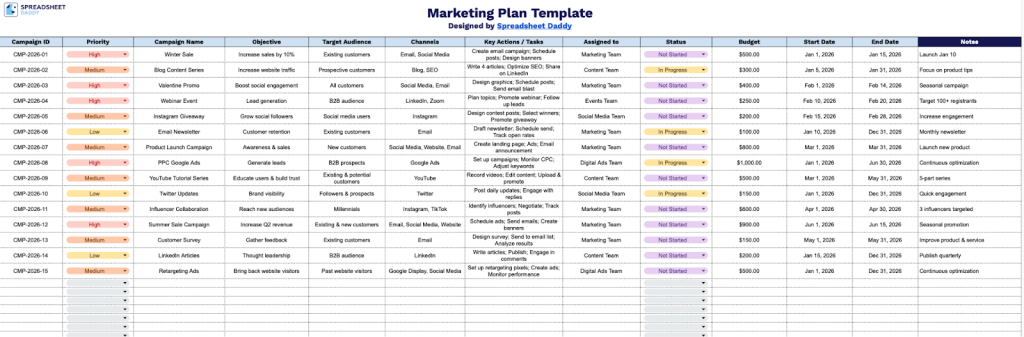
Our Marketing Plan Template helps you organize and track all of your campaigns in one place, giving your team a clear overview of priorities, budgets, timelines, and responsibilities.
What’s included
- Campaign tracking columns: The template includes 12 dedicated columns spanning Campaign ID, Priority, Campaign Name, Objective, Target Audience, Channels, Key Actions / Tasks, Assigned To, Status, Budget, Start Date, and End Date, giving you a comprehensive, at-a-glance view of every campaign detail in a single row.
- Built-in task and ownership tracking: Dedicated “Key Actions / Tasks” and “Assigned To” columns let you break down each campaign into actionable steps and assign responsibility to specific team members, making it easy to coordinate across departments and maintain clear accountability.
- Status and timeline management: Separate “Status,” “Start Date,” and “End Date” columns let you monitor each campaign’s lifecycle at a glance, helping teams stay on schedule and flag initiatives that are overdue or at risk.
You can add or remove columns to fit the specific needs of your business and campaigns.
Access a free, editable Marketing Plan Template by choosing your desired format from the links below:
How to Use Our Marketing Plan Template
1. Choose to download the template in Excel or PDF, or open it in Google Sheets to edit your copy.
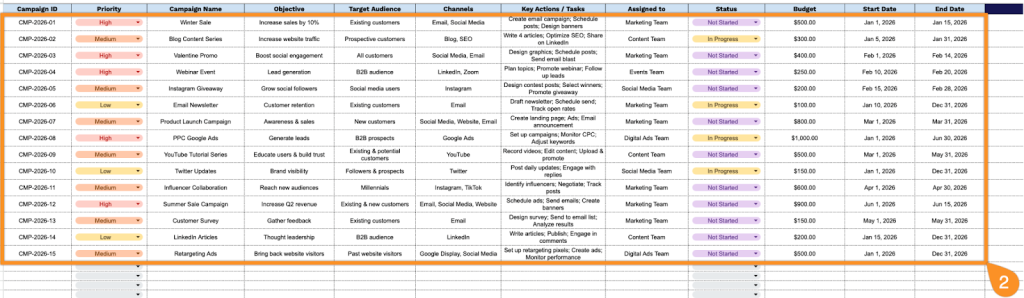
2. Complete the columns by entering all essential marketing information:
- Campaign ID: Enter the unique identifier assigned to each marketing campaign for tracking and reference purposes.
- Priority: Indicate the campaign’s urgency level (high, medium, or low) to guide resource allocation.
- Campaign Name: Specify the complete campaign title that clearly describes the marketing initiative.
- Objective: Define the primary goal or desired outcome (brand awareness, lead generation, sales conversion, etc.).
- Target Audience: Document the specific demographic, psychographic, or behavioral characteristics of your intended audience.
- Channels: List the marketing platforms and mediums to be utilized (social media, email, paid ads, content marketing, etc.).
- Key Actions / Tasks: Outline the specific activities and deliverables required to execute the campaign successfully.
- Assigned to: Specify the team member or department responsible for campaign execution and oversight.
- Status: Record the current progress state (not started, in progress, completed, on hold, or cancelled).
- Budget: Enter the allocated financial resources designated for the campaign.
- Start Date: Document the planned launch date for the marketing campaign.
- End Date: Specify the campaign conclusion date or deadline for completion.
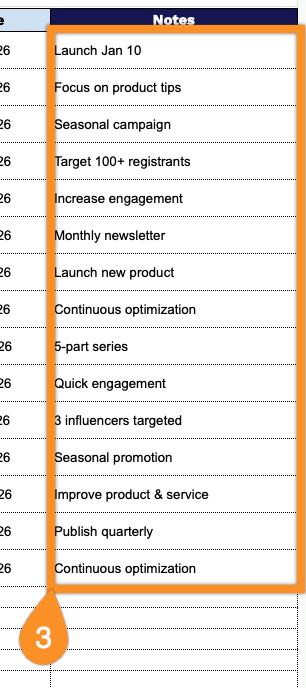
3. Record explanations for unexpected costs, delays, campaign adjustments, or insights from ongoing activities in the Notes section.