Save time and reduce errors with our ready-made Accounts Receivable Template.
Easily track customer invoices, payments, and overdue balances in Google Sheets, Excel, or PDF.
Perfect for small businesses, freelancers, or anyone who wants clear, professional receivables management.
What Is an Accounts Receivable Template?
An accounts receivable template is a pre-formatted document or spreadsheet used to track money owed to a business by its customers for goods or services provided on credit.
Using this template streamlines receivable management, improves cash flow visibility, and ensures timely follow-up on overdue payments.
Download Spreadsheet Daddy’s Free Accounts Receivable Template
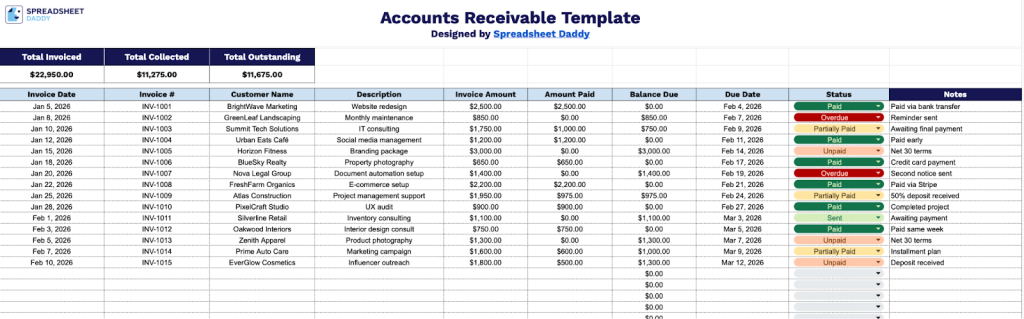
Our Accounts Receivable Template helps you track and manage all your outstanding invoices in one organized place, giving you a clear overview of what has been collected and what is still owed.
What’s included
- Summary dashboard with automatic totals: The top section features three prominently highlighted summary cells, including Total Invoiced, Total Collected, and Total Outstanding, which automatically calculate based on the data entered in the rows below, giving you an at-a-glance financial overview without any manual math.
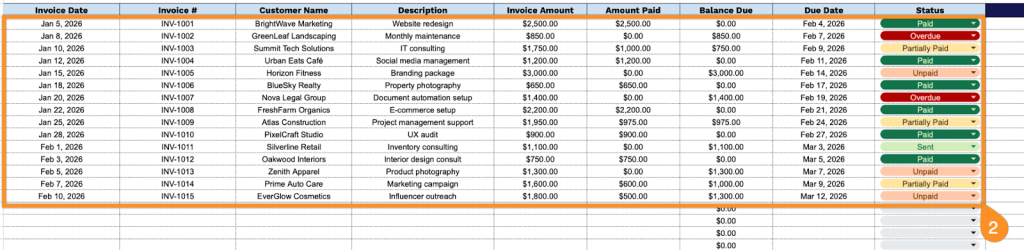
- Comprehensive invoice tracking columns: Each row captures the full lifecycle of a receivable across nine dedicated columns: Invoice Date, Invoice #, Customer Name, Description, Invoice Amount, Amount Paid, Balance Due, Due Date, and Status, ensuring every detail of a transaction is recorded in one centralized location.
- Automatic balance due calculation: The Balance Due column is preconfigured to calculate the difference between the Invoice Amount and Amount Paid for each row, eliminating manual calculations and reducing the risk of errors as payments come in over time.
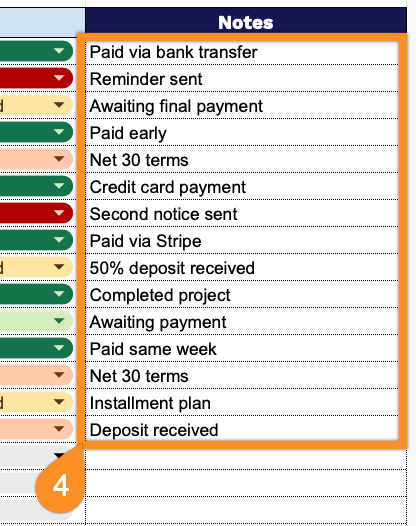
- Status and notes fields for workflow management: A dedicated Status column allows you to flag each invoice with labels such as Paid, Pending, or Overdue, while an adjacent Notes column gives you a free-text space to log follow-up actions, payment arrangements, or any other context relevant to that receivable.
The layout is fully flexible, so you can add or remove columns to make it work exactly the way you need.
Click the links below to get a blank template for Accounts Receivable in the format of your choice:
How to Use Our Accounts Receivable Template
1. Grab this template as an Excel or PDF, or copy it to Google Sheets for your own use.
2. Complete the columns by entering all essential transaction information:
- Invoice Date: Enter the date when the invoice was issued to the customer.
- Invoice #: Specify the unique invoice number assigned to this transaction for tracking and reference.
- Customer Name: Record the client’s full name or business name.
- Description: Include a clear summary of the products or services provided in this transaction.
- Invoice Amount: Document the total amount billed to the customer before any payments are applied.
- Amount Paid: Enter the sum of all payments received from the customer toward this invoice.
- Balance Due: This field is automatically calculated by subtracting the Amount Paid from the Invoice Amount, showing the amount the customer still owes.
- Due Date: Specify the payment deadline agreed upon with the customer.
- Status: Select the appropriate payment status (Paid, Partially Paid, Overdue, Sent, etc.).
3. At the top, the sheet automatically updates Total Invoiced, Total Collected, and Total Outstanding as you add each invoice.

4. Use the Notes column to explain late payments, upcoming expected payments, or any special circumstances affecting collection.