Save time creating a software license tracker from scratch with our free Software License Tracking Template.
Available in Google Sheets, Excel, and PDF, this editable template helps you keep track of license details, renewal deadlines, subscription costs, and software assets in one convenient place.
What Is a Software License Tracking Template?
A software license tracking template is a structured document or spreadsheet used by organizations to record and manage all software licenses they own, including details such as license keys, expiration dates, vendor information, and the number of authorized users.
By maintaining an up-to-date tracking template, businesses can gain full visibility into their software assets, optimize spending by eliminating unused licenses, and streamline audits when required by vendors or regulatory bodies.
Download Spreadsheet Daddy’s Free Software License Tracking Template
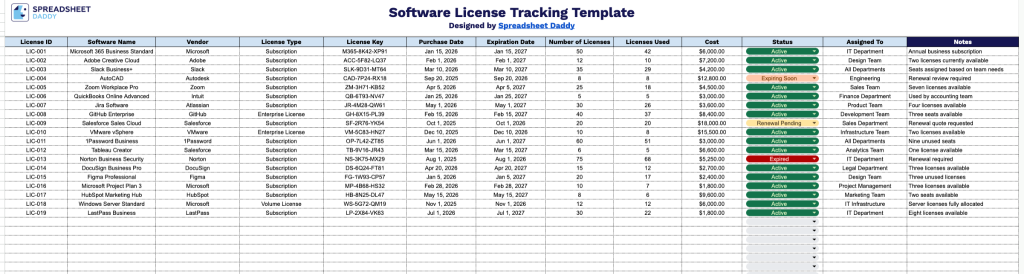
Our Software License Tracking Template gives you a clear, organized way to monitor all your organization’s software licenses in one place.
What’s included
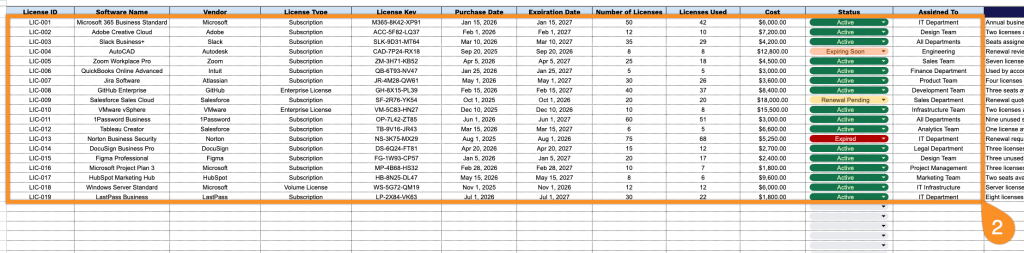
- Comprehensive license tracking columns: The sheet includes twelve dedicated fields: License ID, Software Name, Vendor, License Type, License Key, Purchase Date, Expiration Date, Number of Licenses, Licenses Used, Cost, Status, and Assigned To, giving you a complete record of every software asset your organization owns.
- Built-in fields for license utilization and compliance: The Number of Licenses and Licenses Used columns let you monitor seat allocation at a glance, making it easy to spot over- or under-utilized licenses and stay compliant with vendor agreements.
- Expiration and status tracking for renewals: The Expiration Date and Status columns make it easy to flag upcoming renewals, expired licenses, or inactive software, helping you avoid coverage lapses or unnecessary spend on unused licenses.
- Ownership and accountability fields: The Assigned To column lets you record which employee, department, or device each license is tied to, making it easy to track usage responsibility and follow up when licenses need to be reassigned or reclaimed.
- Cost and vendor documentation: The Vendor, License Key, and Cost columns keep purchasing details and license credentials organized in one place, so you always have quick access to the information needed for renewals, audits, or budget reporting.
You can easily add or remove columns to match your specific tracking needs.
Select your preferred version below to download a ready-to-use Software License Tracking template:
How to Use Our Software License Tracking Template
1. Download a ready-to-use server relocation checklist in Excel or PDF, or customize your own copy directly in Google Sheets.
2. Record all essential license information by adding the software name, vendor details, license type, activation key, purchase date, renewal or expiration date, available license quantity, usage status, cost, and assigned users or teams.
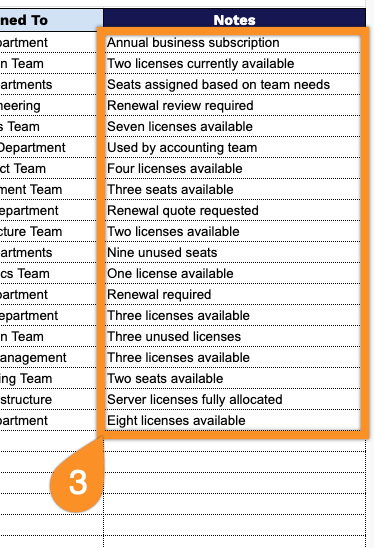
3. Use the Notes section to add important details, such as renewal reminders, usage restrictions, support information, or any additional comments related to the software license.