Want a ready-to-use scorecard?
Our free Scorecard Template is professionally formatted and available in Google Sheets, Excel, and PDF.
Edit it to track key metrics, monitor progress, and make fast, data-driven decisions.
What Is a Scorecard Template?
A scorecard template is a structured framework for tracking, measuring, and evaluating performance metrics against predetermined goals or standards.
Scorecard templates help transform raw data into actionable insights by organizing information in a clear, visual format that facilitates decision-making and continuous improvement.
Download Spreadsheet Daddy’s Free Scorecard Template
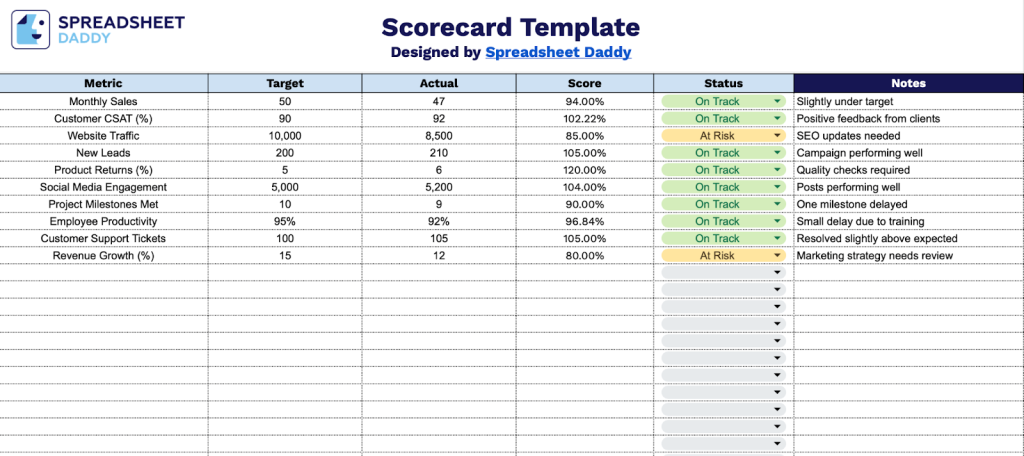
Our Scorecard Template helps you track and monitor key performance metrics across your organization.
What’s included
- Comprehensive metric-tracking framework: The template features a structured five-column layout to monitor key performance indicators, with dedicated columns for Metric, Target, Actual, Score, and Status, enabling systematic tracking of business objectives across multiple dimensions.
- Visual status monitoring system: Built-in Status column lets you quickly assess performance at a glance with color-coded indicators, making it easy to identify which metrics need immediate attention during reviews or stakeholder presentations.
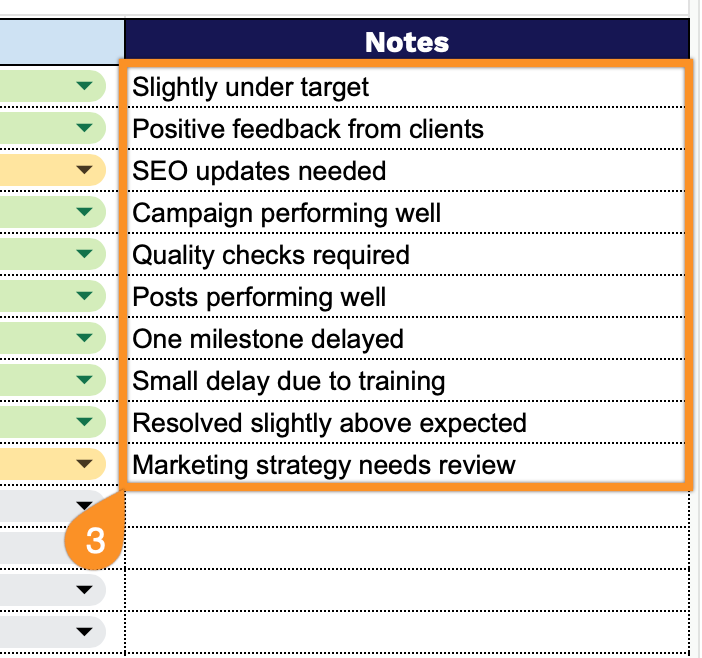
- Flexible notes and context field: Each metric row includes a dedicated Notes column where you can add qualitative context, document reasons for variance, record action items, or provide additional commentary that helps explain the numbers and supports data-driven decision-making during team meetings.
- Customizable metric rows: The template provides multiple pre-formatted rows that can be easily adapted to track any business metric, from sales targets and customer satisfaction scores to operational KPIs and financial indicators, allowing you to tailor the scorecard to your specific department, project, or organizational needs.
Adjust the template by adding or removing columns to match your specific tracking requirements.
Select one of the links below to download a free blank scorecard template in the format you need:
How to Use Our Scorecard Template
1. Grab the template in Excel or PDF, or duplicate it in Google Sheets to customize.
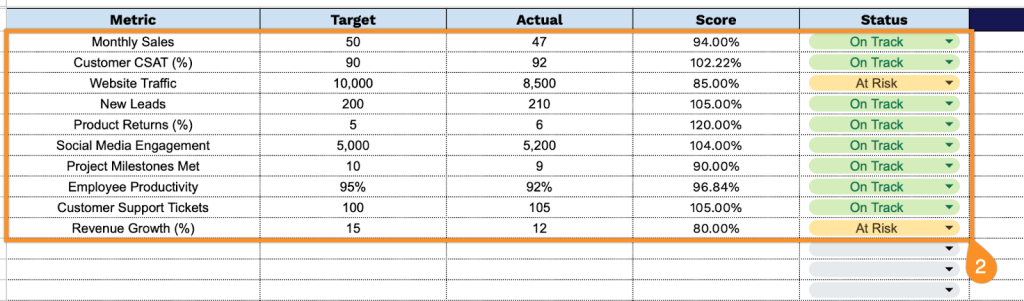
2. Complete the columns by entering all tracking data and evaluation criteria:
- Metric: Define the specific key performance indicator being measured (e.g., response time, completion rate, customer satisfaction).
- Target: Enter the goal or benchmark value that represents successful performance for this metric.
- Actual: Record the real measured result or outcome achieved during the evaluation period.
- Score: The template automatically calculates the performance score based on the comparison between target and actual values.
- Status: Indicate the current standing using a visual indicator (on track, at risk, or off track).
3. Use the Notes section for any important information or special instructions.