Keep accurate maintenance records without having to start from scratch.
Download our free Maintenance Log Template in Google Sheets, Excel, or PDF to organize service schedules, completed tasks, and equipment details in one place.
What Is a Maintenance Log Template?
A maintenance log template is a pre-structured document used to systematically record all maintenance activities performed on equipment, vehicles, facilities, or assets over time.
By providing a standardized format, the template helps organizations track asset history, schedule preventive maintenance, identify recurring issues, and extend the operational lifespan of their equipment.
Download Spreadsheet Daddy’s Free Maintenance Log Template
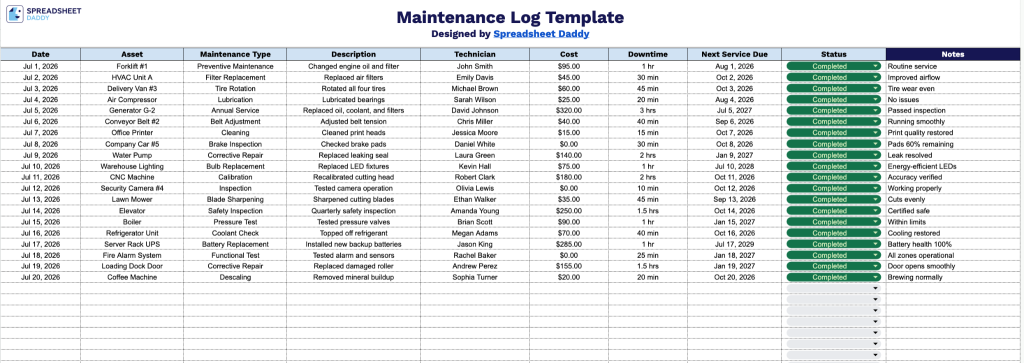
Our Maintenance Log Template gives you a simple, organized way to track upkeep, repairs, and service schedules in one place.
What’s included
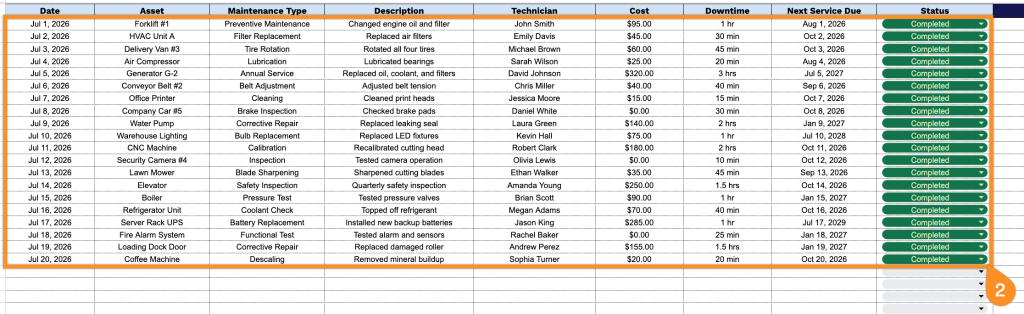
- Ten dedicated tracking columns: The log includes Date, Asset, Maintenance Type, Description, Technician, Cost, Downtime, Next Service Due, and Status columns, giving you a comprehensive record of every maintenance event from start to finish, plus who performed the work and what it cost.
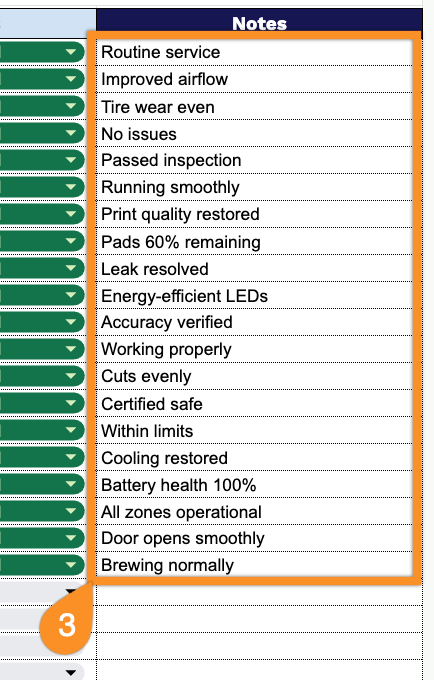
- Expansive Notes field: A dedicated Notes column gives technicians and managers room to document additional context, parts used, follow-up actions, or special instructions for each maintenance entry.
- Ready-to-fill layout: The template comes already formatted and structured for immediate data entry, so you can start logging maintenance activity right away without needing to build out columns or fields yourself.
Add or remove columns to match the specific information you want to track.
Get your free blank Maintenance Log template using the links below. Choose the format that works best for you:
How to Use Our Maintenance Log Template
1. Download the Maintenance Log template in Excel or PDF, or open it in Google Sheets by creating your own copy.
2. Log each maintenance activity by entering the date, asset, maintenance type, service details, technician’s name, cost, downtime, next service date, and status.
3. Use the Notes section to document follow-up actions, scheduled preventive maintenance, safety observations, or any additional comments that may be useful for future maintenance records.