Take control of your production timeline with this easy-to-use Film Production Schedule Template.
Available in Google Sheets, Excel, and PDF, it helps you plan shoot days, coordinate your team, and reduce scheduling mistakes.
What Is a Film Production Schedule Template?
A film production schedule template is a pre-formatted document that helps filmmakers organize and plan every phase of their production timeline.
This template serves as a roadmap for the production team, ensuring everyone knows what needs to be filmed when and helping keep the project on budget and on schedule.
Download Spreadsheet Daddy’s Free Film Production Schedule Template
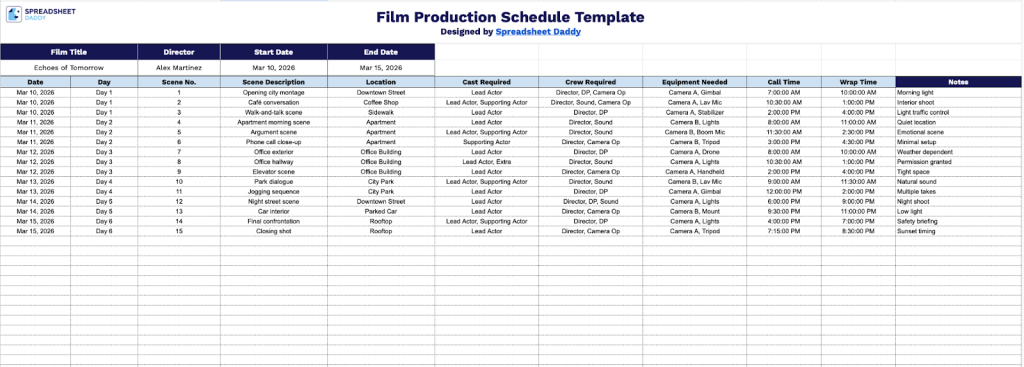
Our Film Production Schedule Template provides a comprehensive framework for organizing your shoot days, including scenes, locations, cast, crew, and timing details.
What’s included
- Comprehensive project header fields: The template includes dedicated input fields for essential production information, including Film Title, Director name, Start Date, and End Date, enabling you to establish clear project parameters and timeline boundaries at the top of your schedule for quick reference throughout production.
- Date and day tracking columns: Each row begins with Date and Day fields that allow you to organize your shooting schedule chronologically and by day of the week, making it easy to plan around weekday versus weekend availability and maintain a clear calendar view of your entire production timeline.
- Detailed scene breakdown columns: The template provides structured columns for Scene Number, Scene Description, and Location, enabling you to methodically organize every shot in your production with specific identifiers, narrative context, and filming venue information for seamless coordination across departments.
- Resource allocation and personnel tracking: Dedicated columns for Cast Required, Crew Required, and Equipment Needed ensure you can precisely document all human and technical resources necessary for each scene, preventing costly oversights and enabling efficient scheduling of talent, technicians, and gear across your shooting days.
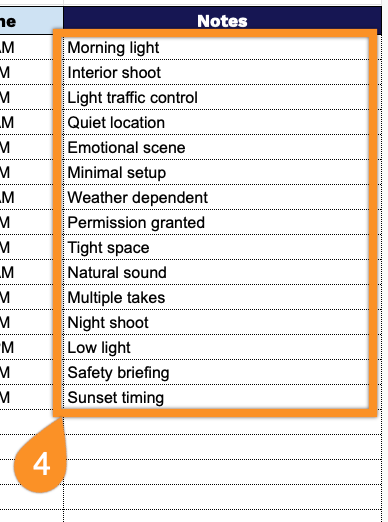
- Time management and production notes fields: Built-in Call Time and Wrap Time columns allow you to establish clear daily schedules for cast and crew arrivals and departures, while a dedicated Notes column provides space for special instructions, weather considerations, backup plans, or any scene-specific details that require attention during production.
The template is fully customizable, allowing you to add or remove columns based on your specific production needs.
Grab a free blank Film Production Schedule using the links below and choose the format that fits your production workflow:
How to Use Our Film Production Schedule Template
1. Download the Film Production Schedule as an Excel or PDF file, or make your own editable version in Google Sheets.
2. Start by entering the film title, director’s name, and the overall start and end dates of the production.

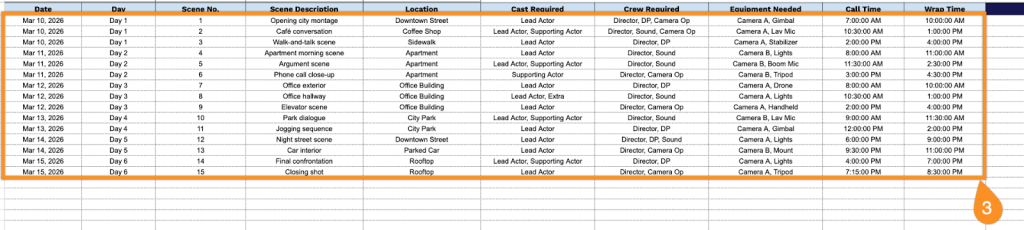
3. Complete the columns by entering all essential filming information:
- Date: Enter the specific calendar date when each scene will be filmed.
- Day: Specify the production day number (Day 1, Day 2, etc.) to track the shooting sequence.
- Scene No.: Record the scene number as it appears in the script for organizational reference.
- Scene Description: Provide a summary of the action or content of the scene being filmed.
- Location: Identify the filming venue or address where the scene will take place.
- Cast Required: List all actors and talent needed on set for that particular scene.
- Crew Required: Document the essential crew members and department personnel needed for the shoot.
- Equipment Needed: Specify all cameras, lighting, sound gear, and technical equipment required.
- Call Time: Record the time when cast and crew must arrive on set and be ready to begin.
- Wrap Time: Note the anticipated or actual time when filming concludes for the day.
4. Record special instructions, weather considerations, location restrictions, or last-minute changes that the team should be aware of in the Notes section.