Create a more organized workflow with our free Submittal Log Template.
Designed for easy editing in Google Sheets, Excel, or PDF, this template helps teams track submittal items, review timelines, approval decisions, and outstanding actions while ensuring project documentation stays accurate and accessible.
What Is a Submittal Log Template?
A submittal log template is a structured document used in construction project management to track and organize all submittals that contractors must send to architects or engineers for review and approval.
By maintaining this log, project teams can ensure nothing slips through the cracks, keep approvals on schedule, and maintain a clear paper trail for accountability and documentation purposes.
Download Spreadsheet Daddy’s Free Submittal Log Template
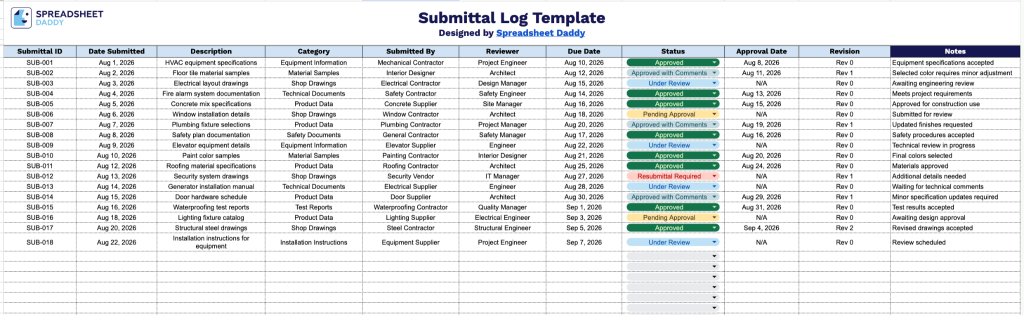
Our Submittal Log Template helps you track and manage project submittals from initial submission through final approval in one organized place.
What’s included
- Comprehensive submittal tracking columns: The log includes ten dedicated columns: Submittal ID, Date Submitted, Description, Category, Submitted By, Reviewer, Due Date, Status, Approval Date, and Revision, giving you a complete, organized record of every submittal from initial send to final approval.
- Dedicated status and approval tracking: Built-in Status and Approval Date columns let you monitor where each submittal stands in the review process and quickly identify which items are outstanding or overdue based on the Due Date column.
- Revision and accountability fields: The Submitted By, Reviewer, and Revision columns create clear accountability by documenting who submitted each item, who is responsible for reviewing it, and which version or revision number is currently active.
- Category classification field: The Category column allows you to group submittals by type, such as shop drawings, product data, samples, or specifications, making it easier to filter and reference related items across a project.
- Open-ended notes field: A Notes column provides space to capture additional context, follow-up actions, or clarifications for any submittal that needs extra explanation beyond the standard fields.
Some projects require additional details while others need fewer, so you can add or remove columns based on what your submittals call for.
Select a file format below to download a free Submittal Log Template:
How to Use Our Submittal Log Template
1. Get started with your Submittal Log by choosing your preferred format: Excel, PDF, or Google Sheets for easy editing.
2. Record essential submittal details, including the submittal ID, submission date, description, category, responsible party, reviewer, due date, current status, approval date, and revision number, to keep project documentation organized.
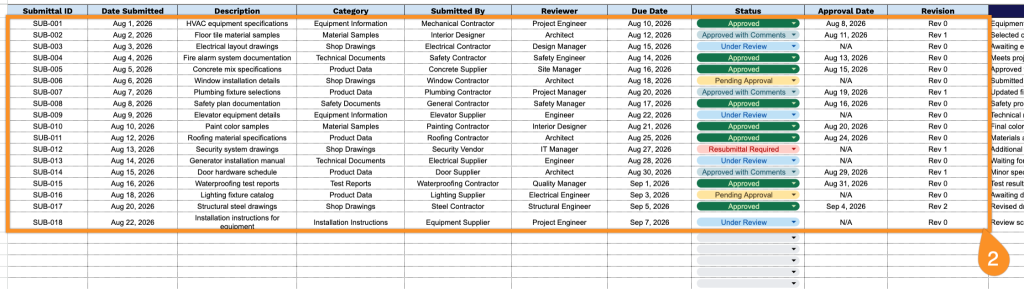
3. Use the Notes section to include additional project details, revision information, special instructions, or important communication related to the submittal.