Planning a trade show can involve dozens of details, from preparing marketing materials and coordinating your team to organizing booth setup and follow-up tasks.
Instead of building a checklist from scratch, use our free, professionally formatted Trade Show Checklist Template in Google Sheets, Excel, or PDF.
It’s easy to customize and helps you keep every important trade show task organized, assigned, and on schedule.
What Is a Trade Show Checklist Template?
A Trade Show Checklist Template is a structured planning document that helps businesses and exhibitors organize and track all the tasks, materials, and logistics required before, during, and after a trade show event.
By using a standardized template, teams can streamline their preparation process, delegate responsibilities efficiently, and maximize their return on investment at each event.
Download Spreadsheet Daddy’s Free Trade Show Checklist Template
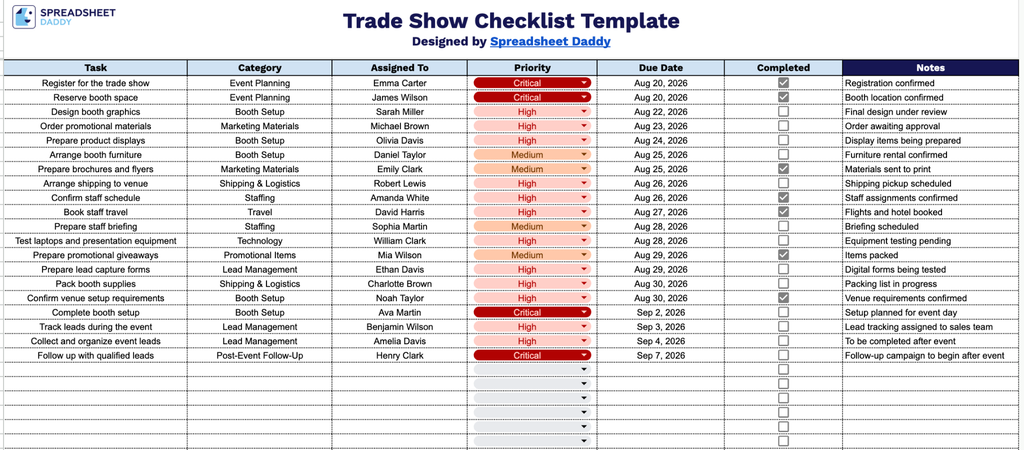
Our Trade Show Checklist Template helps you stay organized before, during, and after your event, keeping every task and deadline in one place from planning through follow-up.
What’s included
- Structured task-tracking table: A single worksheet with columns for Task, Category, Assigned To, Priority, Due Date, Completed, and Notes, giving you one place to capture every to-do involved in planning and executing a trade show.
- Checkbox-style completion tracking: The Completed column uses clickable checkboxes for each row, so you can mark tasks done at a glance without typing “yes” or “done” over and over.
- Category-based organization: A dedicated Category column lets you group tasks by type, keeping related items easy to find and manage together.
- Priority and ownership fields: The Priority and Assigned To columns let you flag urgency and designate a responsible person for each task, keeping accountability clear across your whole team.
- Due date and notes tracking: A Due Date column keeps deadlines visible for every task, while the Notes column gives you space to add context, reminders, or follow-up details as needed.
Customize it by adding or removing columns to match how your team works.
Use the links below to get your free blank Trade Show Checklist template in the format that works best for you:
How to Use Our Trade Show Checklist Template
1. Choose your preferred format and download the Trade Show Checklist in Excel or PDF, or save a customizable version to Google Sheets.
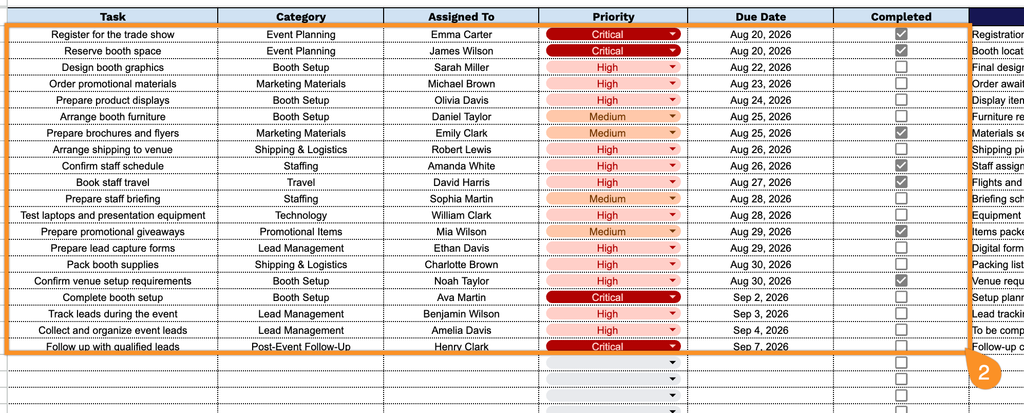
2. Add the task, category, assigned team member, priority level, and due date. Check the box for each task as you complete it to keep track of your trade show preparations.
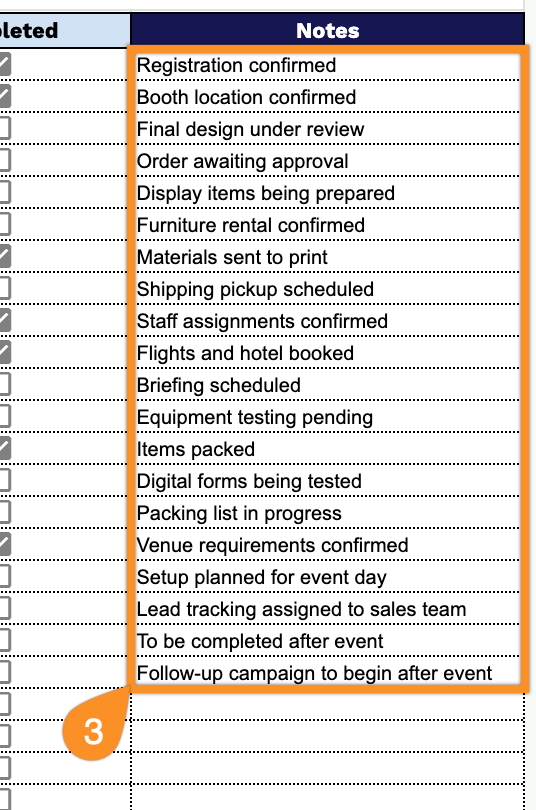
3. Use the Notes section to record special instructions, important reminders, vendor information, packing details, or other notes related to the trade show.