Keep your insurance documentation organized with a free Certificate of Insurance Tracking Template.
Choose from Google Sheets, Excel, or PDF and adapt the template to your needs.
It provides a convenient way to monitor certificates, policy periods, coverage information, and upcoming renewal or expiration dates.
What Is a Certificate of Insurance Tracking Template?
A certificate of insurance (COI) tracking template is a structured document or spreadsheet used by businesses to monitor and manage insurance certificates from vendors, contractors, subcontractors, and other third parties.
By centralizing this information, the template helps businesses reduce liability exposure, ensure compliance with contractual requirements, and receive timely alerts when policies are nearing expiration or fall below required coverage thresholds.
Download Spreadsheet Daddy’s Free Certificate of Insurance Tracking Template
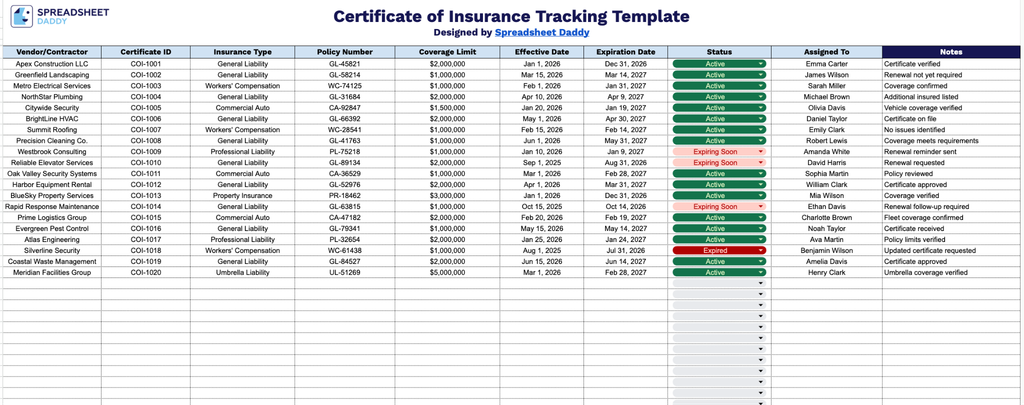
Our Certificate of Insurance Tracking Template helps you keep tabs on vendor and contractor insurance coverage in one organized spreadsheet.
What’s included
- Vendor and contractor identification fields: Dedicated Vendor/Contractor and Certificate ID columns let you log every business you work with alongside a unique identifier for each certificate, making it easy to cross-reference records and avoid duplicate or missing entries.
- Detailed policy information tracking: The Insurance Type, Policy Number, and Coverage Limit columns capture the specific details of each policy on file, so you always know what type of coverage a vendor carries and whether it meets your minimum requirements.
- Coverage window monitoring: Effective Date and Expiration Date fields allow you to track exactly when each certificate becomes active and when it lapses, helping you stay ahead of renewals and avoid working with vendors who have expired coverage.
- Status and accountability fields: The Status column lets you flag where each certificate stands (active, expired, pending, etc.), while the Assigned To column designates which team member is responsible for following up, keeping ownership clear across your organization.
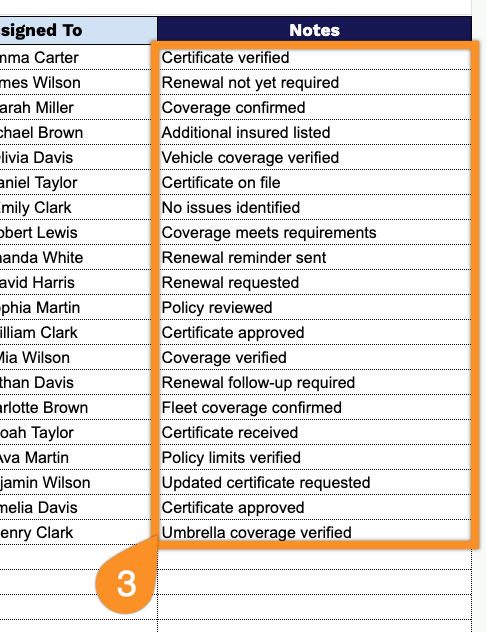
- Open Notes field for additional context: A dedicated Notes column gives you space to record any extra details, follow-up reminders, or special conditions tied to a vendor’s certificate that don’t fit neatly into the other fields.
Simply fill in your own vendor details and update statuses as certificates are verified or renewed.
Choose your preferred file format below and download a free, ready-to-use Certificate of Insurance Tracking template:
How to Use Our Certificate of Insurance Tracking Template
1. Get your copy of the Certificate of Insurance Tracking template in Excel or PDF, or save an editable version directly to Google Sheets.
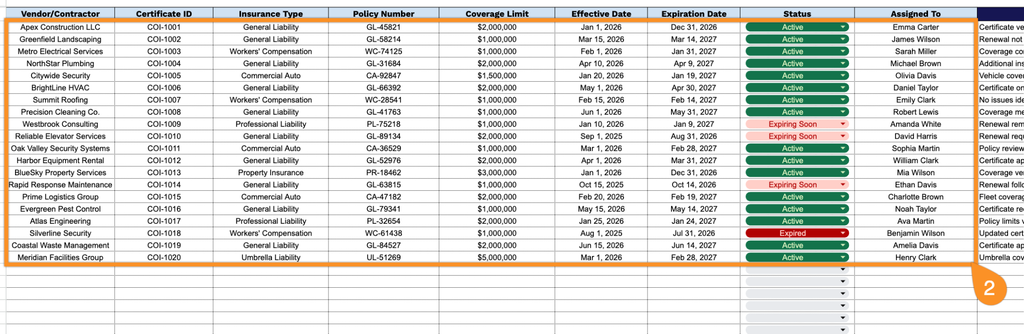
2. Enter key insurance details for each vendor or contractor, including the certificate ID, insurance type, policy number, coverage limit, effective and expiration dates, current status, and the person responsible for tracking the certificate.
3. Use the Notes section to record important details, renewal reminders, missing documents, special requirements, or any follow-up actions related to the certificate.