Skip the hassle of building an applicant tracker from scratch.
Our free Applicant Tracking Template is available in Google Sheets, Excel, and PDF formats, making it easy to customize and use for managing candidate details, application stages, interview notes, and hiring progress.
What Is an Applicant Tracking Template?
An applicant tracking template is a structured tool used by hiring managers and HR professionals to organize and monitor job candidates throughout the recruitment process.
Standardizing how candidate data is recorded and reviewed helps teams stay organized, reduce administrative overhead, and ensure a consistent, fair evaluation process for all applicants.
Download Spreadsheet Daddy’s Free Applicant Tracking Template
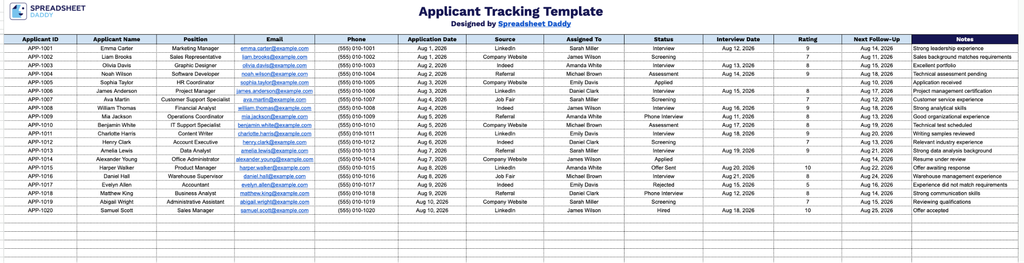
Our Applicant Tracking Template gives you a simple, organized way to track candidates from application through hiring, keeping all their details in one place.
What’s included
- Complete applicant information fields: The template includes dedicated columns for Applicant ID, Applicant Name, Position, Email, and Phone, providing a centralized record of each candidate’s core contact and role details in a single organized view.
- Application tracking and source columns: The Application Date and Source columns let you log exactly when each candidate applied and where they came from (e.g., job board, referral, career site), helping you evaluate which channels bring in the strongest talent.
- Workflow and ownership columns: An Assigned To column lets you designate which team member or recruiter owns each applicant, while the Status column allows you to track each candidate’s stage in the hiring process (e.g., New, Interviewing, Offer, Rejected) at a glance.
- Interview scheduling and evaluation fields: The Interview Date and Rating columns provide space to record scheduled interviews and score candidates, making it easy to compare applicants side by side when making hiring decisions.
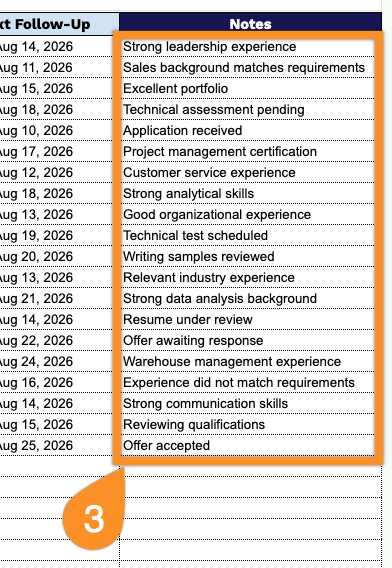
- Follow-up and notes columns: A Next Follow-Up column helps you stay on top of required actions and deadlines, while the open-ended Notes column provides room to capture interview feedback, qualifications, or any other observations for each applicant.
It’s fully customizable, so you can add or remove columns to match exactly what your hiring process needs.
Select a format below and download your free Applicant Tracking template to organize candidate information with ease:
How to Use Our Applicant Tracking Template
1. Get the template in Excel or PDF, or save a customizable version directly to your Google Sheets account.
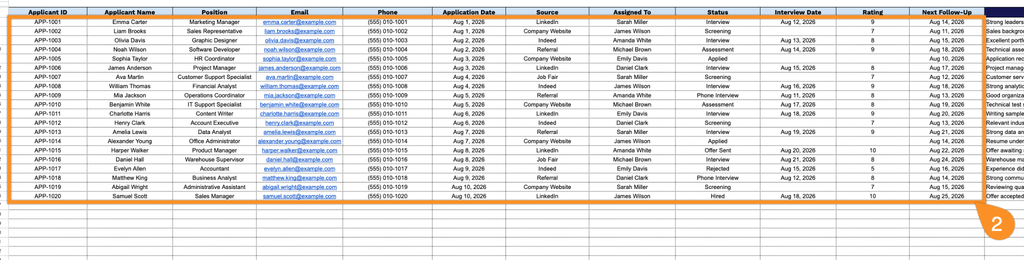
2. Enter the applicant’s key details, including their ID, name, position applied for, email, phone number, application date, and application source. Then record the recruiter or team member assigned to the candidate, the current application status, the interview date, the rating, and the next follow-up date.
3. Use the Notes section to add important candidate details, interview feedback, follow-up reminders, or other comments related to the recruitment process.