Need a simple way to track invoices without starting from scratch?
Our free Invoice Tracker Template is ready to use in Google Sheets, Excel, and PDF formats. Designed for easy editing, it helps you log payments, monitor outstanding invoices, and keep your billing organized.
What Is an Invoice Tracker Template?
An invoice tracker template is a pre-formatted spreadsheet or document that helps businesses monitor and manage invoices in a centralized location.
This tool helps businesses maintain accurate financial records, improve cash flow management, and ensure timely payment collection.
Download Spreadsheet Daddy’s Free Invoice Tracker Template
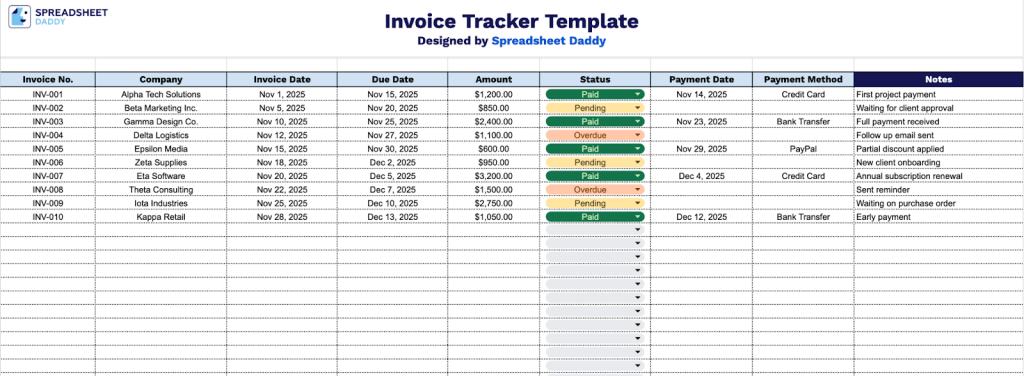
Our Invoice Tracker Template helps you organize and monitor your invoices in one centralized location.
What’s included
- Comprehensive invoice-tracking columns: The template includes dedicated fields for Invoice Number, Company Name, Invoice Date, Due Date, Amount, Status, Payment Date, Payment Method, and Notes, providing a complete system for monitoring every aspect of your invoicing from issuance through payment collection.
- Flexible status monitoring system: A dedicated Status column allows you to categorize and track the current state of each invoice, enabling you to quickly identify outstanding invoices, prioritize follow-ups, and maintain clear visibility over your accounts receivable at a glance.
- Payment reconciliation tracking fields: Dedicated columns for Payment Date and Payment Method enable you to record exactly when and how each invoice was settled, creating a complete audit trail for financial record-keeping, bank reconciliation, and helping you identify payment patterns or preferred methods among your clients.
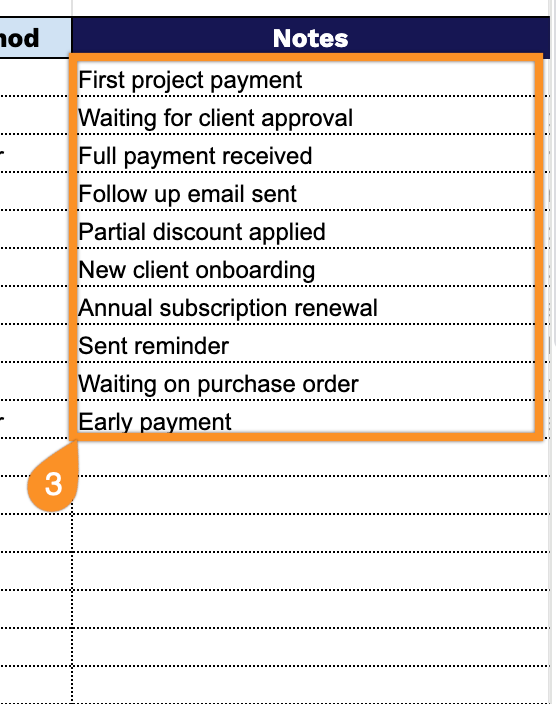
- Customizable notes and documentation area: A flexible Notes column provides space to record important contextual information for each invoice, such as communication history with clients, special payment arrangements, disputed amounts, or any relevant details that help you manage individual transactions more effectively.
Adjust it by adding or removing columns to match your specific business needs.
Select a link below to download a free blank invoice tracker template in the format of your choice:
How to Use Our Invoice Tracker Template
1. Get this invoice tracker template as an Excel or PDF file, or make your own version in Google Sheets.
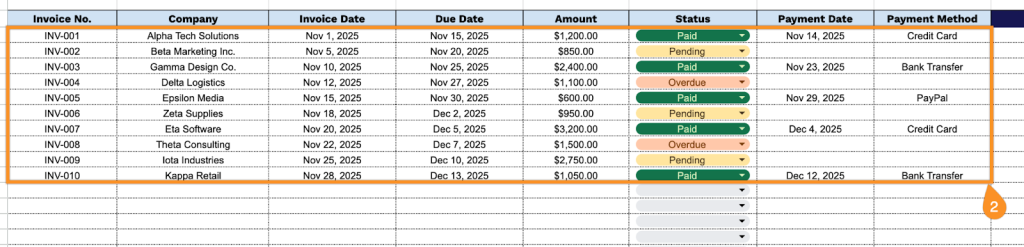
2. Complete the columns by entering all essential transaction information:
- Invoice No.: Enter the unique identification number assigned to each invoice for tracking and reference purposes.
- Company: Specify the complete business name of the client or vendor associated with the transaction.
- Invoice Date: Record the date when the invoice was issued or created.
- Due Date: Document the payment deadline established for the invoice.
- Amount: Enter the total monetary value of the invoice, including all applicable charges.
- Status: Select the current payment state (pending, paid, overdue, cancelled, etc.).
- Payment Date: Record the actual date when the payment was received or processed.
- Payment Method: Specify how the payment was made (check, credit card, bank transfer, cash, etc.).
3. Use the Notes section to include any extra details or special instructions.