Stay on top of tasks and follow-ups with our free Rolling Action Item List Template.
Available in Google Sheets, Excel, and PDF formats, it provides a ready-to-use format for documenting action items, assigning responsibilities, setting due dates, and monitoring completion.
Download, customize, and start managing your outstanding tasks.
What Is a Rolling Action Item List Template?
A rolling action item list (RAIL) template is a dynamic project management tool that tracks ongoing tasks, responsibilities, and deadlines in a continuously updated format.
Unlike static to-do lists, it “rolls” forward with each meeting or work session, carrying over incomplete items while adding new ones, ensuring nothing falls through the cracks.
Download Spreadsheet Daddy’s Free Rolling Action Item List Template
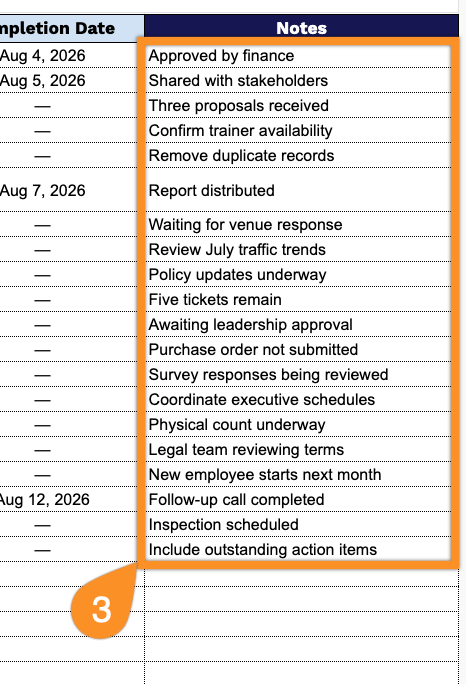
Our Rolling Action Item List Template gives you a clean, organized way to track tasks from meeting to completion.
What’s included
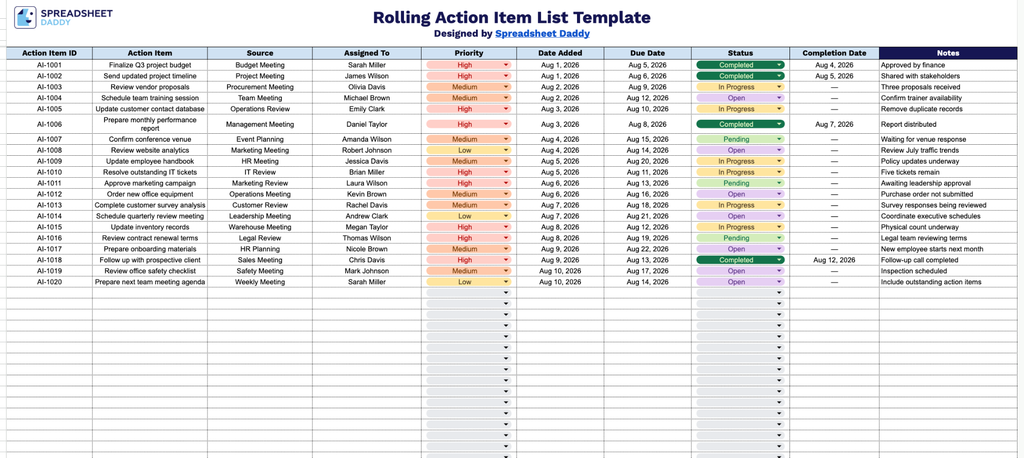
- Structured 9-column tracking framework: The template includes fields for Action Item ID, Action Item, Source, Assigned To, Priority, Date Added, Due Date, Status, and Completion Date, providing everything you need to log, assign, and monitor tasks from creation through resolution.
- Dedicated Notes field: A separate Notes column lets you capture context, blockers, follow-up details, or additional instructions tied to each action item, keeping supplementary information separate from the core tracking data.
- Priority and Status tracking: Built-in Priority and Status columns allow you to flag urgent items and track progress at a glance, making it easy to see what’s outstanding, in progress, or complete.
- Source and ownership tracking: The Source and Assigned To columns let you note where each action item originated (e.g., a meeting or project) and who is responsible for it, supporting accountability and follow-up.
- Date tracking for accountability: Date Added, Due Date, and Completion Date columns work together to help you monitor timelines, flag overdue items, and maintain a clear record of when tasks were opened and closed.
Add or remove columns to match how your team likes to work.
Choose your preferred file format below to get a free, ready-to-use Rolling Action Item List template:
How to Use Our Rolling Action Item List Template
1. Get the template as an Excel or PDF file, or save a customizable version to your Google Sheets.
2. Record the key details for each action item, including its ID, task description, source, assignee, priority, date added, due date, current status, and completion date.
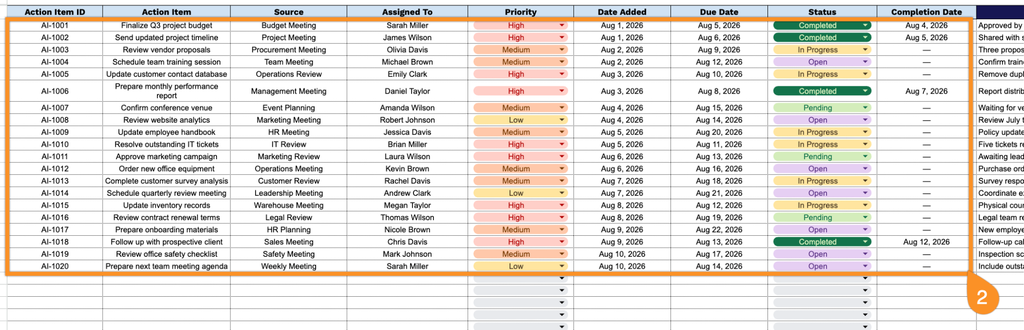
3. Use the Notes section to add important context, follow-up details, dependencies, or special instructions related to each action item.