Take control of your Ads data with our free AdWords template.
Easily track impressions, clicks, CPC, and conversions in a clean, editable format built for Google Sheets, Excel, and PDF.
What Is an AdWords Template?
An AdWords template is a pre-designed framework that advertisers can use to quickly create Google Ads campaigns without starting from scratch.
They serve as a helpful starting point for both beginners and experienced marketers, ensuring ads follow best practices and are optimized for better performance from the get-go.
Download Spreadsheet Daddy’s Free AdWords Template
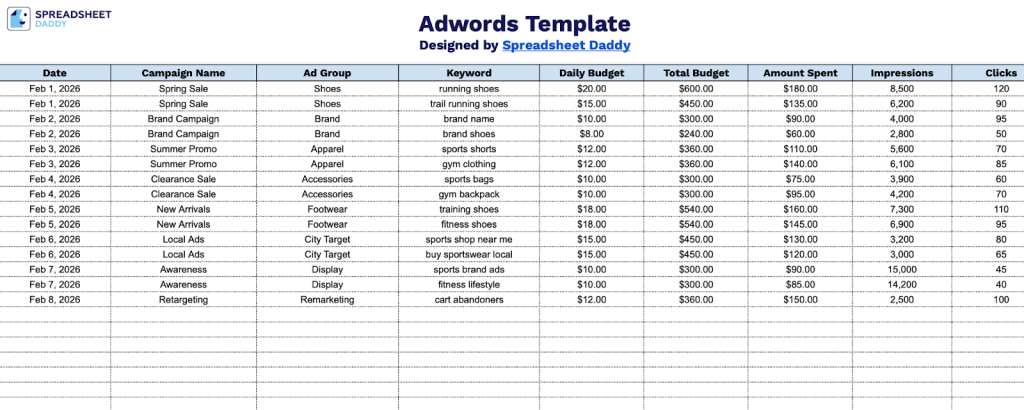
Our Adwords Template is a comprehensive tool that helps you track and manage your advertising campaigns in one place.
What’s included
- Comprehensive campaign-level tracking columns: The template is structured with 13 dedicated columns spanning from Date and Campaign Name through to Status and Notes, providing a single, row-based layout to log, monitor, and annotate every detail of each active AdWords campaign from launch through completion.
- Built-in performance metric fields for real-time analysis: Core KPI columns, including Impressions, Clicks, CTR (%), CPC, Conversions, and Cost per Conversion, are built directly into the row structure, allowing you to track ad performance and calculate efficiency metrics alongside your spend data without needing a separate reporting tool.
- Dual budget tracking system for spend control: Two distinct budget columns, Daily Budget and Total Budget, alongside an Amount Spent field, creating a three-column spend-management framework that lets you set both short-term and long-term financial limits and compare them against actual expenditures at a glance.
- Ad Group and Keyword-level granularity: Beyond top-level campaign tracking, the template includes dedicated columns for Ad Group and Keyword, enabling you to drill down and organize performance data by individual ad group and keyword targeting, making it easy to identify which specific segments are driving results or underperforming.
- Status and Notes fields for campaign lifecycle management: The final two columns, Status and Notes, provide a built-in workflow system for flagging each campaign as active, paused, or completed, while the open-ended Notes field gives you space to log strategy changes, observations, or next steps directly alongside the relevant campaign data.
You can customize the template by adding or removing columns to fit your specific needs.
Pick your preferred format and download a free, entirely blank AdWords Template from the links provided:
How to Use Our AdWords Template
1. Save this template in Excel or PDF, or work on your own copy via Google Sheets.
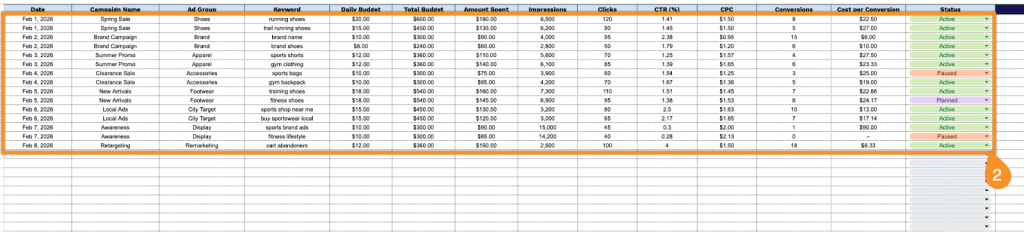
2. Complete the columns by entering all essential advertising performance data:
- Date: Record the specific date for each campaign activity to maintain an accurate timeline of your advertising efforts.
- Campaign Name: Enter the full name of the Google Ads campaign to identify and distinguish it from other active campaigns clearly.
- Ad Group: Specify the ad group within the campaign that the keywords and ads are organized under.
- Keyword: List the targeted keyword or keyword phrase being tracked for performance within the ad group.
- Daily Budget: Set the maximum amount you are willing to spend on the campaign per day to control ad delivery.
- Total Budget: Enter the overall allocated budget for the campaign across its entire run period.
- Amount Spent: Log the actual spend incurred to date, allowing you to monitor budget consumption in real time.
- Impressions: Record the total number of times your ad has been displayed to users on the Google network.
- Clicks: Document the number of times users have clicked on your ad after viewing it.
- CTR (%): Note the click-through rate, calculated as the ratio of clicks to impressions, which reflects ad relevance and appeal.
- CPC: Enter the average amount spent each time a user clicks on your ad.
- Conversions: Log the number of desired actions completed by users, such as purchases, sign-ups, or form submissions.
- Cost per Conversion: Calculate and record the total spend divided by the number of conversions to evaluate campaign efficiency.
- Status: Indicate the current state of the campaign (active, paused, completed, or planned).
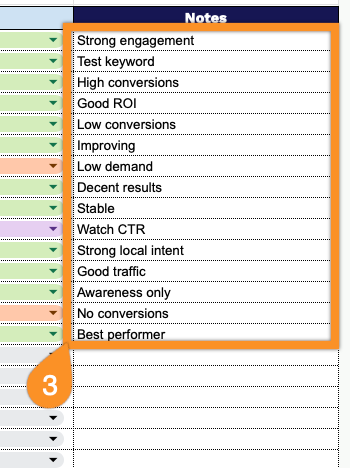
3. Use the Notes section to include additional information, such as special promotions, targeting notes, or campaign goals.