Need a quick way to track software bugs without building a system from scratch?
Our free Bug Tracker Template is ready to use in Google Sheets, Excel, and PDF.
It’s fully editable, making it simple to log issues, assign priorities, and monitor fixes efficiently.
What Is a Bug Tracker Template?
A bug tracker template is a pre-formatted document used to systematically record, monitor, and manage software defects throughout the development lifecycle.
These templates help development teams maintain organized issue documentation, prioritize fixes, and track progress from bug discovery through resolution.
Download Spreadsheet Daddy’s Free Bug Tracker Template
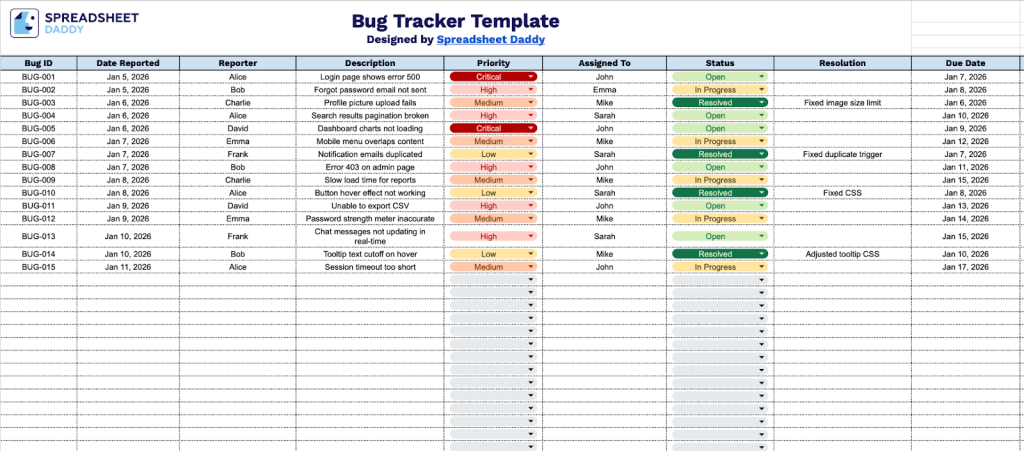
Our Bug Tracker Template provides a structured system for logging and managing software issues throughout the development process.
What’s included
- Comprehensive bug documentation columns: The template includes 11 essential fields, including Bug ID, Date Reported, Reporter, Description, Priority, Assigned To, Status, Resolution, Due Date, Category, and Notes, providing a complete framework to capture, track, and manage software issues from identification through resolution.
- Priority and status management system: Dedicated Priority and Status columns enable teams to categorize bugs by urgency level and track their current state throughout the workflow, ensuring critical issues receive immediate attention and nothing falls through the cracks.
- Assignment and accountability tracking: The Assigned To and Due Date fields clearly assign ownership to each bug, enabling project managers to delegate tasks effectively and monitor deadlines, while keeping team members accountable for timely resolution.
- Detailed resolution documentation: The Resolution column provides space to record how each bug was fixed, creating a valuable knowledge base for future reference and helping teams identify patterns or recurring issues that may require systematic improvements.
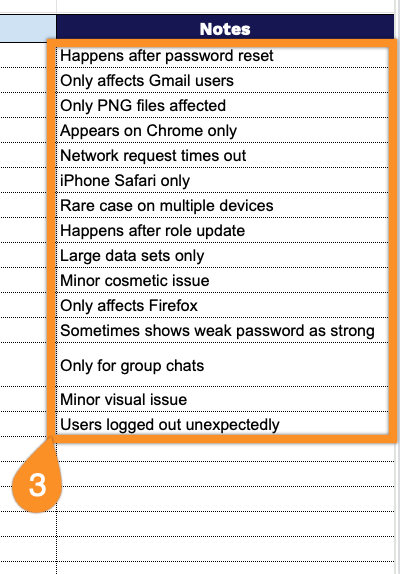
- Flexible categorization and notes system: The Category field lets you organize bugs by module, feature, severity, or custom classifications, while the Notes column provides unlimited space for reproduction steps, technical details, stakeholder comments, and any additional context needed for efficient troubleshooting.
You can easily customize the template by adding or removing columns to match your team’s specific workflow and reporting needs.
Select a link below to access a free blank bug tracker template in the format you need:
How to Use Our Bug Tracker Template
1. Save this template in Excel or PDF format, or create a personal copy in Google Sheets.
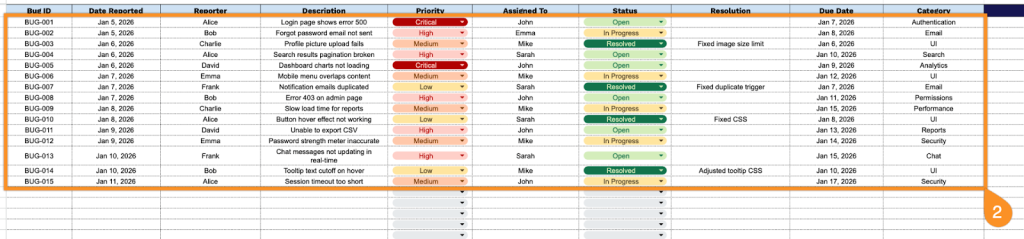
2. Complete the columns by entering all essential tracking and identification information:
- Bug ID: Enter the unique identifier assigned to track this specific defect or issue.
- Date Reported: Record when the bug was initially discovered and logged in the system.
- Reporter: Specify the name or username of the person who identified and reported the bug.
- Description: Provide a detailed explanation of the bug, including symptoms, reproduction steps, and impact.
- Priority: Set the urgency classification for this bug (critical, high, medium, or low priority).
- Assigned To: Designate the team member or developer responsible for investigating and resolving the bug.
- Status: Indicate the current state of the bug (open, in progress, resolved, reopened, or closed).
- Resolution: Document how the bug was addressed once fixed (e.g., code correction, configuration change, won’t fix, or duplicate).
- Due Date: Set the target date for resolving the bug.
- Category: Classify the bug type or affected system area (UI, database, performance, security, etc.).
3. Use the Notes section for additional context, steps to reproduce, or any critical comments.