Stay on top of your sales game with our free Lead Tracking Template.
Available in Google Sheets, Excel, and PDF, it makes managing leads, scheduling follow-ups, and tracking conversions effortless.
What Is a Lead Tracking Template?
A lead tracking template is a structured document or spreadsheet used to monitor and manage potential customers throughout the sales process.
By centralizing this data, sales teams can prioritize follow-ups, identify conversion patterns, and ensure no potential opportunities slip through the cracks.
Download Spreadsheet Daddy’s Free Lead Tracking Template
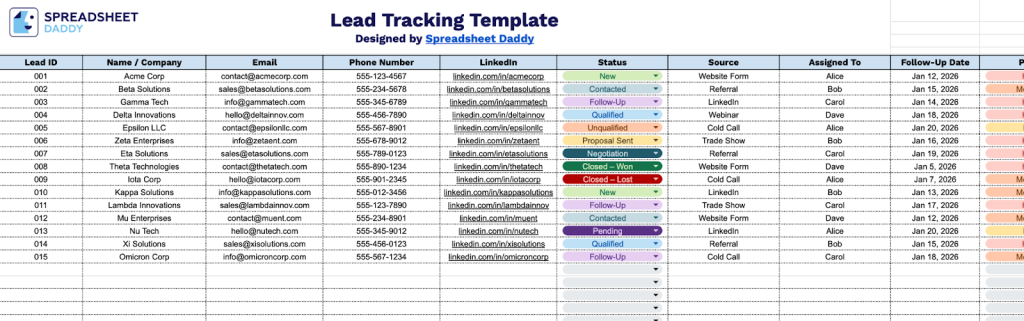
Our Lead Tracking Template helps you organize and manage your sales pipeline by capturing essential information about each prospect in a structured format.
What’s included
- Comprehensive lead management columns: Track essential contact information, including Lead ID, Name/Company, Email, Phone Number, and LinkedIn profile links, alongside key workflow fields like Status, Source, Assigned To, Follow-Up Date, Priority, Next Action, and Notes to maintain complete visibility of each lead’s journey
- Flexible status and priority tracking: Monitor where each lead stands in your sales pipeline with the Status column, while the Priority field helps you focus on high-value opportunities first, ensuring your team addresses the most critical leads without delay
- Source attribution and assignment: The Source column lets you identify which marketing channels or campaigns are generating leads, while the Assigned To field enables clear ownership and accountability across your sales team
- Built-in follow-up system: Never miss an opportunity with the Follow-Up Date column that helps you schedule and track upcoming touchpoints, paired with the Next Action field to document precisely what needs to happen next with each lead
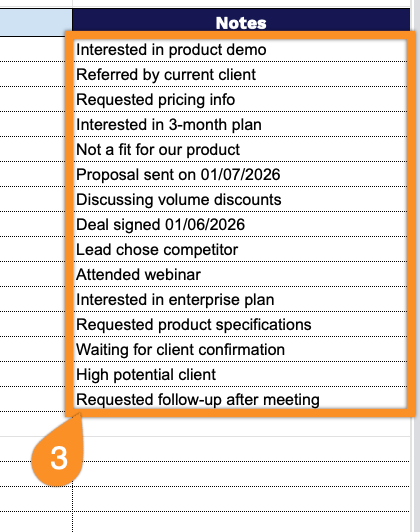
- Customizable notes and documentation: The Notes column provides space to capture conversation highlights, lead preferences, pain points, or any other contextual information that helps personalize your outreach and close more deals
You can easily customize the spreadsheet by adding or removing columns to match your specific business needs and workflow.
Use the links below to download a free blank lead tracking template in your preferred format:
How to Use Our Lead Tracking Template
1. Get started by downloading the template in Excel or PDF, or creating a personal Google Sheets version.
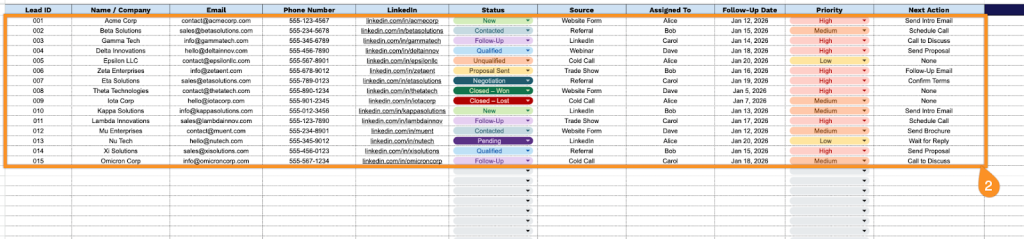
2. Complete the columns by entering all essential prospect details:
- Lead ID: Enter the unique identifier assigned to each lead for tracking and reference purposes.
- Name / Company: Specify the complete contact name and their associated business or organization.
- Email: Record the primary email address for digital communication and follow-up correspondence.
- Phone Number: Include the direct contact number for calls and text message outreach.
- LinkedIn: Document the LinkedIn profile URL for professional networking and research.
- Status: Select the current stage in your sales pipeline (new, contacted, qualified, negotiating, etc.).
- Source: Identify where the lead originated (referral, website, social media, trade show, cold outreach, etc.).
- Assigned To: Specify the team member responsible for managing and nurturing this lead.
- Follow-Up Date: Set the next scheduled contact or touchpoint with the prospect.
- Priority: Indicate the urgency level (high, medium, low) based on potential value and conversion likelihood.
- Next Action: Define the specific task or step required to advance the lead through your sales process.
3. Use the Notes section to capture important lead-related information, follow-ups, or special terms.