Need a lesson plan template without the hassle of creating one from scratch?
Download our free, ready-to-use Lesson Plan Template in Google Sheets, Excel, or PDF. It’s easy to edit and helps you structure your lessons, track objectives, and plan activities efficiently.
What Is a Lesson Plan Template?
A lesson plan template is a structured document that helps educators organize and outline their teaching objectives, activities, and assessments for a specific class or learning session.
Using a template ensures consistency in planning and helps teachers prepare comprehensive, well-organized lessons.
Download Spreadsheet Daddy’s Free Lesson Plan Template
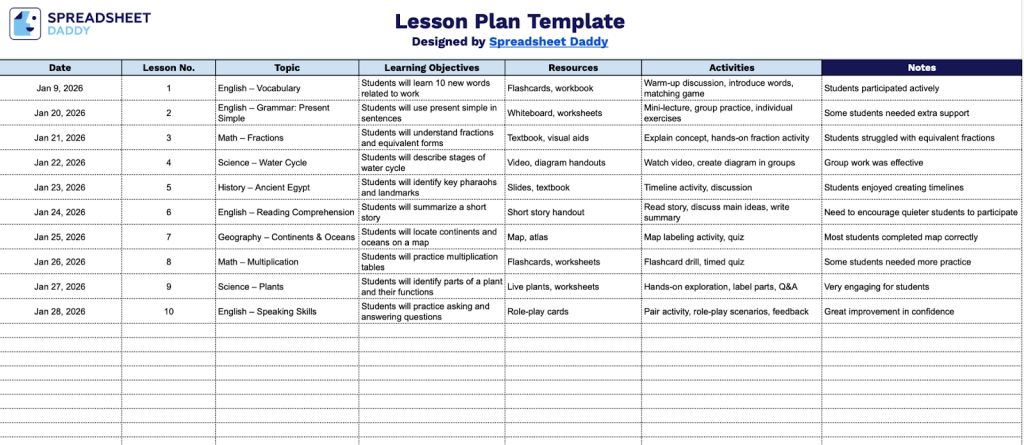
Our Lesson Plan Template provides a structured format for organizing and tracking your teaching activities over time.
What’s included
- Comprehensive lesson planning structure: The template features seven essential columns (Date, Lesson No., Topic, Learning Objectives, Resources, Activities, and Notes) that guide educators through systematic lesson development, ensuring all critical components are documented in a single, organized row-based format for easy tracking and reference.
- Flexible date and numbering system: Dedicated columns for date entry and lesson numbering allow teachers to chronologically organize their curriculum, maintain sequential lesson tracking throughout the academic term, and quickly locate specific lessons when reviewing or revising instructional plans.
- Learning objectives documentation: A designated column for recording clear, measurable learning objectives helps educators articulate what students should know or be able to do by the end of each lesson, ensuring alignment with curriculum standards and educational goals.
- Resource and activity planning fields: Separate columns for resources and activities enable teachers to list required materials, textbooks, technology, and instructional strategies in advance, facilitating thorough preparation and ensuring all necessary components are available before lesson delivery.
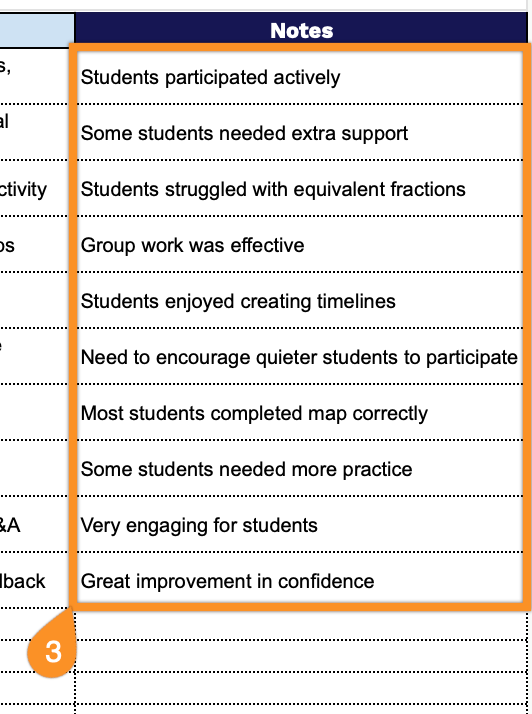
- Notes section for reflective practice: The final column provides space for post-lesson observations, student feedback, modifications for future use, differentiation strategies, or assessment insights, supporting continuous improvement and personalized instruction through documented reflection.
Adjust the template by adding or removing columns to fit your specific teaching needs and preferences.
Select one of the links below to access a free blank lesson plan template in the format that works best for you:
How to Use Our Lesson Plan Template
1. Access the lesson plan template by downloading it in Excel or PDF, or by creating a copy in Google Sheets.
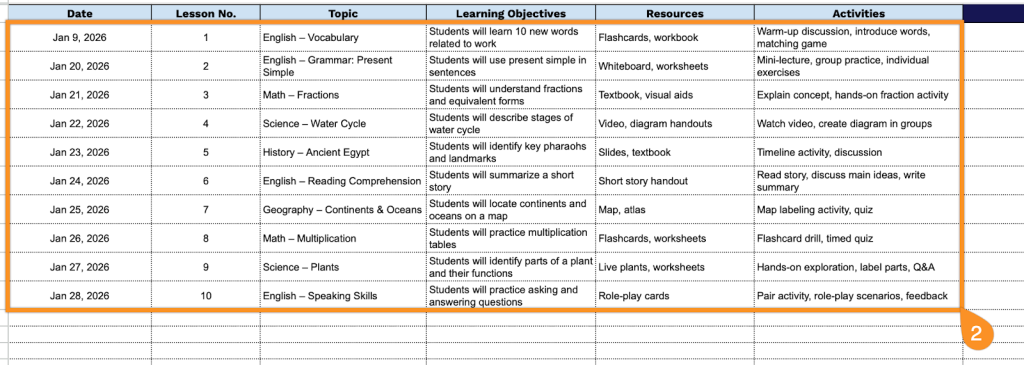
2. Complete the columns by filling in all essential instructional information:
- Date: Enter the scheduled date when the lesson will be taught to maintain an accurate teaching timeline.
- Lesson No.: Assign a sequential number or unique identifier to each lesson for easy reference and curriculum tracking.
- Topic: Specify the main subject or theme that will be covered during the instructional session.
- Learning Objectives: Define the specific skills, knowledge, or competencies students are expected to achieve by the end of the lesson.
- Resources: List all materials, tools, textbooks, technology, or supplementary aids required to deliver the lesson effectively.
- Activities: Document the planned instructional activities, exercises, and student engagement strategies that will facilitate learning.
3. Use the Notes section to include any essential information, special terms, or additional details.