Skip the hassle of designing your own spreadsheet.
Our free Medical Patient Tracking Template is available in Google Sheets, Excel, and PDF, making it easy to maintain accurate patient records and monitor ongoing care.
What Is a Medical Patient Tracking Template?
A medical patient tracking template is a structured document or digital tool used by healthcare providers to systematically record, monitor, and manage essential patient information throughout the course of treatment.
By centralizing this information in a standardized format, the template helps improve care coordination, reduce errors, support informed clinical decision-making, and enhance overall patient outcomes.
Download Spreadsheet Daddy’s Free Medical Patient Tracking Template
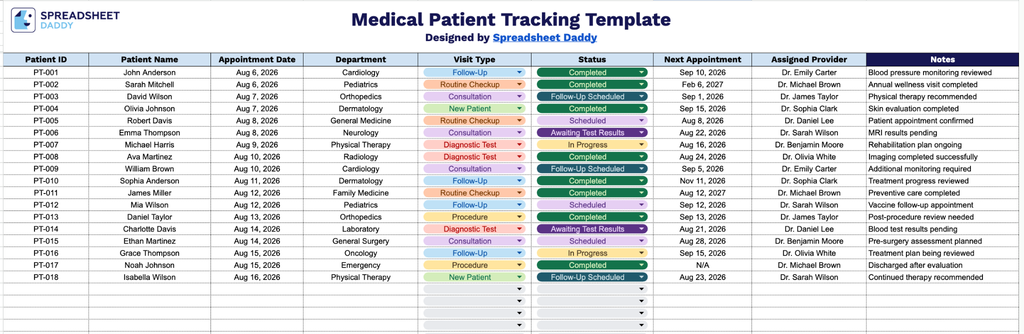
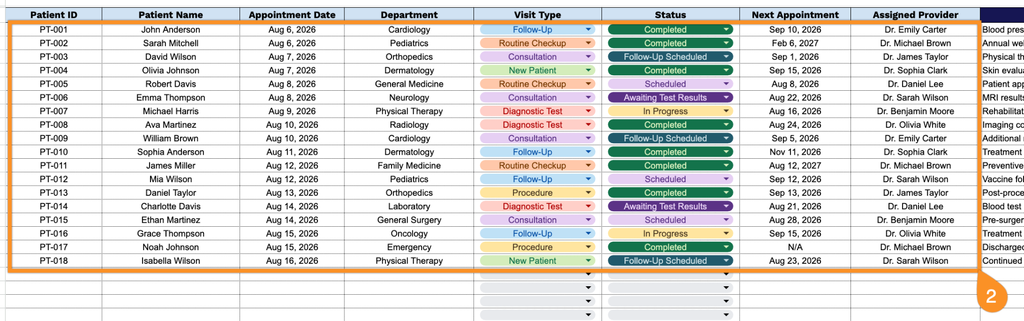
Our Medical Patient Tracking Template gives you a clean, organized way to track patient appointments, visit types, statuses, and providers all in one place.
What’s included
- Patient identification fields: The Patient ID and Patient Name columns allow you to assign a unique identifier to each patient while retaining their full name on record, making it easy to search for and cross-reference specific individuals across departments.
- Appointment scheduling fields: Separate Appointment Date and Next Appointment columns allow staff to log the current visit date alongside the upcoming scheduled appointment, so follow-ups are never missed and scheduling stays organized.
- Department and visit type tracking: The Department and Visit Type columns capture the practice area where a patient is being seen and the nature of the visit, providing a clear breakdown of patient flow across the organization.
- Status and provider assignment fields: The Status column tracks where each patient is in their care journey (e.g., scheduled, in progress, completed), while the Assigned Provider column links each patient to the physician or specialist responsible for their care.
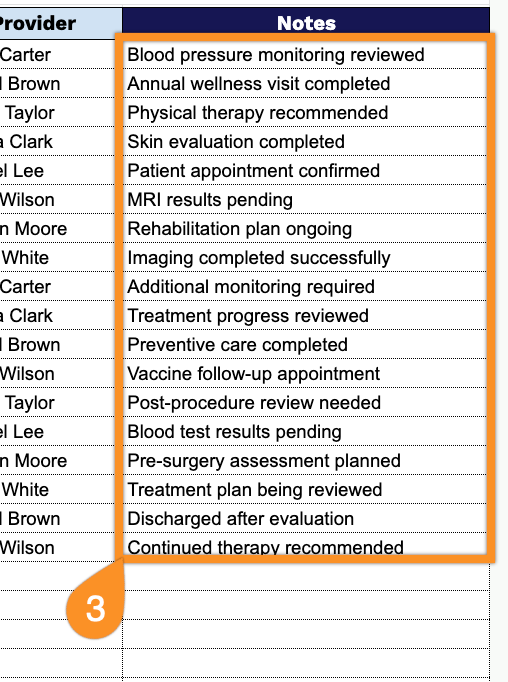
- Notes field for additional context: A dedicated Notes column provides space to record any additional details, special instructions, or observations relevant to a patient’s visit, ensuring important information isn’t lost between appointments.
Add or remove columns to match exactly what your practice needs to track.
Choose your preferred format and download a blank Medical Patient Tracking Template using the links below:
How to Use Our Medical Patient Tracking Template
1. Download the Medical Patient Tracking template in Excel or PDF, or save your own editable copy in Google Sheets.
2. Record the patient’s information, including the patient ID, name, appointment date, department, visit type, status, next scheduled appointment, and assigned provider.
3. Use the Notes section to document additional medical observations, special care instructions, allergies, communication with the patient, or any other important information that should accompany the patient’s record.