Streamline workforce planning with our professionally designed Monthly Employee Schedule Template.
Available in Google Sheets, Excel, and PDF formats, this template allows you to efficiently schedule employees, allocate shifts, and maintain a clear monthly overview.
What Is a Monthly Employee Schedule Template?
A monthly employee schedule template is a pre-formatted document or digital tool that helps managers organize and display staff work schedules for an entire month at a glance.
Using a template saves time by providing a consistent structure that can be reused and customized each month rather than creating schedules from scratch.
Download Spreadsheet Daddy’s Free Monthly Employee Schedule Template
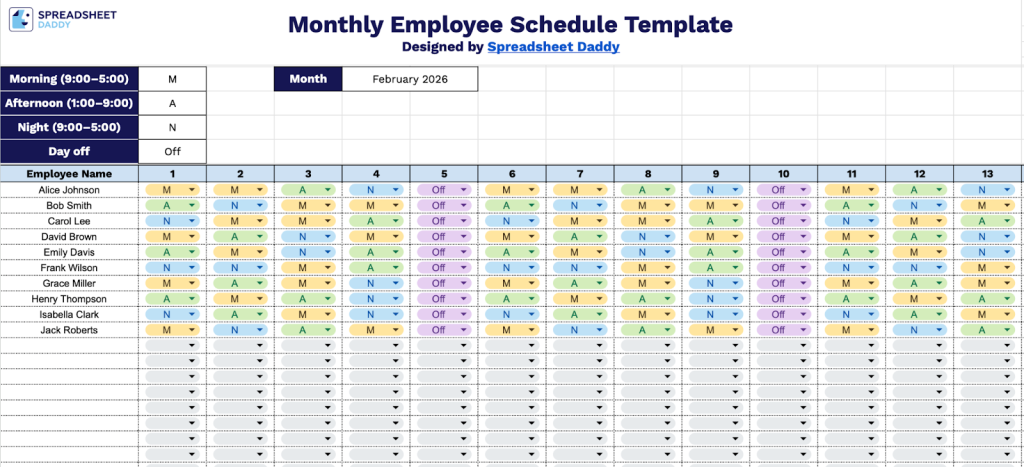
Our Monthly Employee Schedule Template helps you organize and track staff shifts throughout the month.
What’s included
- Comprehensive monthly calendar grid: The template features a complete 31-day calendar layout with numbered columns (1-31) representing each day of the month, allowing you to schedule and track employee shifts across an entire month at a glance with clear daily visibility.
- Multiple shift type indicators: Pre-defined shift codes include Morning (M, 9:00–5:00), Afternoon (A, 1:00–9:00), Night (N, 9:00–5:00), and Day Off (Off), enabling you to quickly assign and differentiate between shift times using standardized abbreviations for consistent scheduling across your workforce.
- Employee roster column: A dedicated “Employee Name” column on the left side provides space to list all staff members vertically, making it easy to view each person’s complete monthly schedule in a single row and manage multiple employees simultaneously.
- Flexible scheduling framework: The blank template design allows you to customize shift assignments by simply entering the appropriate shift code (M, A, N, or Off) in each day’s cell, providing a straightforward system for creating, modifying, and updating employee schedules without complex formatting.
The flexible design allows you to add or remove columns as needed to match your team size and scheduling requirements.
Select from the links below to get a free, ready-to-use Monthly Employee Schedule Template:
How to Use Our Monthly Employee Schedule Template
1. Start planning shifts by downloading the template in Excel or PDF, or copying it into Google Sheets.
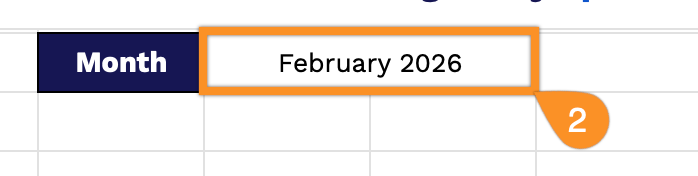
2. Enter the month and year you’re planning for.
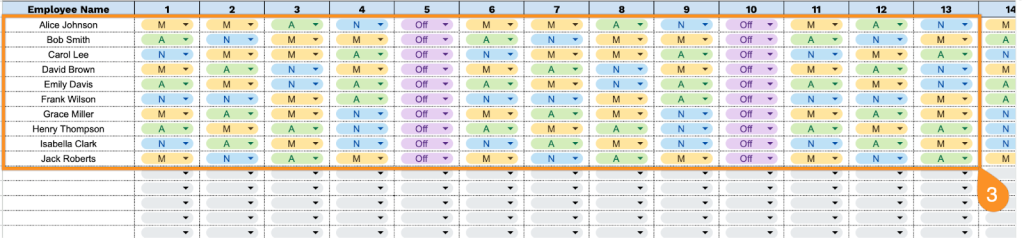
3. Add employees’ names and select the appropriate shift code for each day of the month to build their work schedule.