Make your move simpler!
Our free Moving Template in Google Sheets, Excel, and PDF keeps your packing lists and moving essentials organized.
Fully customizable and ready to use, it’s the perfect tool for a stress-free move.
What Is a Moving Template?
A moving template is a pre-designed document or form that helps organize and streamline the relocation process from one home or office to another.
By providing a structured framework, moving templates help ensure nothing is forgotten and reduce the stress of coordinating a move.
Download Spreadsheet Daddy’s Free Moving Template
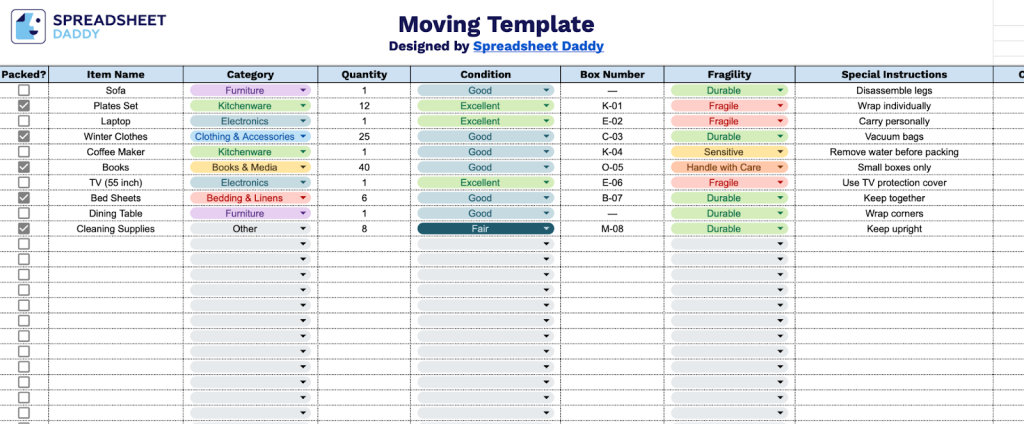
Our Moving Template helps you organize and track your belongings during a move by keeping all essential information in one place.
What’s included
- Comprehensive inventory tracking system: The template features a multi-column spreadsheet structure designed to catalog every item in your move, with fields for Item Name, Category, Quantity, and Condition, enabling you to maintain a complete record of all belongings being transported from one location to another.
- Box organization and fragility management: Built-in columns for Box Number, Fragility level, and Special Instructions let you assign items to specific containers, flag delicate items that require extra care during handling, and document any unique packing or moving requirements for each item.
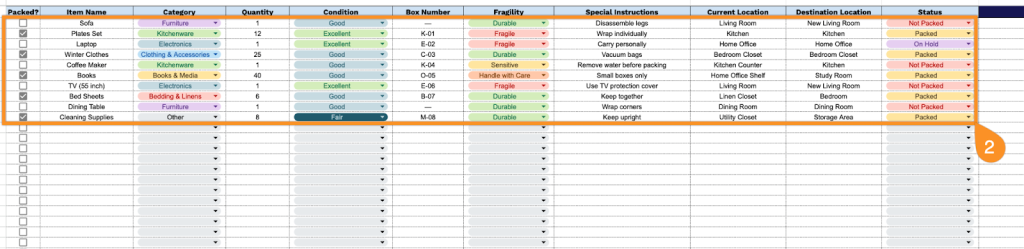
- Location tracking and status monitoring: Dual location fields (Current Location and Destination Location) paired with a Status column provide real-time visibility into where items are in the moving process, helping you track which belongings have been packed, loaded, are in transit, or have been delivered to their final destination.
- Packing progress indicator: A dedicated “Packed?” column at the start of each row lets you check off items as they’re packed into boxes, giving you an at-a-glance view of your packing progress and ensuring nothing gets left behind during the move.
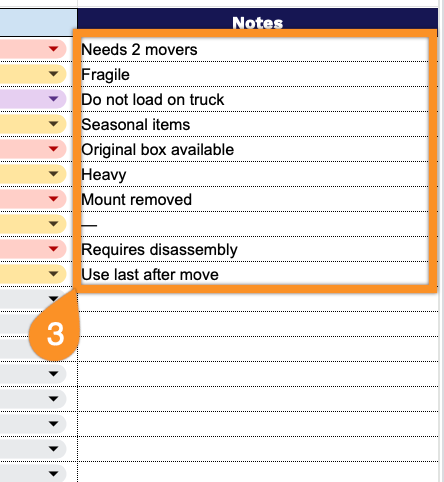
- Notes and documentation field: An additional Notes column provides flexible space to record additional information, observations, damage reports, or exceptional circumstances for specific items, creating a comprehensive audit trail for your entire moving inventory.
You can customize the spreadsheet by adding or removing columns to fit your specific moving needs.
Use the links below to access a free blank moving template in the format that works best for you:
How to Use Our Moving Template
1. Access this template in Excel or PDF, or duplicate it to Google Sheets for personal use.
2. Complete the columns by documenting all essential item details and logistics information:
- Packed?: Mark this box when the item has been successfully packed and secured for transport.
- Item Name: Enter the specific name or description of the item being moved.
- Category: Classify the item type (furniture, electronics, kitchenware, clothing, etc.) for organization purposes.
- Quantity: Record the number of identical or similar items included in this entry.
- Condition: Document the current state of the item (excellent, good, fair, broken, etc.) before the move.
- Box Number: Assign the unique box identifier if the item is containerized for easy tracking and unpacking.
- Fragility: Indicate the handling requirement level (fragile, handle with care, sensitive, durable, etc.).
- Special Instructions: Note any specific packing, loading, or handling requirements for this particular item.
- Current Location: Specify where the item is presently located (room name, floor, or specific area).
- Destination Location: Identify where the item should be placed in the new location (room assignment or storage area).
- Status: Track the current progress stage (not packed, packed, in transit, delivered, unpacked, etc.).
3. Use the Notes section to include any critical details.