Looking for a ready-made solution to manage your goals?
Our free OKR Template in Google Sheets, Excel, and PDF is professionally designed and fully editable.
Track objectives, monitor key results, and measure progress easily to keep your team aligned and focused.
What Is an OKR Template?
An OKR template is a structured framework that helps organizations define and track Objectives and Key Results, a goal-setting methodology popularized by companies like Google and Intel.
Using a standardized template ensures consistency across departments, simplifies planning, and makes it easier to align goals, monitor progress, and communicate priorities throughout the organization.
Download Spreadsheet Daddy’s Free OKR Template
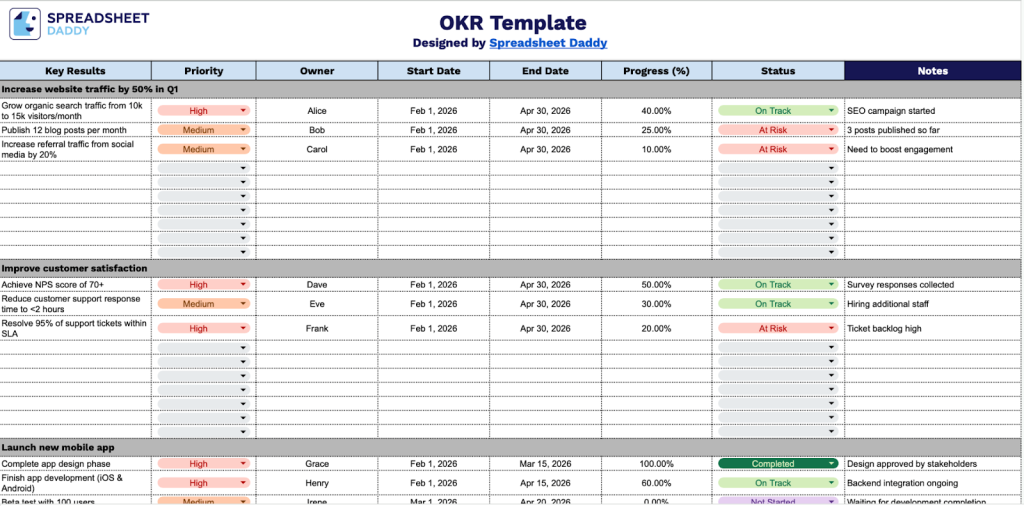
Our OKR Template helps you track objectives and key results for your team or organization.
What’s included
- Structured objective framework: The template provides five dedicated objective sections, each designed to capture high-level strategic goals with clear formatting and sufficient space for articulating meaningful objectives that align with your organizational priorities.
- Comprehensive key results tracking system: Each objective includes multiple rows to define measurable key results, with dedicated columns for priority level, owner assignment, start date, end date, progress percentage, current status, and detailed notes, enabling complete visibility into execution and accountability.
- Progress monitoring capabilities: A built-in progress-tracking column lets you record completion percentages for each key result, providing at-a-glance visibility into how close you are to achieving your objectives and identifying areas that may need additional attention or resources.
- Ownership and timeline management: Dedicated columns for assigning specific owners to each key result and setting clear start and end dates ensure accountability is established upfront and deadlines are transparent, facilitating better coordination and time management across teams.
- Status and notes documentation: The status column enables quick visual identification of key results’ health (on track, at risk, completed, etc.), while the notes field provides space for context, blockers, updates, and any relevant information stakeholders need to understand progress and next steps.
You can customize the template by adding or removing columns to fit your specific tracking needs.
Choose your favorite format and get a free blank OKR template via the links below:
How to Use Our OKR Template
1. Download the template in Excel or PDF format, or duplicate it in Google Sheets for your use.
2. Complete the OKR Template by entering all essential information for each category:
- Key Results: Define the specific, measurable outcomes that will indicate achievement of your objective.
- Priority: Assign each key result an importance level (high, medium, or low) to guide resource allocation.
- Owner: Designate the individual or team responsible for driving this key result to completion.
- Start Date: Record when work on this key result will begin or has begun.
- End Date: Specify the target completion date or deadline for achieving this key result.
- Progress (%): Track the current completion percentage to monitor advancement toward the goal.
- Status: Indicate the current state (on track, at risk, not started, or completed) of the key result.

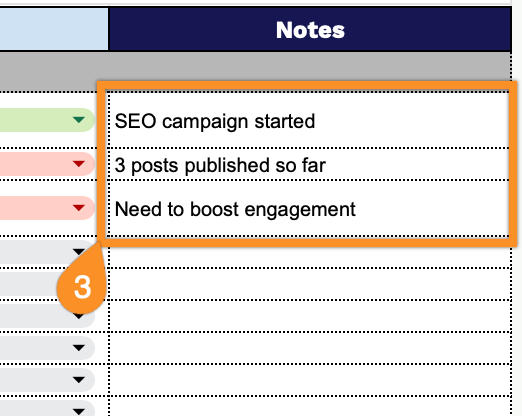
3. Use the Notes section for any additional details or special instructions.