Skip the hassle of creating a pet health tracker from the ground up.
Download our free Pet Health Record Template in Google Sheets, Excel, or PDF and start recording your pet’s medical history right away.
With customizable sections for vaccinations, checkups, medications, weight tracking, and wellness updates, it makes it simple to stay on top of your pet’s care.
What Is a Pet Health Record Template?
A pet health record template is a structured document used to organize and store essential medical information about an animal, including vaccination history, medical conditions, medications, allergies, and veterinary visit notes.
Having this information in a consistent, standardized format makes it easier to track a pet’s health over time, prepare for emergencies, and share accurate records when switching vets or traveling with a pet.
Download Spreadsheet Daddy’s Free Pet Health Record Template
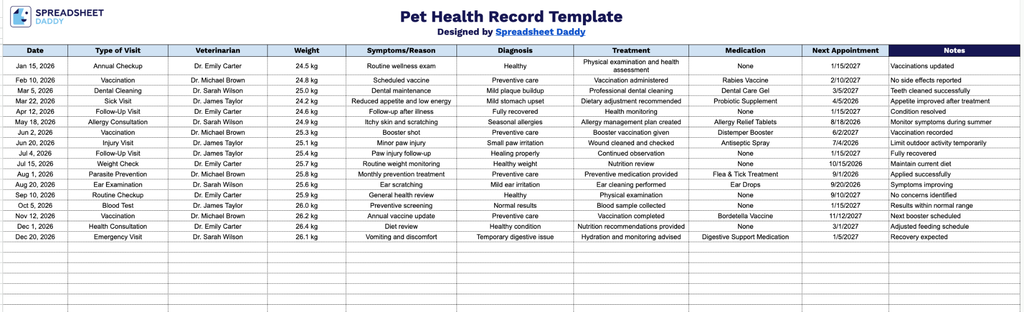
Our Pet Health Record Template gives you a simple, organized way to track your pet’s veterinary visits, symptoms, treatments, and upcoming appointments all in one place.
What’s included
- Structured visit-log table: A single table format with columns for Date, Type of Visit, Veterinarian, Weight, Symptoms/Reason, Diagnosis, Treatment, Medication, Next Appointment, and Notes, giving you one consistent format to log every vet visit in one place.
- Dedicated tracking fields for medical history: Separate columns for Symptoms/Reason, Diagnosis, Treatment, and Medication let you capture the full clinical picture of each visit individually, rather than cramming it all into one general notes field, making it easier to scan for patterns over time.
- Weight tracking column: A built-in Weight column lets you monitor your pet’s weight across visits over time, helping you and your veterinarian spot trends or changes early.
- Next Appointment column: A dedicated field for logging the date of your pet’s next scheduled visit, so upcoming appointments stay visible right alongside past visit history instead of needing a separate calendar or tracker.
- Veterinarian tracking: A specific column for recording which veterinarian or clinic handled each visit, useful for pet owners who see multiple vets or specialists and want to keep track of who provided which care.
You can add or remove columns as needed to fit whatever details matter most for your pet.
Choose your preferred file format and download our free blank Pet Health Record Template to start organizing your pet’s medical information:
How to Use Our Pet Health Record Template
1. Access the Pet Health Record template in three flexible formats: Excel, PDF, or Google Sheets, allowing you to manage your pet’s health details your way.
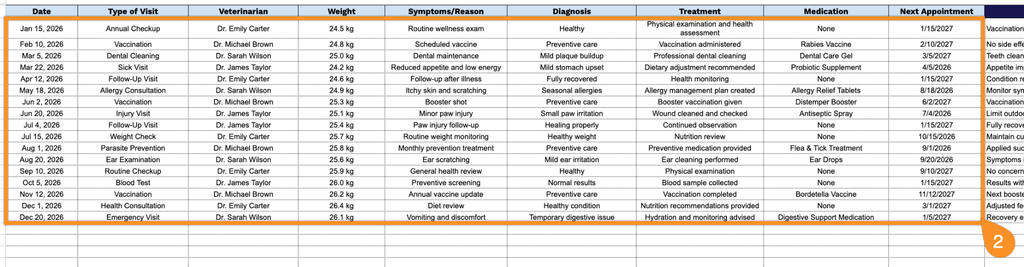
2. Record each veterinary visit by entering the appointment date, visit type, veterinarian’s name, pet’s weight, symptoms or concerns, diagnosis, prescribed treatment, medications, and any upcoming follow-up appointments.
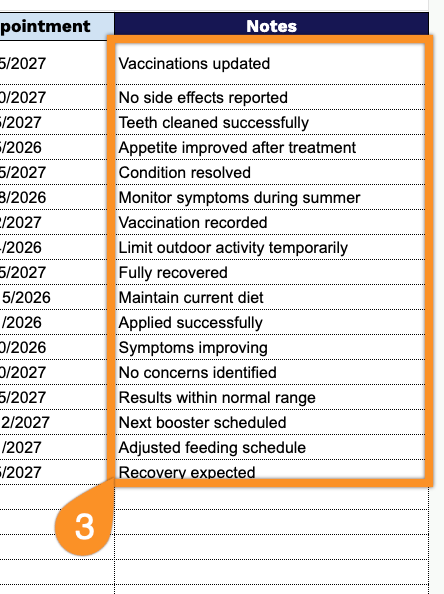
3. Use the Notes section to include any additional information, special care instructions, behavioral observations, or important reminders related to your pet’s health.