

Save time creating a privilege log with our free, professionally structured template.
Offered in Google Sheets, Excel, and PDF formats, it makes it easier to organize information about documents and communications withheld from discovery and identify the privilege supporting each claim. Edit the fields as needed to suit your legal matter.
What Is a Privilege Log Template?
A privilege log template is a structured document used in legal proceedings to identify and catalog materials a party is withholding from discovery on the grounds of legal privilege, such as the attorney-client privilege or work-product protection.
Using a template ensures consistency, completeness, and compliance with court rules, saving legal teams significant time when managing large volumes of privileged documents during litigation.
Download Spreadsheet Daddy’s Free Privilege Log Template
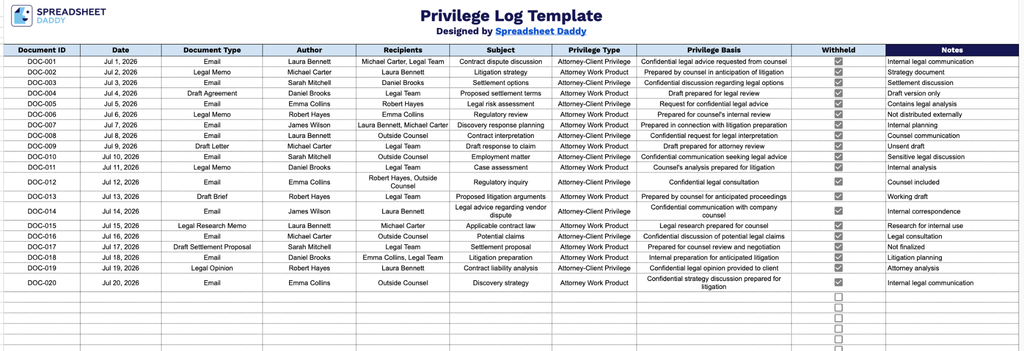
Our Privilege Log Template gives you a clean, organized way to track documents withheld from production, capturing key details like document type, author, recipients, and the basis for each privilege claim.
What’s included
- Document identification fields: Dedicated columns for Document ID, Date, and Document Type let you assign a unique reference number to each record and log when it was created and what kind of document it is (email, memo, letter, etc.), making it easy to locate and reference specific items during discovery disputes.
- Author and recipient tracking: The Author and Recipients columns capture who created each document and who it was sent to or shared with, which is essential for determining whether the attorney-client privilege or work-product protection applies to the communication.
- Subject matter summary: A Subject column provides space to briefly describe the general topic of the document without revealing privileged content, giving opposing counsel enough context to evaluate the privilege claim without waiving it.
- Privilege classification fields: The Privilege Type and Privilege Basis columns let you specify the category of privilege being asserted (e.g., attorney-client, work product) and the legal justification supporting that claim, keeping your reasoning organized and consistent across entries.
- Withheld status and notes tracking: A checkbox-based Withheld column lets you mark whether a document is being fully withheld, while the accompanying Notes column gives you room to add clarifying details, such as partial redactions or special handling instructions.
It’s built to be flexible, so you can easily add or remove columns to match the specific requirements of your case or firm’s standard practices.
Choose your preferred format below to download a free, blank Privilege Log template:
How to Use Our Privilege Log Template
1. Download the Privilege Log template in your preferred file format, including Excel and PDF, or work with an editable Google Sheets copy.
2. Enter the relevant document details, including the document ID, date, type, author, recipients, subject, privilege type, and privilege basis. Check the box to indicate whether the document is being withheld.
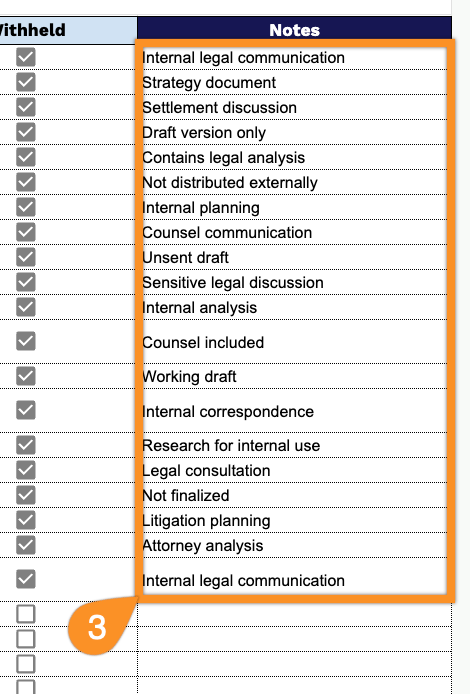
3. Add any relevant notes or additional information that may help explain the privilege claim, document status, or other important details in the Notes section.
