Skip the hassle of building a savings tracker from the ground up.
Our free Procurement Savings Tracker Template is available in Google Sheets, Excel, and PDF formats, giving you a simple way to record procurement costs, compare savings, monitor supplier performance, and keep your purchasing data organized.
What Is a Procurement Savings Tracker Template?
A procurement savings tracker template is a structured document or spreadsheet that organizations use to systematically record, monitor, and report cost savings achieved through purchasing and procurement activities.
By centralizing this information, the template helps stakeholders gain visibility into sourcing performance, supports budget planning, and provides evidence of value delivered by the procurement function.
Download Spreadsheet Daddy’s Free Procurement Savings Tracker Template
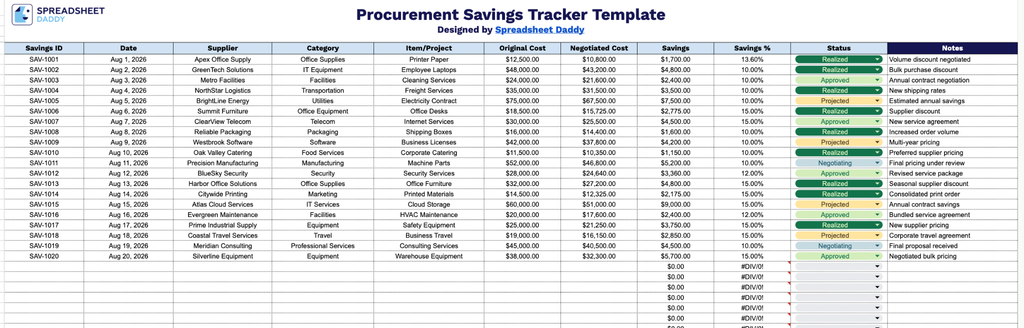
Our Procurement Savings Tracker Template helps you track supplier savings from negotiation to realization in one simple, ready-to-use sheet.
What’s included
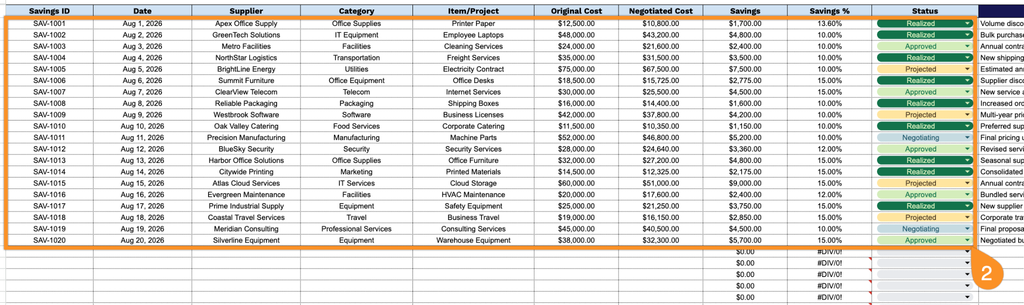
- Comprehensive savings-tracking columns: The table includes dedicated fields for Savings ID, Date, Supplier, Category, and Item/Project, providing a structured way to log every negotiated deal and quickly identify which purchases, vendors, or categories are driving cost reductions.
- Automatic savings calculations: The Original Cost and Negotiated Cost columns feed directly into built-in Savings and Savings % formulas, so the dollar amount and percentage saved on each line item are calculated instantly as soon as you enter your cost figures.
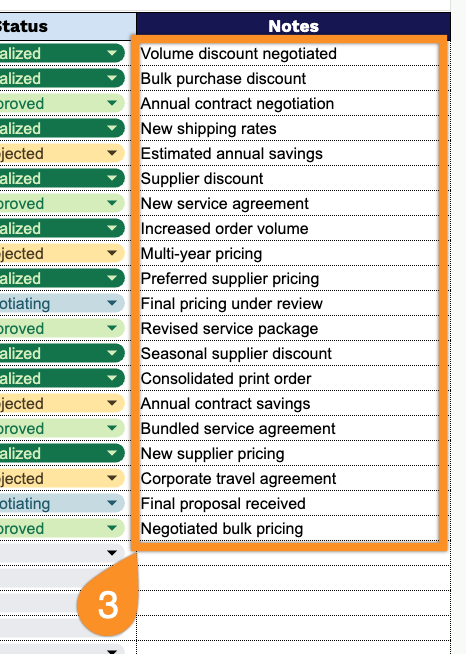
- Status and Notes tracking: A Status column lets you flag where each savings initiative stands (e.g., pending, approved, completed), while the adjacent Notes column provides space to document negotiation details, justifications, or follow-up actions for each entry.
Add or remove columns as needed to match your own procurement process.
Choose your preferred file format below to download a free, ready-to-use Procurement Savings Tracker template:
How to Use Our Procurement Savings Tracker Template
1. Pick the format that works best for you: download the tracker in Excel or PDF, or duplicate it in Google Sheets.
2. Enter the savings ID, date, supplier, category, item or project, original cost, negotiated cost, and current status. The Procurement Savings Tracker automatically calculates the total savings and the savings percentage based on the entered costs.
3. Use the Notes section to record important details, such as negotiation outcomes, supplier agreements, cost-saving strategies, or other relevant comments.