Track every task, milestone, and deadline effortlessly with our free Progress Tracker Template.
Professionally designed for Google Sheets, Excel, and PDF, it’s easy to customize and perfect for monitoring your project’s progress from start to finish.
What Is a Progress Tracker Template?
A progress tracker template is a pre-designed tool that helps individuals or teams monitor and visualize the advancement of tasks, projects, or goals over time.
These templates provide a structured framework that can be customized to track anything from daily habits and personal goals to complex multi-phase projects.
Download Spreadsheet Daddy’s Free Progress Tracker Template
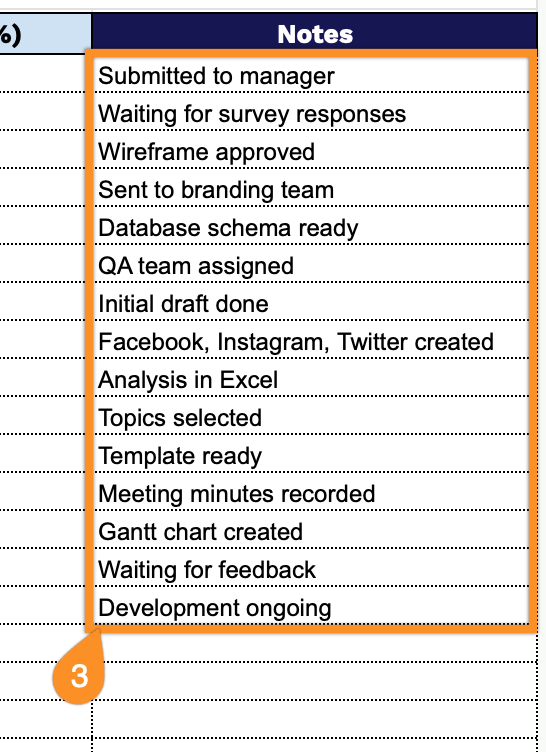
Our Progress Tracker Template helps you monitor tasks, deadlines, and completion status for your projects in an organized spreadsheet format.
What’s included
- Comprehensive task management columns: The template features six essential tracking columns (Task, Priority, Start Date, End Date, Status, Progress %, and Notes) that let you monitor project milestones from initiation to completion, with dedicated fields for prioritization and detailed commentary for each task.
- Generous row capacity for extensive project tracking: With 40+ blank rows in the main tracking grid, this template accommodates substantial project portfolios, multiple team assignments, or long-term initiatives, ensuring you have ample space to document all tasks without creating additional sheets.
- Visual progress monitoring system: The Progress (%) column enables quantitative tracking of task completion, allowing you to input numerical values that provide at-a-glance visibility into how far each task is along, making it easy to identify bottlenecks and prioritize resources where they’re needed most.
- Flexible priority and status fields: The Priority and Status columns allow you to categorize tasks by urgency level and current state (such as Not Started, In Progress, Completed, or On Hold), providing a quick visual reference system for managing workload distribution and identifying which tasks require immediate attention.
You can easily adjust it by adding or removing columns to fit your specific workflow and tracking needs.
Access a free blank Progress Tracker Template in the format of your choice through the links below:
How to Use Our Progress Tracker Template
1. Access this template in Excel or PDF format, or create a Google Sheets version.
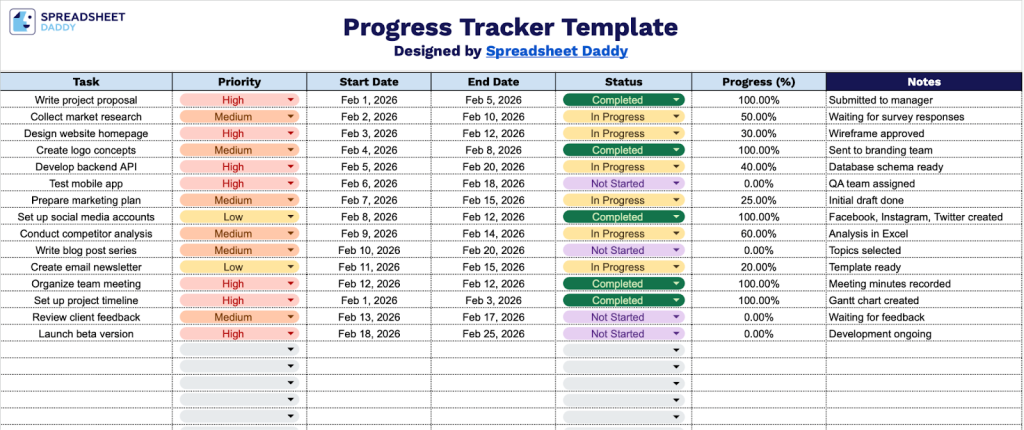
2. Complete the columns by entering all essential project tracking and timeline information:
- Task: Enter the specific activity or deliverable that needs to be completed.
- Priority: Set the task’s importance level (high, medium, or low).
- Start Date: Record when work on this task is scheduled to begin.
- End Date: Specify the target completion date for this task.
- Status: Indicate the current state of the task (Not Started, In Progress, Completed, or On Hold).
- Progress (%): Enter the percentage of completion for this task (0-100%).
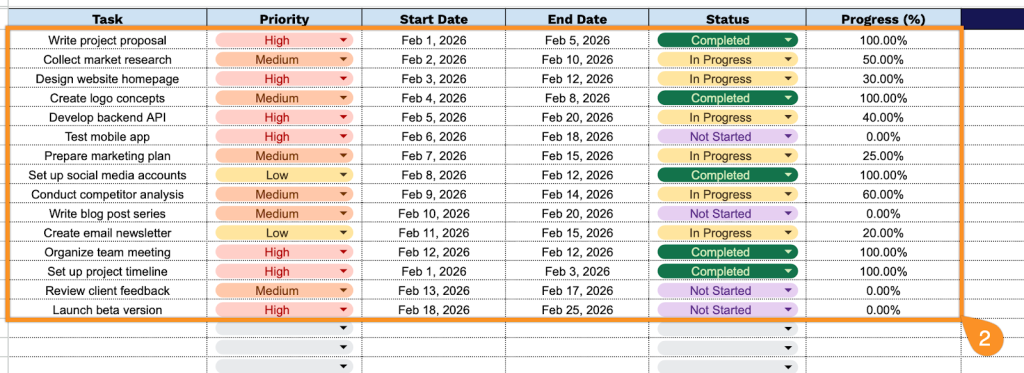
3. Record explanations for any delays, challenges, or special circumstances affecting your progress, as well as reminders or achievements you want to highlight in the Notes section.