Instead of building a punch list from the ground up, use our free Punch List Template to keep unfinished work and outstanding issues organized.
Available in Google Sheets, Excel, and PDF, it’s fully editable and makes it easy to record tasks, assign them to the right person, monitor their status, and track completed work.
What Is a Punch List Template?
A punch list template is a standardized document used in construction and project management to track incomplete or deficient work items that must be addressed before a project can be officially closed out.
By using a consistent template, project managers and contractors can ensure nothing is overlooked, streamline communication between teams, and maintain a clear record of all corrections made before final approval or client handover.
Download Spreadsheet Daddy’s Free Punch List Template
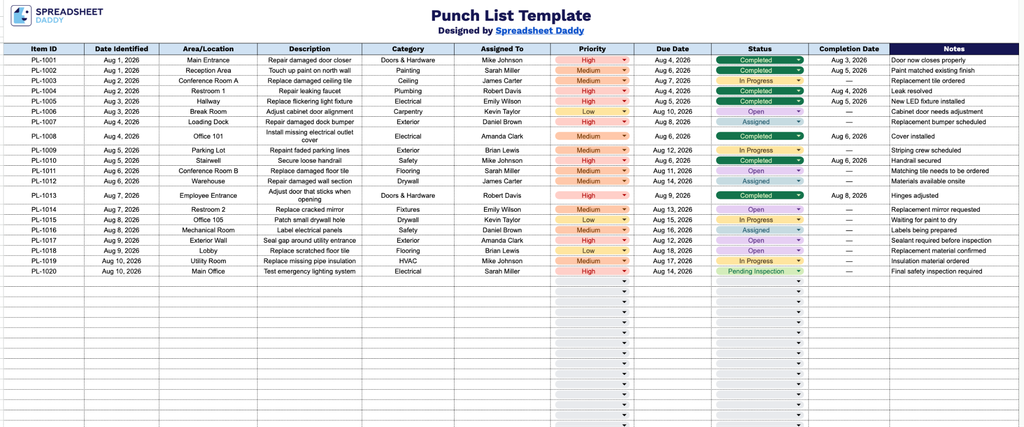
Our Punch List Template gives you a clean, organized way to track construction or renovation tasks from identification through completion.
What’s included
- Comprehensive tracking columns: The spreadsheet includes 11 dedicated fields: Item ID, Date Identified, Area/Location, Description, Category, Assigned To, Priority, Due Date, Status, Completion Date, and Notes, giving you a complete record of every punch list item from discovery through resolution.
- Item identification and location fields: The Item ID and Area/Location columns let you assign a unique identifier to each task and pinpoint exactly where in the project or property the issue is located, making it easy to reference and locate items during walkthroughs.
- Categorization for organized review: The Category column allows you to group punch list items by type (e.g., electrical, plumbing, cosmetic, structural), helping teams prioritize and delegate work more efficiently across trades.
- Assignment and accountability fields: Dedicated Assigned To and Priority columns let you designate responsibility for each task and flag urgency levels, making it easy to organize work across contractors, subcontractors, or team members.
- Status and completion tracking: Separate Due Date, Status, and Completion Date columns let you monitor whether items are open, in progress, or resolved, giving you a clear timeline for accountability on every punch list entry.
You can add or remove columns as needed to fit your specific project requirements.
Choose your preferred format below and download a free, ready-to-use Punch List template:
How to Use Our Punch List Template
1. Download the Punch List template as an Excel or PDF file, or make your own editable copy in Google Sheets.
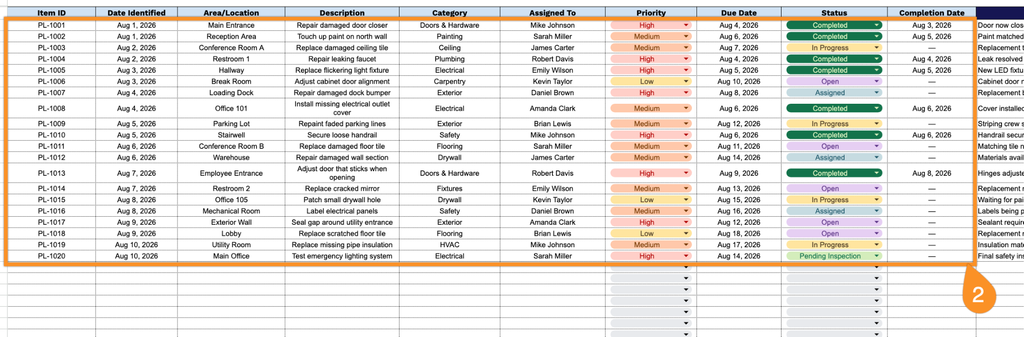
2. Record each punch list item with key details such as the item ID, date identified, area or location, issue description, category, assigned team member, priority level, due date, current status, and completion date.
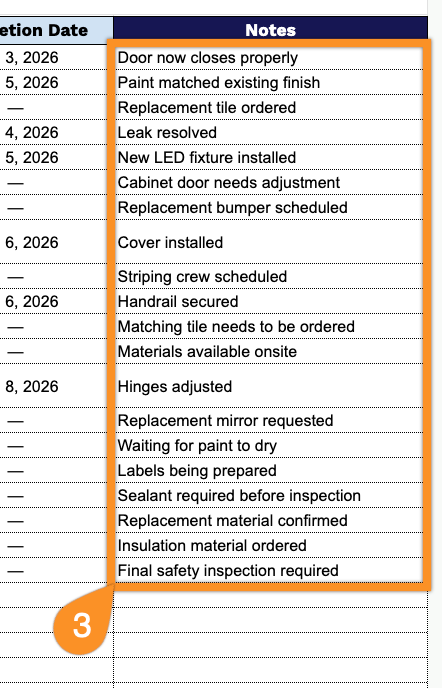
3. Use the Notes section to add important details, special instructions, follow-up information, or any other comments related to the punch list item.