Skip the hassle of designing a risk register yourself.
Download this ready-to-use Risk Register template in Google Sheets, Excel, or PDF to keep potential issues clearly documented and under control.
What Is a Risk Register Template?
A risk register template is a structured document used in project management to systematically identify, track, and manage potential risks that could impact a project’s success.
This template serves as a centralized tool that helps teams proactively monitor threats and opportunities throughout a project’s lifecycle.
Download Spreadsheet Daddy’s Free Risk Register Template
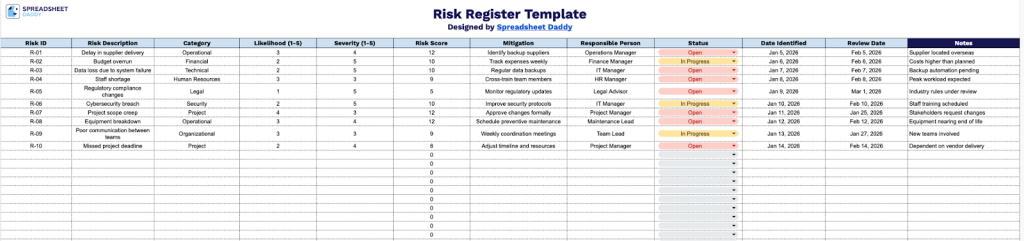
Our Risk Register Template provides a centralized system for identifying, evaluating, and tracking potential threats to your projects or operations.
What’s included
- Comprehensive risk tracking columns: The template features 11 essential columns including Risk ID, Risk Description, Category, Likelihood (1-5 scale), Severity (1-5 scale), Risk Score, Mitigation strategies, Responsible Person, Status, Date Identified, Review Date, and Notes, providing a complete framework for documenting and managing organizational risks from identification through resolution.
- Quantitative risk assessment system: Built-in numerical scoring fields use standardized 1-5 scales for Likelihood and Severity, automatically enabling Risk Score calculations to help you prioritize risks by potential impact and probability, ensuring critical threats receive appropriate attention and resources.
- Assignment and timeline tracking fields: Dedicated columns for Responsible Person, Status, Date Identified, and Review Date enable clear accountability by assigning risk ownership, tracking current progress, and establishing review schedules to ensure risks are actively monitored and managed over time.
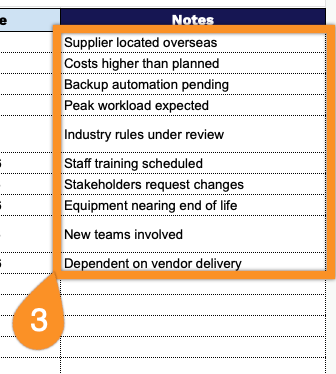
- Flexible categorization and documentation: The Category column allows you to organize risks by type (financial, operational, strategic, compliance, etc.), while the Notes field provides space for additional context, supporting documentation references, or detailed observations that don’t fit in other standardized fields.
Tailor the structure by adding or removing columns to match your organization’s unique risk management approach.
Select one of the links below to get a free Risk Register Template for documenting and tracking risks:
How to Use Our Risk Register Template
1. Download the Risk Register template in Excel or PDF, or open a personal version in Google Sheets for easy updates.
2. Complete the columns by entering all essential risk information:
- Risk ID: Assign a unique identifier to each risk for tracking and reference purposes throughout the project lifecycle.
- Risk Description: Provide a clear and comprehensive explanation of the potential threat or opportunity, including its nature and circumstances.
- Category: Classify the risk type (financial, operational, technical, strategic, compliance, etc.).
- Likelihood (1-5): Assess the probability of the risk occurring on a scale from 1 (very unlikely) to 5 (very likely).
- Severity (1-5): Evaluate the potential impact if the risk materializes on a scale from 1 (minimal impact) to 5 (critical impact).
- Risk Score: The template automatically calculates the overall risk priority by multiplying Likelihood × Severity to determine focus areas.
- Mitigation: Document the planned actions, strategies, or controls to reduce or eliminate the risk.
- Responsible Person: Designate the individual or team accountable for monitoring and managing the risk.
- Status: Track the current state of the risk (open, in progress, on hold, etc.).
- Date Identified: Record when the risk was first recognized and added to the register.
- Review Date: Schedule the next assessment date to ensure ongoing monitoring and updates.

3. Use the Notes section to capture assumptions, dependencies, escalation details, or any updates that provide additional context.