Bring your vision to life with our free Shot List Template.
Whether you’re shooting a short film, commercial, or music video, this easy-to-edit template in Google Sheets, Excel, or PDF keeps your scenes and shots perfectly organized.
What Is a Shot List Template?
A shot list template is a pre-formatted document used in film and video production to organize and plan every camera shot needed for a project.
Using a template saves time and ensures no critical shots are missed, making it an essential planning tool for directors, cinematographers, and production teams.
Download Spreadsheet Daddy’s Free Shot List Template
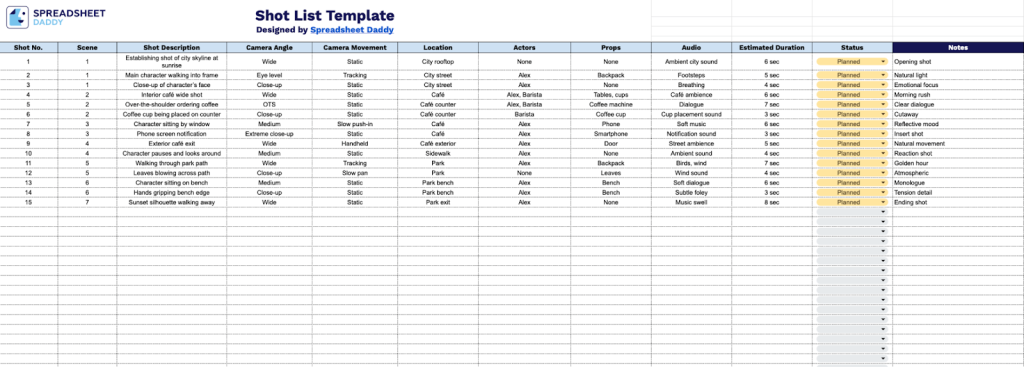
Our Shot List Template helps you organize and plan every shot in your video production from start to finish.
What’s included
- Comprehensive shot-tracking system: The template includes organized columns for shot number, scene reference, and a detailed shot description, along with a status field to monitor each shot’s progress from planning through completion, ensuring nothing falls through the cracks during production.
- Technical specifications columns: Dedicated fields for camera angle and camera movement let you document precise visual requirements, while the estimated duration column helps schedule and time each shot accurately.
- Production logistics management: The template provides columns for location details, actor assignments, and required props, giving all departments clear visibility into what’s needed for each shot and streamlining coordination between crew members and production teams.
- Audio documentation field: A dedicated audio column allows you to note dialogue requirements, sound effects, ambient audio needs, or music cues that must be captured during filming or added in post-production, ensuring complete audio planning for every shot.
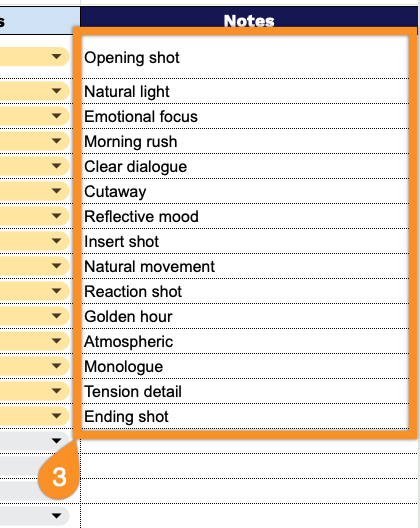
- Flexible notes section: A notes column provides space for additional shot-specific information, such as lighting requirements, wardrobe changes, special effects needs, continuity reminders, and other essential details that don’t fit in the standard columns but are crucial to successful shot execution.
You can easily customize it by adding or removing columns to match your specific project needs.
Click any of the links below to download a free blank shot list template in your chosen format:
How to Use Our Shot List Template
1. Grab the template in PDF or Excel, or copy it to Google Sheets to personalize.
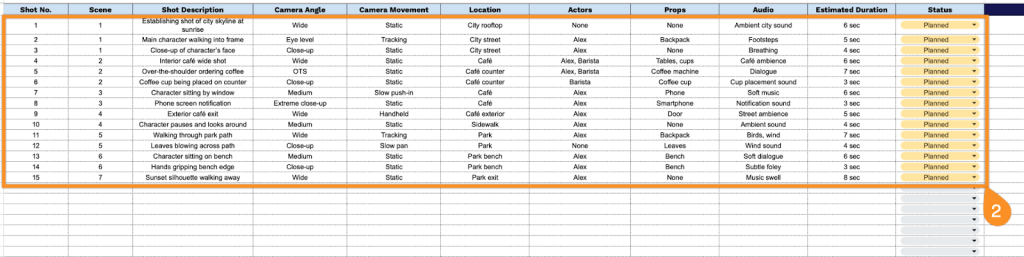
2. Complete the columns by entering all essential production information:
- Shot No.: Enter the unique sequential number assigned to each shot for organizational tracking and reference.
- Scene: Specify the scene number or name that this shot belongs to within the overall production.
- Shot Description: Provide a detailed explanation of what will be captured.
- Camera Angle: Indicate the perspective from which the shot will be filmed (eye-level, high angle, low angle, bird’s eye, etc.).
- Camera Movement: Document the type of camera motion required (static, pan, tilt, dolly, tracking, handheld, etc.).
- Location: Record the specific filming location or set where the shot will take place.
- Actors: List all talent or subjects appearing in the shot by name or character designation.
- Props: Identify any necessary items, objects, or set dressing required for the shot.
- Audio: Specify sound requirements, including dialogue, ambient sound, or special audio needs.
- Estimated Duration: Note the anticipated length of the shot in seconds or minutes.
- Status: Track the current production stage (planned, filmed, or needs reshoot).
3. Use the Notes section to capture any special instructions or essential details.