Avoid messy sketches and scattered notes.
With our free Storyboard Template, you can plan shots, scenes, and story flow in a clean, structured format.
Available in Google Sheets, Google Docs, Word, Excel, and PDF, it is flexible enough for beginners and professionals alike.
What Is a Storyboard Template?
A storyboard template is a pre-formatted visual planning tool that consists of a series of empty panels or frames arranged in sequence, used to map out scenes before production begins.
These templates are commonly used in film, animation, video production, and presentations to organize narrative flow and communicate creative vision to team members.
Download Spreadsheet Daddy’s Free Storyboard Template
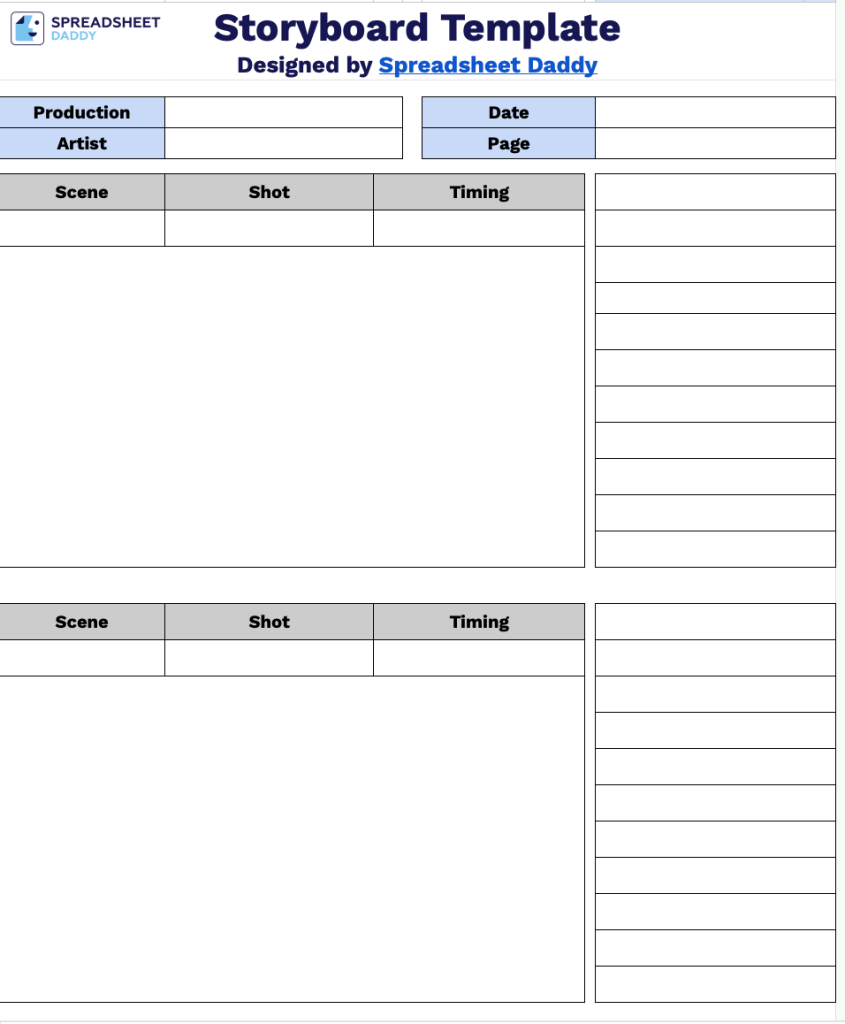
Our Storyboard Template provides a clean, organized layout for planning your video or animation projects.
What’s included
- Production tracking header: The template includes dedicated fields for Production, Date, Artist name, and Page number at the top of each sheet, providing essential metadata to keep your storyboards organized, properly credited, and sequenced throughout the production workflow.
- Visual storyboard frames: Each page contains three generously sized rectangular boxes, specifically designed for sketching or illustrating your scenes, giving you ample space to capture visual details, camera angles, and action sequences with clarity.
- Scene and shot identification fields: Every frame includes labeled spaces for Scene number and Shot number, allowing you to systematically catalog and reference each visual moment in your production for seamless communication with your team.
- Timing notation areas: Each storyboard frame features a dedicated Timing field where you can record shot duration, frame counts, or time codes to precisely plan pacing and ensure your visual sequence aligns with your production schedule.
The template is fully customizable, allowing you to add or remove columns and rows based on your specific project requirements.
Get a free blank Storyboard Template available in multiple downloadable formats below:
How to Use Our Storyboard Template
1. Download and customize this storyboard template in Excel, Word, PDF, or through Google Docs and Google Sheets.
2. Enter basic project details such as the production name, artist, date, and page number.

3. For each frame, fill in the scene description, shot type, and timing. Use the adjacent column to add notes, dialogue, or any extra details.

4. Use each frame panel to sketch or describe how the scene will unfold visually.