Need a simple way to organize and track everything your website needs?
Skip the hassle of building a checklist from scratch and use our free, professionally designed Website Checklist Template.
Available in Google Sheets, Excel, and PDF, it’s fully editable and helps you plan, monitor, and complete essential website tasks in an organized way.
What Is a Website Checklist Template?
A website checklist template is a structured document that outlines the essential tasks, elements, and criteria to be reviewed or completed during the creation, launch, or maintenance of a website.
By following a standardized checklist, teams and individuals can streamline their workflow, maintain consistency, and confidently verify that a website meets all necessary standards before going live or undergoing updates.
Download Spreadsheet Daddy’s Free Website Checklist Template
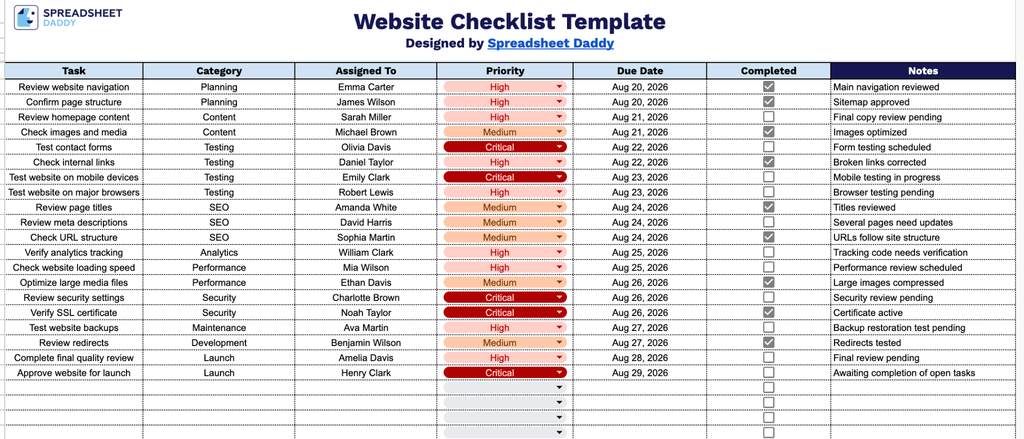
Our Website Checklist Template helps you track every task involved in planning, building, testing, and launching a website, from reviewing navigation and content to checking security settings and approving final launch.
What’s included
- Task and category tracking: The Task and Category columns let you list every website-related action item and group it by type (e.g., design, content, SEO, testing), keeping related work organized and easy to scan.
- Ownership and accountability fields: The Assigned To column lets you designate a specific team member or stakeholder responsible for each task, so nothing falls through the cracks on a multi-person project.
- Priority and deadline management: The Priority and Due Date columns let you flag the most urgent tasks and set clear deadlines, helping you sequence work and keep the project on schedule.
- Completion tracking: The Completed column provides a simple checkbox for each task, giving you an at-a-glance view of overall progress across the entire website project.
- Notes for context and detail: The Notes column offers space to add extra instructions, links, blockers, or clarifications for any task, keeping all relevant information in one place.
You can add or remove columns to fit your own workflow and requirements.
Select a format below to download a free Website Checklist template:
How to Use Our Website Checklist Template
1. Get the Website Checklist in Excel or PDF, or make a customizable copy directly in Google Sheets.
2. Add each website task along with its category, assignee, priority level, and due date. Check the box as you complete each task to keep track of your progress.
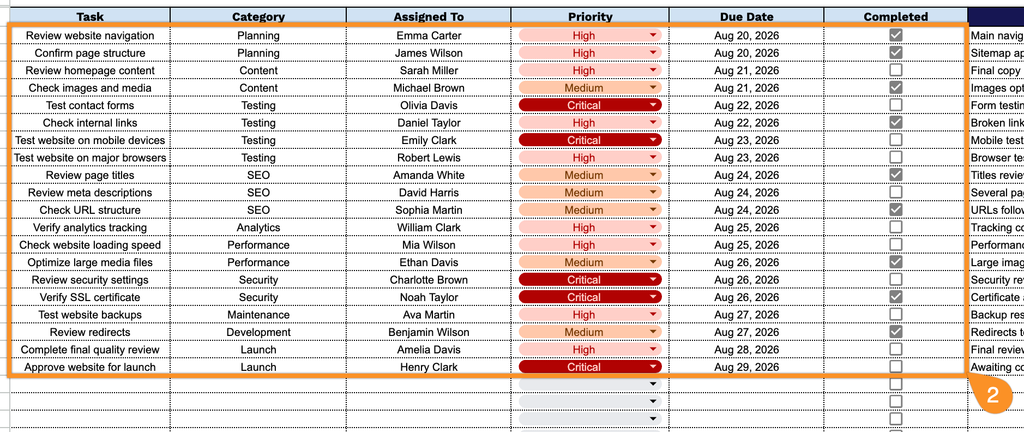
3. Use the Notes section to add important reminders, special instructions, links, or other details related to individual website tasks.