Skip the setup and focus on closing deals.
Download our free Sales Pipeline Template in Google Sheets, Excel, or PDF to visualize your sales stages, track opportunities, and stay on top of your targets.
It’s professionally formatted and simple to customize.
What Is a Sales Pipeline Template?
A sales pipeline template is a structured framework that visualizes and organizes the stages a potential customer moves through from initial contact to final purchase.
By using a template, businesses can maintain consistency across their sales process, forecast revenue more accurately, and pinpoint bottlenecks that may be slowing down conversions.
Download Spreadsheet Daddy’s Free Sales Pipeline Template
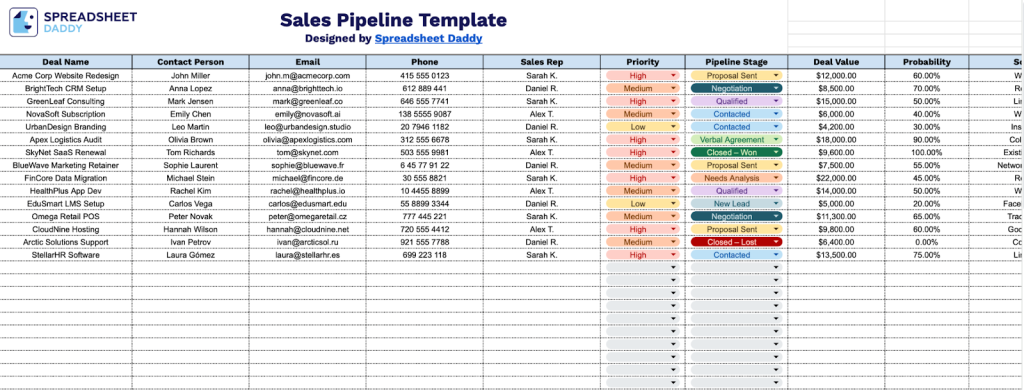
Our Sales Pipeline Template helps you track and manage your sales opportunities from initial contact through deal closure.
What’s included
- Comprehensive deal-tracking columns: The template features 11 essential data fields, including Deal Name, Contact Person, Email, Phone, Sales Rep, Priority, Pipeline Stage, Deal Value, Probability, Source, and Expected Close Date, enabling you to capture every critical detail of your sales opportunities in one centralized view.
- Priority and probability assessment tools: Built-in Priority and Probability columns let you rank deals by urgency and assign percentage-based likelihood of closing, helping you focus on high-value, high-probability opportunities and forecast revenue more accurately.
- Pipeline stage progression tracking: The Pipeline Stage column provides a clear framework for categorizing deals across your sales process, giving you instant visibility into each opportunity’s status and identifying potential bottlenecks in your sales funnel.
- Contact and assignment management: Dedicated fields for Contact Person, Email, Phone, and Sales Rep ensure all relationship and ownership information is documented, making it easy to coordinate follow-ups, delegate responsibilities across your team, and maintain communication continuity throughout the sales cycle.
- Deal analytics and source attribution: The Deal Value, Expected Close Date, Source, and Notes columns work together to enable financial forecasting, track lead origins for ROI analysis, set closing timelines for pipeline management, and capture contextual information that informs your sales strategy and decision-making.
The template is fully customizable, allowing you to add or remove columns to match your specific workflow and business needs.
Use the links below to download a free Sales Pipeline template in your preferred format:
How to Use Our Sales Pipeline Template
1. Access the template in Excel or PDF, or make your own editable version in Google Sheets.
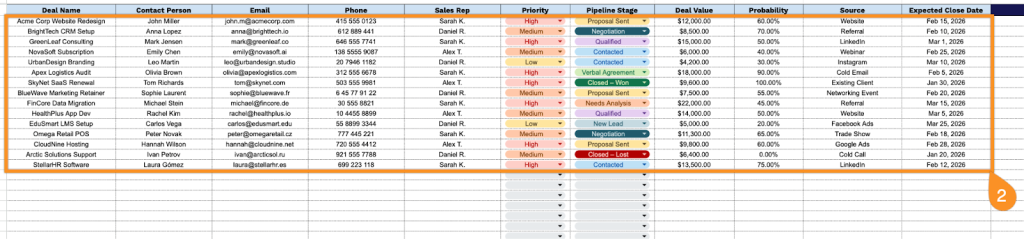
2. Complete the columns by entering all essential sales tracking details:
- Deal Name: Enter a descriptive identifier for the sales opportunity that clearly reflects the product or service being offered.
- Contact Person: Specify the full name of the primary decision-maker or key stakeholder associated with this deal.
- Email: Record the contact’s professional email address for correspondence and follow-up communications.
- Phone: Include the direct phone number where the contact person can be reached.
- Sales Rep: Assign the team member responsible for managing and closing this opportunity.
- Priority: Indicate the urgency level (high, medium, or low) based on strategic importance and timeline.
- Pipeline Stage: Select the current position in your sales process (New Lead, Contacted, Qualified, Needs Analysis, etc.).
- Deal Value: Document the estimated or confirmed monetary value of the opportunity.
- Probability: Enter the percentage likelihood of successfully closing this deal based on current engagement.
- Source: Identify how this lead was generated (referral, marketing campaign, cold outreach, etc.).
- Expected Close Date: Record the anticipated date when the deal is projected to finalize.
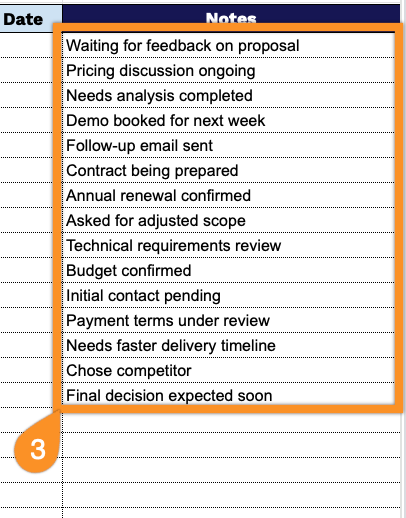
3. Use the Notes section to capture important deal information, special terms, or follow-up reminders.