Stop juggling multiple spreadsheets and start managing your debt with confidence.
Our free Debt Tracker Template is professionally formatted for Google Sheets, Excel, and PDF.
Easily record debts, payments, and interest, so you always know where you stand and how close you are to financial freedom.
What Is a Debt Tracker Template?
A debt tracker template is a structured spreadsheet designed to help you organize and monitor all your outstanding debts in one place.
By using this tool, you can create a clear repayment strategy, track your progress toward becoming debt-free, and avoid missed payments that could damage your credit score.
Download Spreadsheet Daddy’s Free Debt Tracker Template
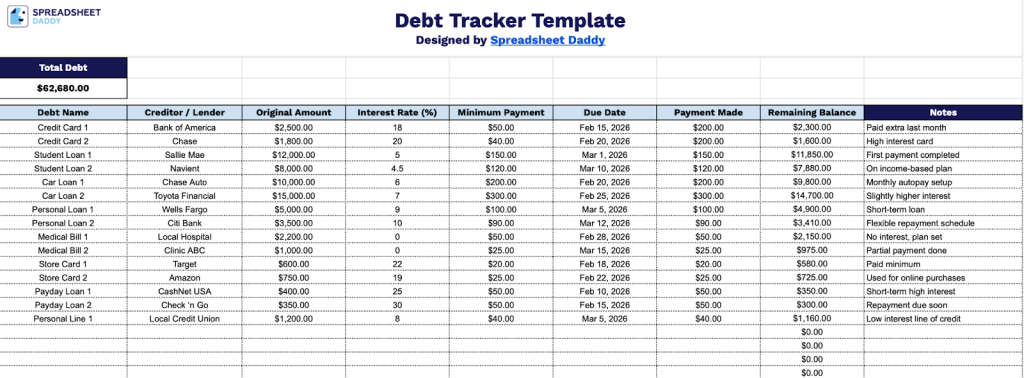
Our Debt Tracker Template gives you a clear, organized overview of all your outstanding debts in one place, helping you stay on top of payments and monitor your progress toward becoming debt-free.
What’s included
- Comprehensive debt entry table: The main tracking sheet features a multi-column row structure with dedicated fields for Debt Name, Creditor / Lender, Original Amount, Interest Rate (%), Minimum Payment, Due Date, Payment Made, Remaining Balance, and Notes, giving you a complete snapshot of every debt obligation in a single, organized view.
- Automatic remaining balance calculations: Each row in the Remaining Balance column is pre-formatted to calculate and display dollar values, dynamically reflecting what you still owe on each debt as you log payments made, eliminating the need for manual math.
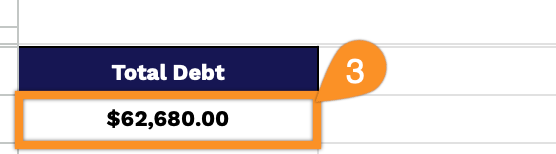
- Real-time total debt summary header: A bold, prominently styled “Total Debt” summary box sits at the top of the sheet and automatically aggregates all remaining balances across every row, giving you an at-a-glance figure of your full debt load without needing to scroll through individual entries.
Add or remove columns to fit your personal financial situation and tracking preferences.
Download a customizable, empty Debt Tracker Template in your preferred file type from the links provided:
How to Use Our Debt Tracker Template
1. Grab your Debt Tracker template in Excel or PDF, or create a Google Sheets version.
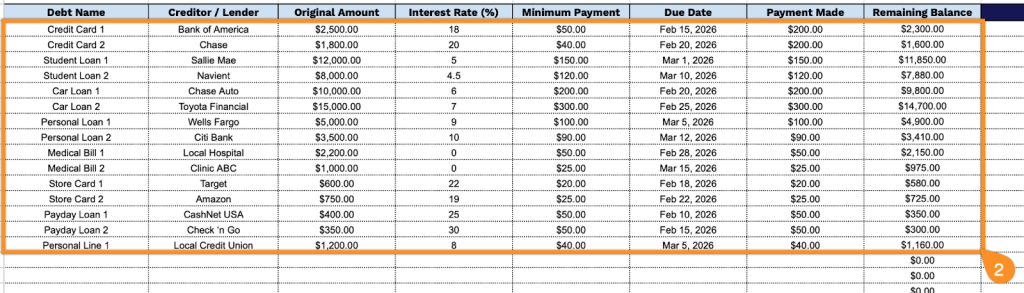
2. Complete the columns by entering all essential financial information:
- Debt Name: Enter a descriptive identifier for each debt to help you easily recognize it (e.g., “Chase Credit Card” or “Student Loan”).
- Creditor / Lender: Specify the complete name of the financial institution or company to whom the debt is owed.
- Original Amount: Record the initial principal balance when the debt was first incurred.
- Interest Rate (%): Include the annual percentage rate (APR) being charged on the outstanding balance.
- Minimum Payment: Document the required monthly minimum payment amount specified by the creditor.
- Due Date: Enter the monthly payment deadline to avoid late fees and negative credit reporting.
- Payment Made: Record the actual amount paid each month toward this debt obligation.
- Remaining Balance: This field is automatically calculated from your original amount and payments made, showing your current outstanding balance.
3. As you enter your debts in the table, the Total Debt at the top updates automatically.
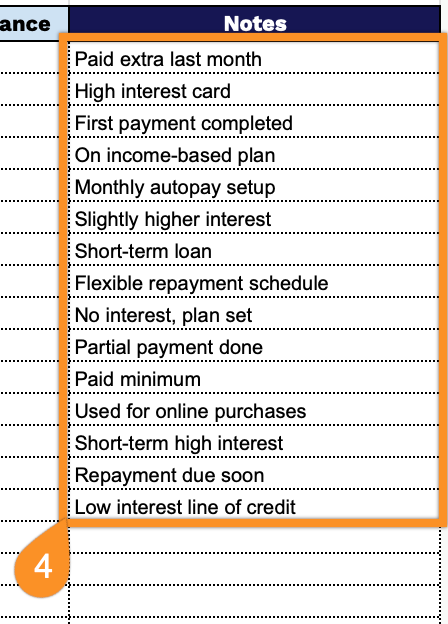
4. Use the Notes column to explain any unusual payments, upcoming changes (e.g., interest rate adjustments), or other circumstances affecting your debt repayment plan.