Simplify your banking records with our professionally formatted Bank Ledger Template.
Available in Google Sheets, Excel, and PDF, it’s ready to use for logging transactions, monitoring balances, and keeping your accounts accurate.
What Is a Bank Ledger Template?
A bank ledger template is a pre-formatted spreadsheet used to track and record all financial transactions flowing through a bank account.
This organizational tool helps maintain accurate financial records, identify discrepancies, and provide a clear overview of account activity over time.
Download Spreadsheet Daddy’s Free Bank Ledger Template
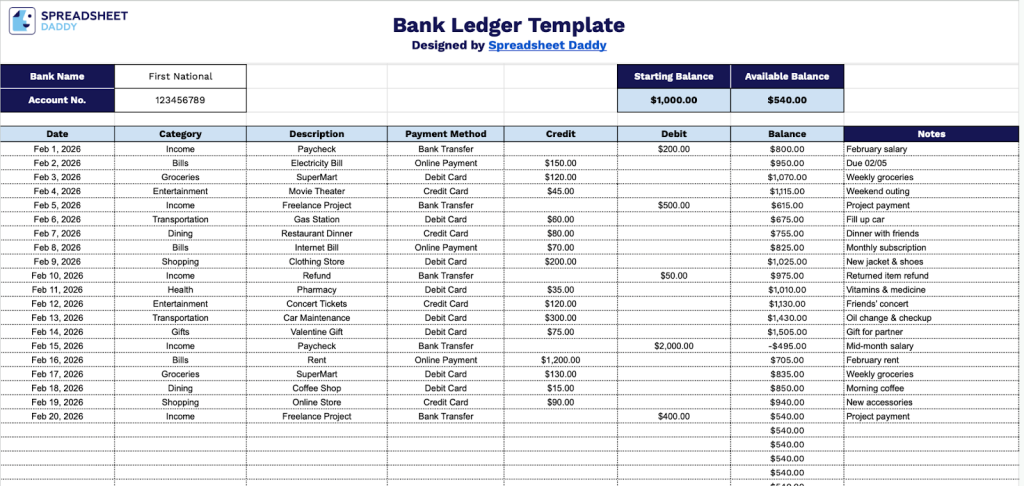
Our Bank Ledger Template helps you track your financial transactions in an organized format.
What’s included
- Account header with essential banking details: The top section includes fields for Bank Name, Account Number, Starting Balance, and Available Balance, providing a clear overview of your account information and current financial position.
- Comprehensive transaction tracking columns: Each row includes dedicated columns for Date, Category, Description, Payment Method, Debit, Credit, Balance, and Notes, enabling you to record every detail of your financial transactions in an organized, systematic manner.
- Running balance calculation system: The Balance column automatically tracks your account balance after each transaction, updating with every debit and credit entry to give you real-time visibility into your available funds throughout the ledger.
- Categorization and payment method fields: Built-in Category and Payment Method columns let you organize transactions by type (e.g., utilities, groceries, or rent) and track how payments were made (check, card, transfer, etc.), making it easier to analyze spending patterns and reconcile accounts.
The template is fully customizable, allowing you to add or remove columns based on your specific tracking needs.
Click the links below to get a free blank Bank Ledger Template in the file type of your choice:
How to Use Our Bank Ledger Template
1. Get this Bank Ledger template as an Excel or PDF file, or make your own version in Google Sheets.
2. Enter your bank’s name, account number, and starting balance. As you record transactions, the template will automatically update your available balance.

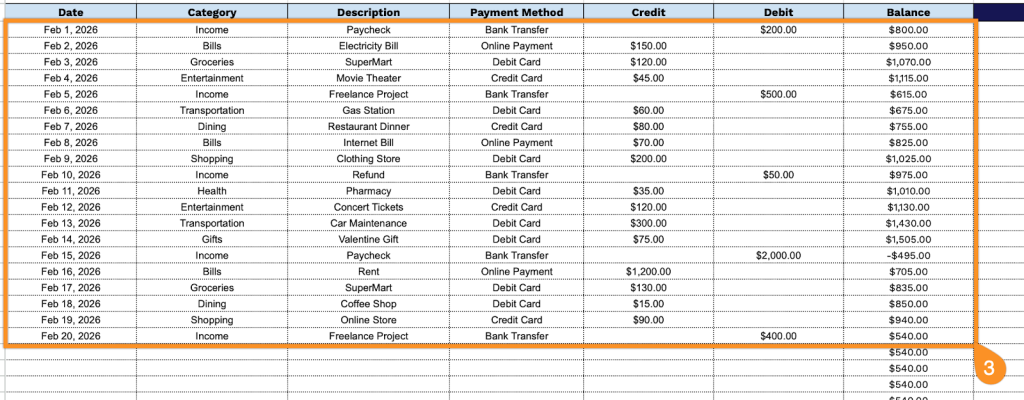
3. Complete the columns by entering all essential banking information:
- Date: Record the transaction date when the deposit, withdrawal, or transfer occurred.
- Category: Add the appropriate transaction classification (income, expenses, transfers, fees, etc.).
- Description: Specify the complete details of the transaction, including the purpose and relevant parties involved.
- Payment Method: Document how the transaction was executed (cash, check, wire transfer, debit card, etc.).
- Credit: Enter deposit amounts or incoming funds that increase the account balance.
- Debit: Record withdrawal amounts or outgoing funds that decrease the account balance.
- Balance: This field calculates automatically to display the running account total after each transaction.
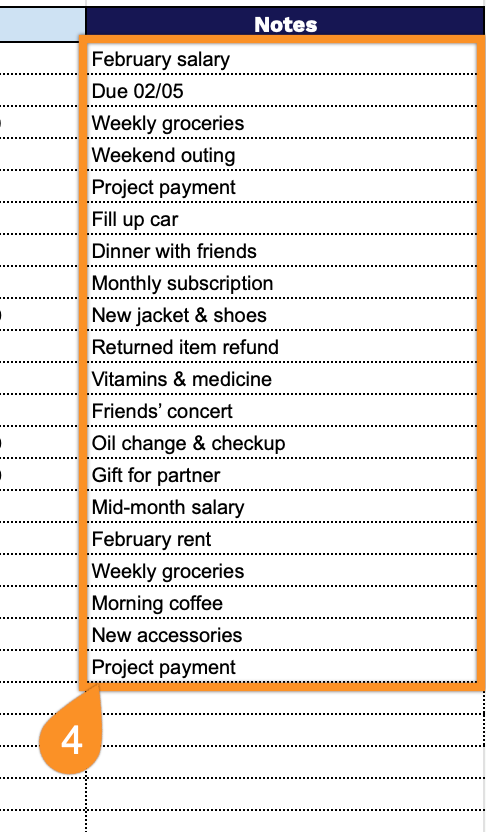
4. Record explanations for unusual transactions, reminders for upcoming bills, or any extraordinary circumstances affecting your account in the Notes section.