

Don’t want to spend time designing a client overview from scratch?
Our free Customer Fact Sheet Template provides a clean, structured format for organizing key customer data.
Available in Google Sheets, Excel, and PDF, it’s fully customizable and ideal for tracking contact details, account information, transaction history, and important notes in a single, streamlined document.
What Is a Customer Fact Sheet Template?
A customer fact sheet template is a standardized document that organizes key information about a customer or client in a clear, accessible format.
This tool enables sales, support, and account management teams to maintain consistency in customer interactions and ensure everyone has immediate access to the most important customer data.
Download Spreadsheet Daddy’s Free Customer Fact Sheet Template
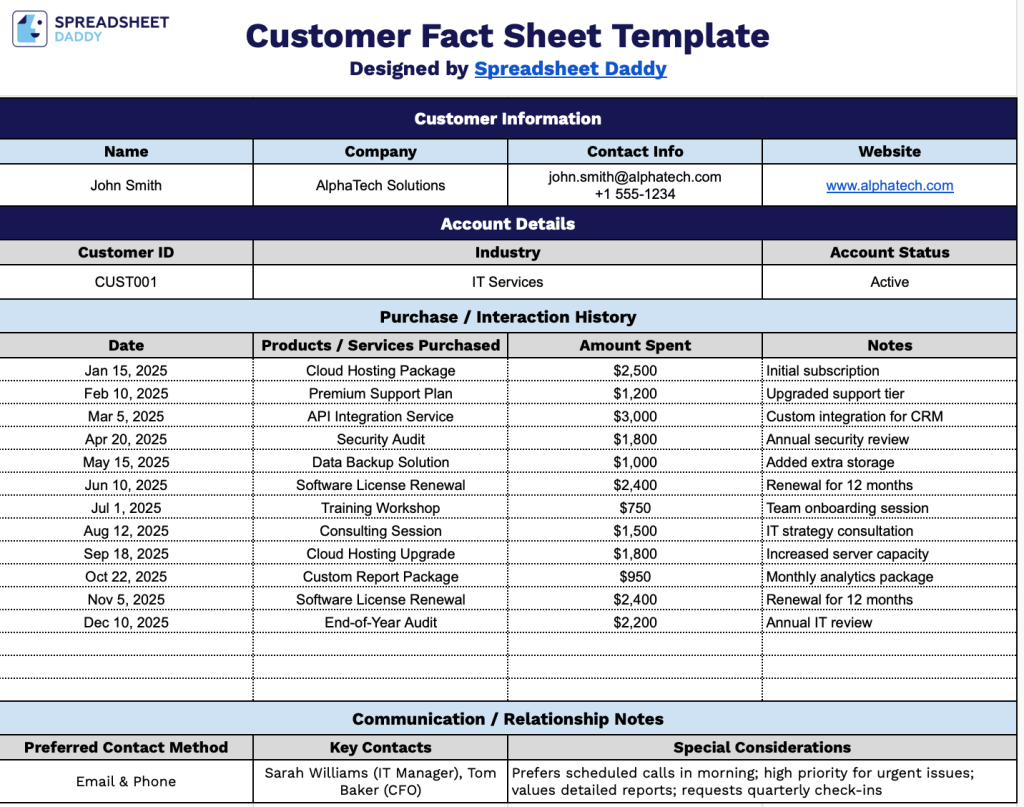
Our Customer Fact Sheet Template provides a clean and organized way to track all essential customer information in one place, from account details to purchase history and communication notes.
What’s included
- Customer Information section: The top section includes four clearly labeled columns, including Name, Company, Contact Info, and Website, providing a clean, organized space to capture all essential identifying details for each customer account at a glance.
- Account Details section: A dedicated row beneath the customer information captures the Customer ID, Industry classification, and Account Status, giving your team a quick reference for segmenting and managing accounts by type or standing.
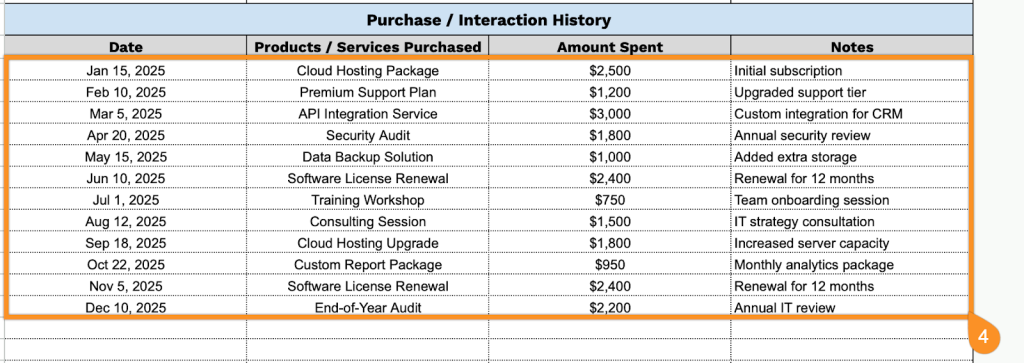
- Purchase / Interaction History table: The largest section of the template features a multi-row table with four columns, including Date, Products/Services Purchased, Amount Spent, and Notes, offering ample space to log an ongoing record of transactions and customer touchpoints in one centralized location.
- Communication/Relationship Notes section: The bottom of the sheet includes a three-column row for Preferred Contact Method, Key Contacts, and Special Considerations, ensuring that relationship nuances and communication preferences are documented and accessible to anyone working on the account.
You can easily add or remove columns to tailor the layout to your specific business needs.
Choose your preferred format and download the free Customer Fact Sheet Template using the links below:
How to Use Our Customer Fact Sheet Template
1. Access the Customer Fact Sheet as an Excel file, PDF document, or editable Google Sheets copy.
2. Start by entering the customer’s full name, company name, contact details (email, phone, etc.), and company website. This section gives you a quick overview of who the customer is and how to reach them.

3. In the Account Details section, add the customer ID, industry, and current account status (e.g., Active, Inactive, Prospect). This helps you quickly understand their classification and standing.

4. Use the Purchase / Interaction History section to track key activities. Include the date of each purchase or interaction, the products or services provided, the amount spent, and any relevant notes.
5. In the Communication / Relationship Notes section, record the customer’s preferred contact method (such as email or phone), key contacts if applicable, and any special considerations that may help maintain a strong working relationship.

