Want to see your debts disappear faster?
Our Debt Snowball Template gives you a clear roadmap.
With versions for Google Sheets, Excel, and PDF, it’s easy to customize, keep track of payments, and motivate you with a step-by-step debt payoff plan.
What Is a Debt Snowball Template?
A debt snowball template is a financial planning tool that helps you organize and track multiple debts while following the debt snowball repayment method.
This approach involves listing your debts from smallest to largest balance, making minimum payments on all debts while putting extra money toward the smallest one first, then rolling that payment into the next-smallest debt once it’s paid off.
Download Spreadsheet Daddy’s Free Debt Snowball Template
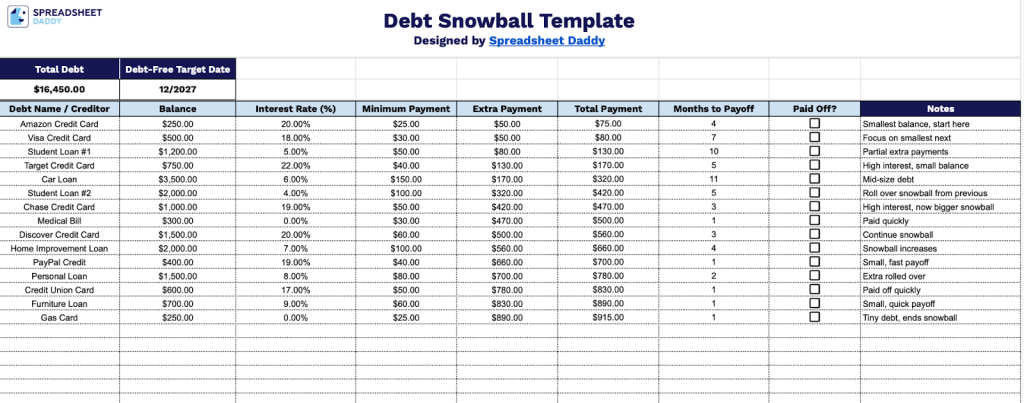
Our Debt Snowball Template helps you organize and track your progress as you work toward becoming debt-free.
What’s included
- Total debt summary dashboard: The top section displays an automated overview with total outstanding debt and a projected debt-free target date, giving you a clear snapshot of your payoff progress at a glance before diving into individual accounts.
- Comprehensive debt tracking table: The main tab includes clearly labeled columns for Debt Name / Creditor, Balance, Interest Rate (%), Minimum Payment, Extra Payment, Total Payment, Months to Payoff, Paid Off?, and Notes, allowing you to track every loan, credit card, or bill in one organized sheet.
- Built-in snowball calculation columns: Dedicated Extra Payment and Total Payment columns are structured to reflect the debt snowball method, helping you roll payments from paid-off debts into the next balance automatically and visualize how your snowball grows over time.
- Status and progress indicators: A “Paid Off?” column lets you mark completed debts, while the Months to Payoff column helps estimate timelines, making it easy to prioritize the smallest balances first and monitor momentum.
You can easily add or remove columns as needed to customize it for your personal financial situation.
Use the links below to access a blank Debt Snowball Template, ready for you to customize:
How to Use Our Debt Snowball Template
1. Download the template in Excel or PDF, or duplicate it to Google Sheets for personal use.
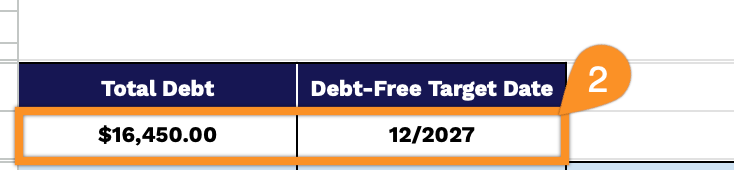
2. At the top of the sheet, enter your estimated debt-free target date to keep your payoff goal clear and motivating. The Total Debt section will automatically calculate the combined balance of all your debts, so you can instantly see how much you owe overall.
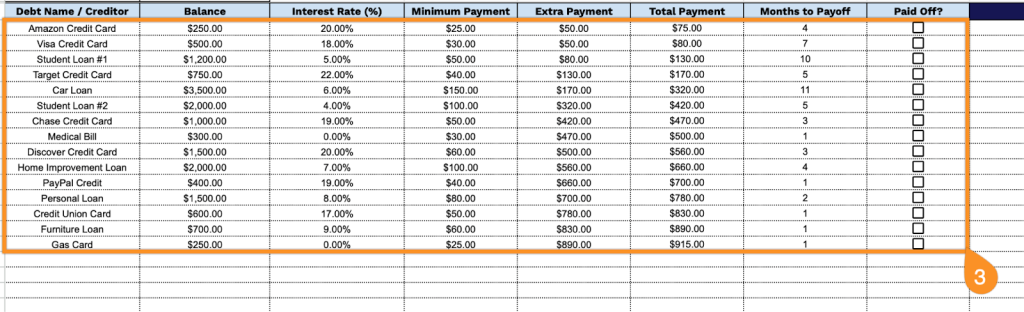
3. Complete the columns by entering all essential information for each debt:
- Debt Name / Creditor: Enter the name of the lender or creditor (e.g., Chase Credit Card, Student Loan – Sallie Mae).
- Balance: Specify the current total amount owed on this debt.
- Interest Rate (%): Record the annual percentage rate (APR) being charged on the outstanding balance.
- Minimum Payment: Enter the minimum monthly payment required by the creditor.
- Extra Payment: Input any additional amount you plan to allocate toward this debt beyond the minimum payment.
- Total Payment: This field is automatically calculated by adding your minimum payment and any extra payments.
- Months to Payoff: This field is automatically calculated based on your balance and the total payment amount.
- Paid Off?: Mark this checkbox once the debt has been eliminated to track your progress.
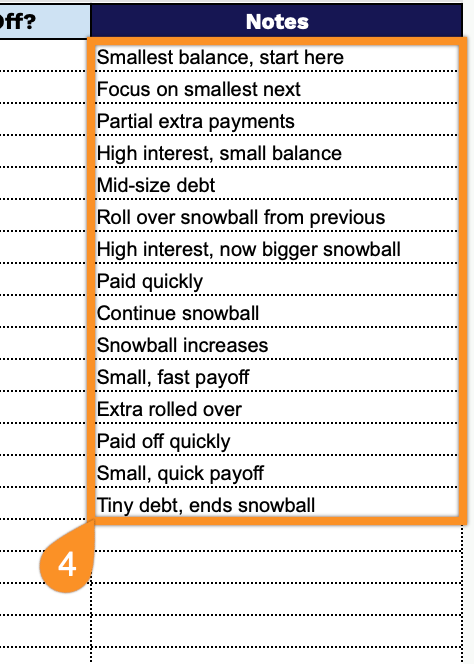
4. Record explanations for any changes, reminders for upcoming payments, or special circumstances affecting your repayment plan, such as expected windfalls or unexpected expenses, in the Notes section.