Planning a film? Don’t waste time building a budget from scratch.
Grab our free Film Budget Template, fully editable in Google Sheets, Excel, or PDF.
Keep all your production costs organized, compare estimates to actuals, and make smart financial decisions for every scene.
What Is a Film Budget Template?
A film budget template is a standardized document that outlines all anticipated costs for producing a film, from pre-production through post-production.
This template serves as both a planning tool and a financial roadmap, enabling producers to allocate resources efficiently and stay within their overall budget constraints.
Download Spreadsheet Daddy’s Free Film Budget Template
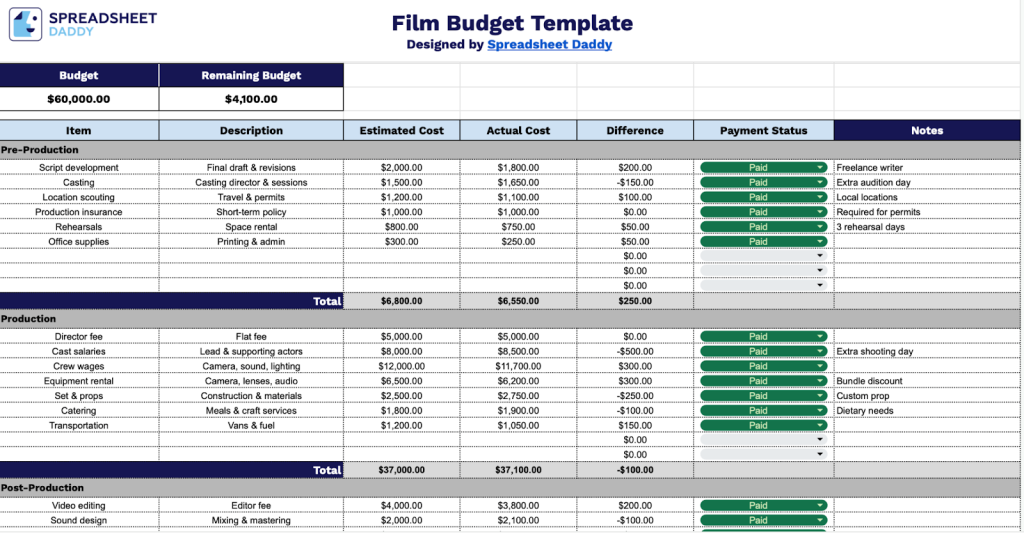
Our Film Budget Template helps you track estimated versus actual costs across all phases of your production.
What’s included
- Comprehensive budget-tracking dashboard: The template features a top-level budget summary that displays the total estimated budget and remaining balance, providing instant visibility into your film project’s financial status at a glance.
- Multi-category expense organization: The spreadsheet includes five separate category sections, each with 9 line items for detailed expense tracking, allowing you to organize costs by department, such as Pre-Production, Production, Post-Production, Cast, and Crew.
- Detailed cost comparison columns: Each line item includes fields for Item Description, Estimated Cost, Actual Cost, Difference (automatically calculated), Payment Status, and Notes, enabling you to track budget variances and maintain comprehensive financial records throughout your production.
- Automatic calculation and totaling system: The template features built-in formulas that automatically calculate the difference between estimated and actual costs for each item, subtotal expenses within each category, and update the overall budget remaining figure for real-time financial monitoring.
- Payment tracking and annotation capabilities: Each expense entry includes a Payment Status field to mark items as paid, pending, or outstanding, and a Notes column for recording essential details such as payment dates, vendor information, or special conditions for each budget line item.
Customize the layout by adding or removing columns to match your unique workflow and production requirements.
Grab your free blank Film Budget Template in the format that works best for you using the links below:
How to Use Our Film Budget Template
1. Start by downloading the Film Budget Template as an Excel or PDF file, or duplicate it in Google Sheets for online use.
2. Enter the total amount allocated for the production, including pre-production, filming, and post-production costs.

3. List each expense under categories such as Cast, Crew, Equipment, Locations, Props, Post-Production, and Marketing. For every item, add a brief description, the estimated cost, the actual cost, and the payment status.

4. The template will automatically calculate totals, highlight cost differences, and show your remaining budget so you can track spending throughout the production.

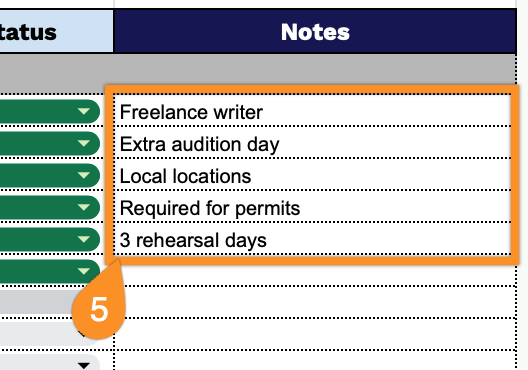
5. Record special instructions, contract terms, payment schedules, scene or shoot references, or any production-specific reminders that may affect budgeting decisions in the Notes section.