Whether you’re growing flowers, vegetables, herbs, or fruit, this free Garden Journal template helps you keep detailed records.
Download it as a Google Sheets, Excel, or PDF file and customize it to match your gardening style and goals.
What Is a Garden Journal Template?
A garden journal template is a structured document that helps gardeners track and record important information about their garden throughout the growing season, such as planting dates, seed varieties, soil conditions, and weather patterns.
Over time, a well-maintained garden journal becomes an invaluable tool for improving yields, troubleshooting problems, and preserving gardening knowledge year after year.
Download Spreadsheet Daddy’s Free Garden Journal Template
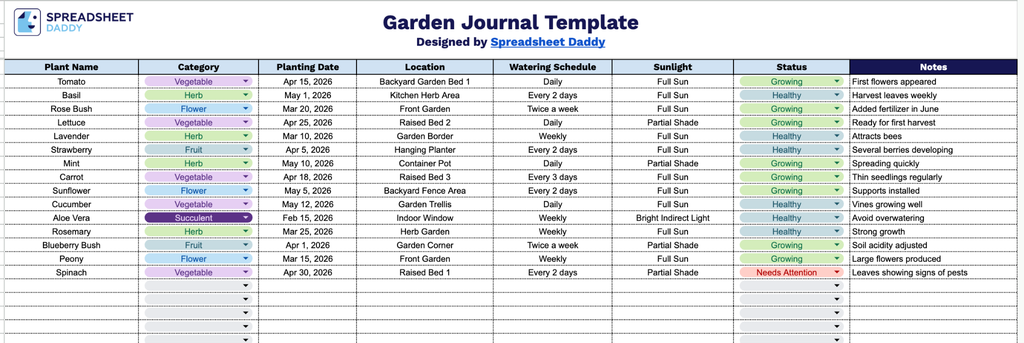
Our Garden Journal Template gives you a simple, organized way to track everything happening in your garden, from planting dates and locations to watering schedules and plant health.
What’s included
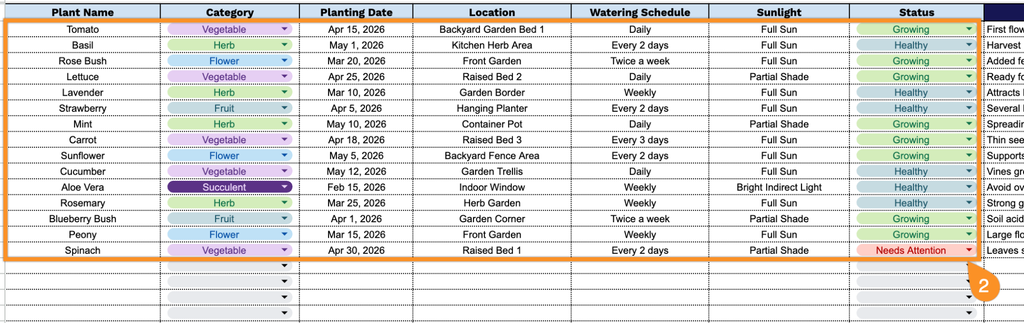
- Plant identification and category tracking: The Plant Name and Category columns let you log each plant individually and group them by type (e.g., vegetable, herb, flower, shrub), making it easy to organize and reference your garden inventory at a glance.
- Planting date and location fields: Dedicated columns for Planting Date and Location let you record exactly when and where each plant was placed, which helps track growth timelines and plan garden bed rotations in future seasons.
- Watering schedule and sunlight requirements: These two columns capture the specific care needs of each plant, so you always have quick access to how often it needs water and how much sun exposure it requires without having to look it up elsewhere.
- Status tracking for plant health and progress: The Status column gives you a place to note the current condition of each plant, such as germinating, thriving, harvested, or dormant, helping you monitor progress throughout the growing season.
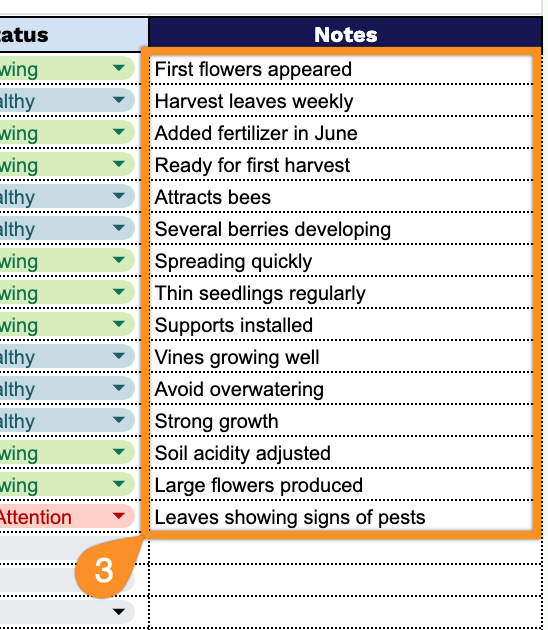
- Open Notes column for personalized observations: The Notes column provides space to jot down additional details, such as fertilizing dates, pest issues, pruning reminders, or general observations specific to each plant.
Add or remove columns to fit whatever information matters most to your own gardening routine.
Select your preferred file format below to download a free, customizable Garden Journal template:
How to Use Our Garden Journal Template
1. Start by downloading the Garden Journal as an Excel or PDF file, or duplicate it to your Google Sheets account.
2. Fill in each plant’s details, including its name, category, planting date, location, watering routine, sunlight requirements, and status.
3. Use the Notes section to document gardening tips, challenges, successes, or plans for future planting seasons.