Looking for an easier way to document your IT infrastructure?
Download our free Network Documentation Template in Google Sheets, Excel, or PDF.
It gives you a structured starting point for recording network devices, IP addresses, configurations, connections, and other important network details.
What Is a Network Documentation Template?
A network documentation template is a structured framework used by IT professionals to record and organize critical information about a network infrastructure, including IP addresses, device configurations, network topology, hardware inventory, and security protocols.
By standardizing how network data is captured and stored, these templates reduce downtime, improve onboarding for new staff, and provide a clear audit trail for compliance and future planning purposes.
Download Spreadsheet Daddy’s Free Network Documentation Template
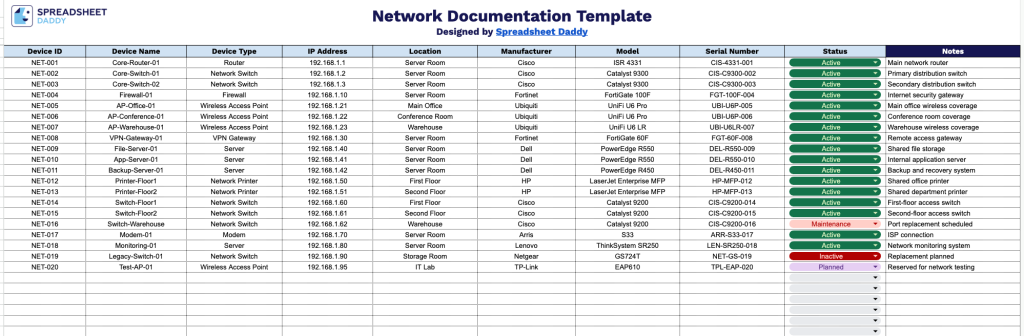
Our Network Documentation Template gives you a clean, organized way to track every device on your network, from routers and switches to servers and access points.
What’s included
- Structured device inventory columns: The sheet includes ten dedicated fields: Device ID, Device Name, Device Type, IP Address, Location, Manufacturer, Model, Serial Number, Status, and Notes, giving you a consistent, standardized way to log every piece of hardware on your network in one place.
- Dedicated status tracking field: A standalone Status column lets you flag each device as active, inactive, in repair, or retired (or any status labels you choose), making it easy to filter or scan for devices that need attention.
- Location and ownership tracking: The Location, Manufacturer, and Model fields let you record exactly where each device lives and what it is, which is especially useful for multi-site networks or when coordinating with vendors on repairs and replacements.
- Serial number and identification tracking: Dedicated Device ID and Serial Number columns support asset tagging and make it easy to cross-reference devices with warranty records, purchase orders, or support tickets.
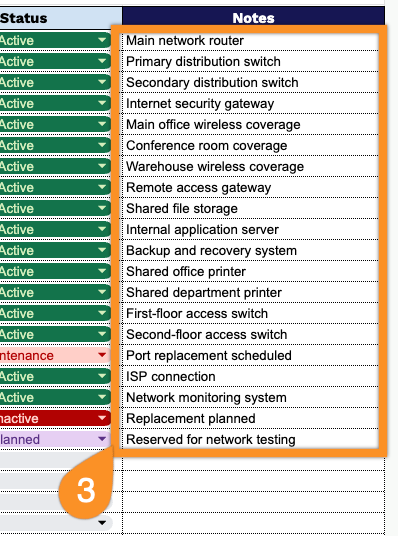
- Open-ended Notes field: A free-text Notes column lets you capture anything that doesn’t fit the standard fields, such as configuration details, maintenance history, known issues, or reminders for the next audit.
It’s fully customizable, so you can add or remove columns to match whatever details matter most for your setup.
Choose a file format below and download the free Network Documentation template:
How to Use Our Network Documentation Template
1. Select Excel or PDF to download the Network Documentation template, or open it in Google Sheets and create your own editable copy.
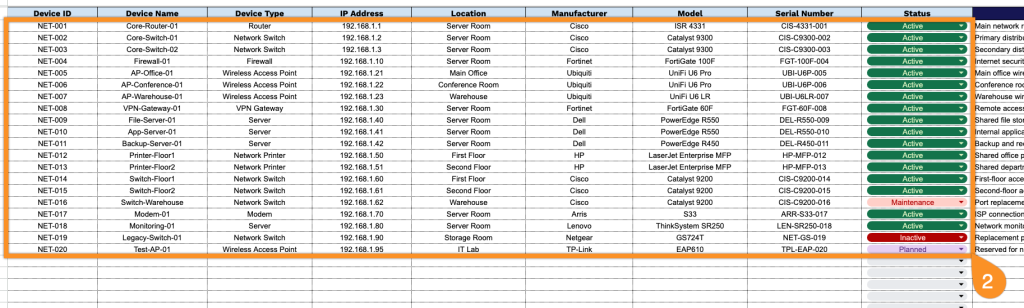
2. Enter each device’s key details, including its device ID, name, type, IP address, location, manufacturer, model, serial number, and current status.
3. Use the Notes section to record important configuration details, maintenance information, access instructions, issues, or other special notes related to the network.