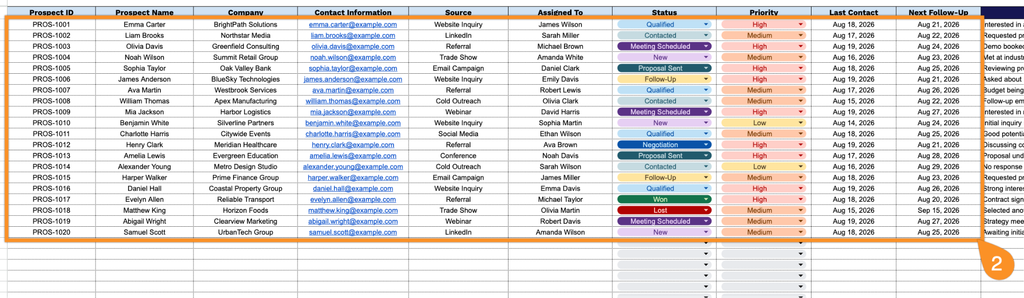
Stay on top of your potential customers with a ready-to-use Prospect Tracking Template.
Available as a free download in Google Sheets, Excel, and PDF, it makes it easy to organize prospect information, document communication, and track each lead as it moves through your sales pipeline.
What Is a Prospect Tracking Template?
A prospect tracking template is a structured tool used by sales and business development teams to organize and monitor potential customers throughout the sales pipeline.
By using this template, sales professionals can prioritize outreach, avoid missed follow-ups, and make data-driven decisions to improve conversion rates and overall sales performance.
Download Spreadsheet Daddy’s Free Prospect Tracking Template
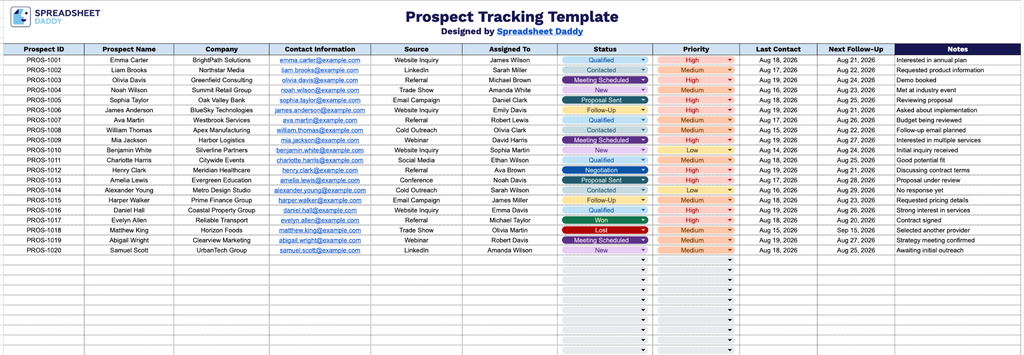
Our Prospect Tracking Template gives you a simple, organized way to manage and follow up with sales leads in one place.
What’s included
- Comprehensive prospect identification fields: Dedicated columns for Prospect ID, Prospect Name, and Company let you assign a unique tracking number to each lead while keeping their identity and business affiliation clearly organized side by side.
- Contact and origin tracking: The Contact Information and Source columns provide a single place to log phone numbers, emails, and other details alongside where each prospect came from (referral, cold call, website, event, etc.), making it easy to evaluate which channels are generating the best leads.
- Team accountability and workflow status: The Assigned To, Status, and Priority columns let you designate which team member owns each prospect, track where they stand in your pipeline (e.g., New, Contacted, Qualified, Closed), and flag high-value leads that need immediate attention.
- Follow-up scheduling fields: Last Contact and Next Follow-Up columns help you keep a clear record of when you last touched base with a prospect and when you’re due to reach out again, reducing the risk of leads falling through the cracks.
You can add or remove columns to fit your own sales process and reporting needs.
Pick the format you prefer and download a free Prospect Tracking Template for keeping your prospect records organized:
How to Use Our Prospect Tracking Template
1. Download the Prospect Tracking Template in Excel or PDF format, or duplicate it in Google Sheets to customize it for your needs.
2. Add each prospect’s ID, name, company, contact details, lead source, assigned team member, current status, priority level, last contact date, and next follow-up date to keep your pipeline organized and up to date.
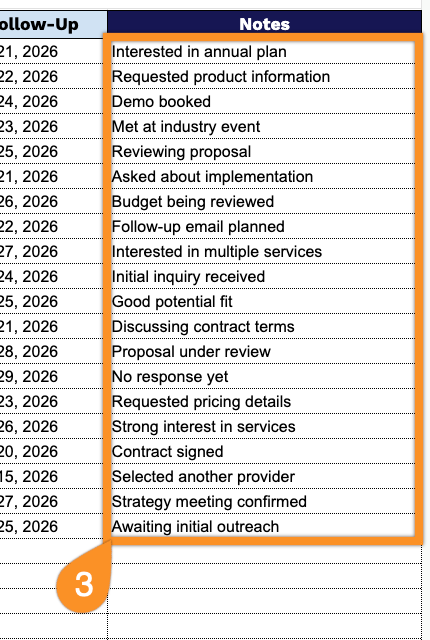
3. Use the Notes section to record important conversations, preferences, requirements, or other details that can help you build stronger relationships with prospects.