Skip the hassle of creating a workout plan from scratch.
Download our free Workout Plan Template to organize your training sessions, track performance, and stay motivated.
Available in Google Sheets, Excel, and PDF, it’s easy to customize for any fitness level.
What Is a Workout Plan Template?
A workout plan template is a pre-structured framework that outlines exercise routines, typically organized by days, weeks, or training cycles.
These templates serve as customizable blueprints that help individuals stay consistent with their training goals, whether for strength building, weight loss, endurance, or general fitness.
Download Spreadsheet Daddy’s Free Workout Plan Template
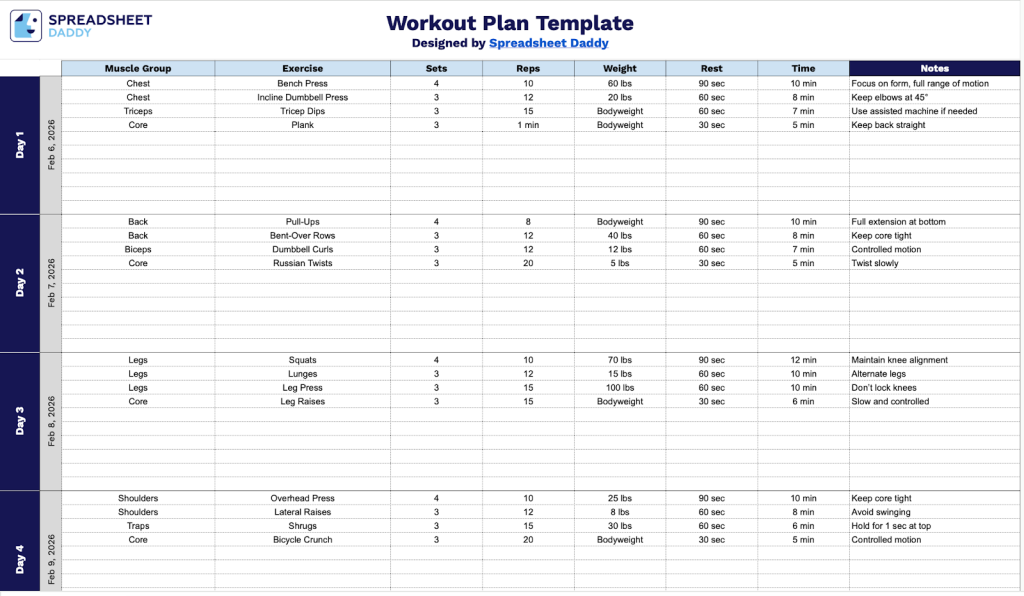
Our Workout Plan Template provides a structured weekly schedule to help you organize your fitness routine with detailed tracking for exercises, sets, reps, and other essential metrics.
What’s included
- Seven-day workout structure with date tracking: The template provides a full week layout (Day 1 through Day 7) with dedicated date fields for each day, allowing you to plan and track your fitness routine across an entire week while maintaining chronological organization of your training schedule.
- Comprehensive exercise tracking columns: Each workout day includes structured columns for Muscle Group (to categorize exercises by body part), Exercise (to name the specific movement), Sets (to record the number of sets performed), Reps (to track repetitions per set), and Weight (to document the resistance used), providing complete workout documentation in one organized view.
- Rest time and notes sections for detailed planning: The template includes a Rest Time column to specify recovery periods between sets, plus a Notes field for recording form cues, modifications, personal records, and other relevant observations that help you refine and progress your training over time.
- Clean, minimalist table format for easy readability: The workout plan uses a simple grid layout with clearly labeled rows and columns, making it effortless to fill in your exercises, scan your weekly schedule at a glance, and maintain consistent tracking without visual clutter or complexity.
The template is fully customizable, allowing you to add or remove columns based on your specific training needs and preferences.
It’s designed to accommodate various workout styles and can be easily adapted as your fitness goals evolve.
Choose a format below to download a blank Workout Plan and customize your training schedule:
How to Use Our Workout Plan Template
1. Download the workout plan as an Excel or PDF file, or duplicate it for use in Google Sheets.
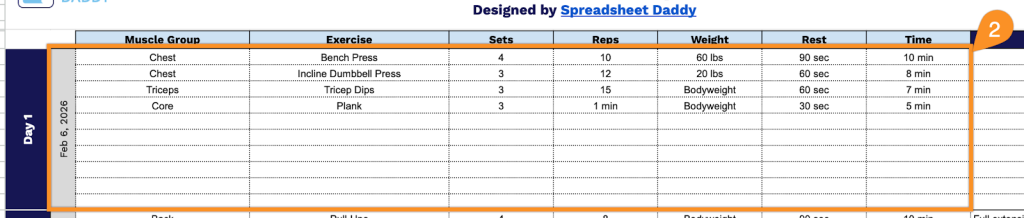
2. Complete the columns by entering all essential training information for each day of the week:
- Date: Enter the specific date for each workout day to track your training schedule.
- Muscle Group: Specify the target muscle area being trained (chest, back, legs, shoulders, arms, core, etc.).
- Exercise: Record the complete name of each movement or exercise being performed.
- Sets: Document the total number of sets to be completed for each exercise.
- Reps: Indicate the number of repetitions to perform within each set.
- Weight: Log the resistance amount or load used (in pounds or kilograms).
- Rest: Note the recovery time between sets (typically measured in seconds or minutes).
- Time: Track the duration allocated for each exercise or the total workout session.
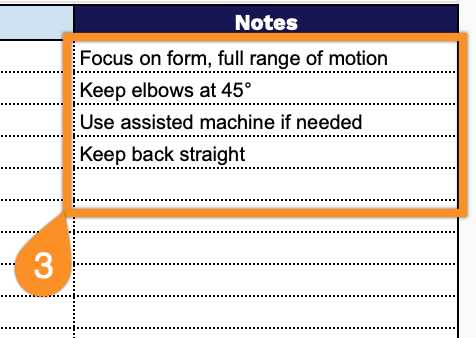
3. Use the Notes section to record how you felt during the workout, progress observations, injuries or soreness, skipped sessions, or adjustments to your plan for future workouts.