Skip the hassle of starting from scratch.
Our free Thanksgiving planning template is professionally formatted and available in Google Sheets, Excel, and PDF for quick, stress-free editing.
What Is a Thanksgiving Template?
A Thanksgiving template is a pre-formatted organizational tool that helps you plan and coordinate all aspects of your Thanksgiving celebration in one place.
These templates allow you to assign dishes to different people, track what needs to be purchased, monitor expenses, and manage guest information, making it easy to ensure nothing is forgotten for your Thanksgiving gathering.
Download Spreadsheet Daddy’s Free Thanksgiving Template
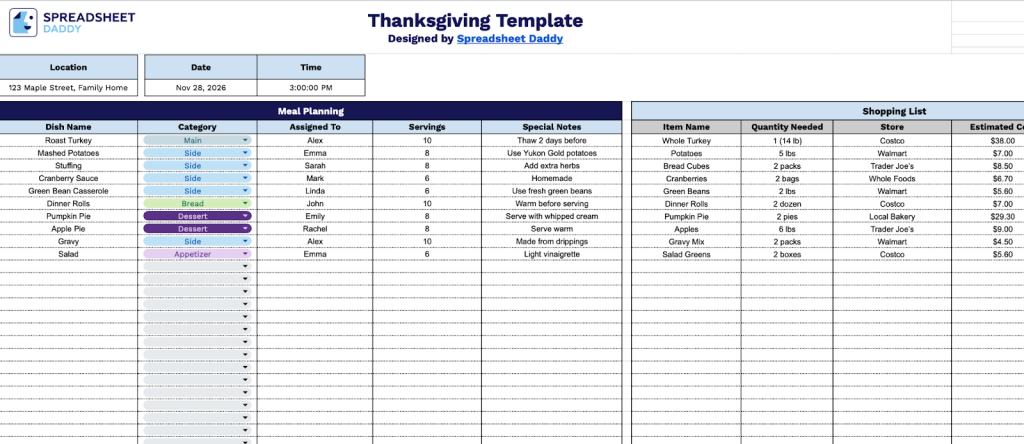
Our Thanksgiving planning template helps you organize your holiday gathering with sections for meal planning, shopping, budgeting, and guest management.
What’s included
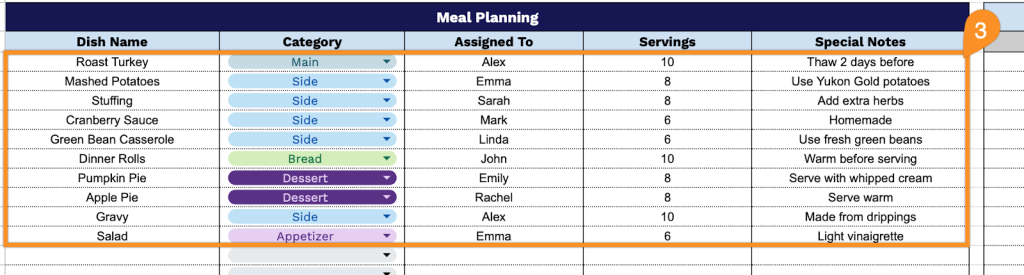
- Comprehensive meal planning section: The template includes dedicated fields for organizing your Thanksgiving dinner with columns for Dish Name, Category, Assigned To, Servings, and Special Notes, allowing you to coordinate who’s bringing what dishes, track portion sizes, and capture important details like dietary restrictions or preparation instructions for seamless meal coordination.
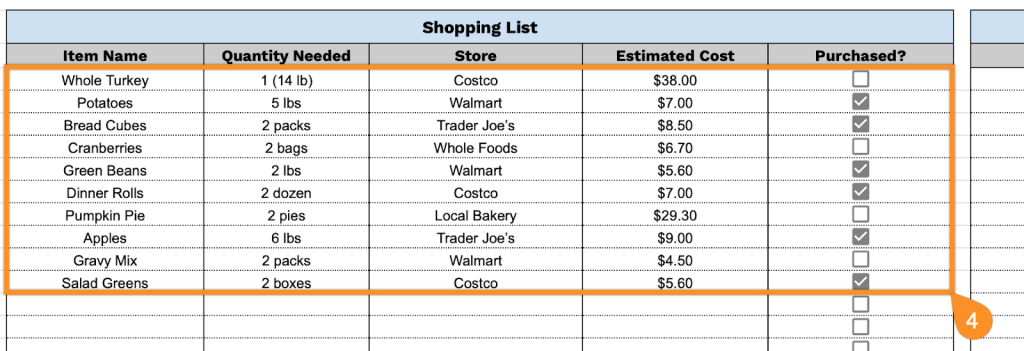
- Integrated shopping list with budget tracking: A detailed shopping list section features columns for Item Name, Quantity Needed, Store, Estimated Cost, and a Purchased checkbox, enabling you to plan your grocery runs efficiently, compare prices across stores, and check off items as you buy them to stay organized throughout your shopping trips.
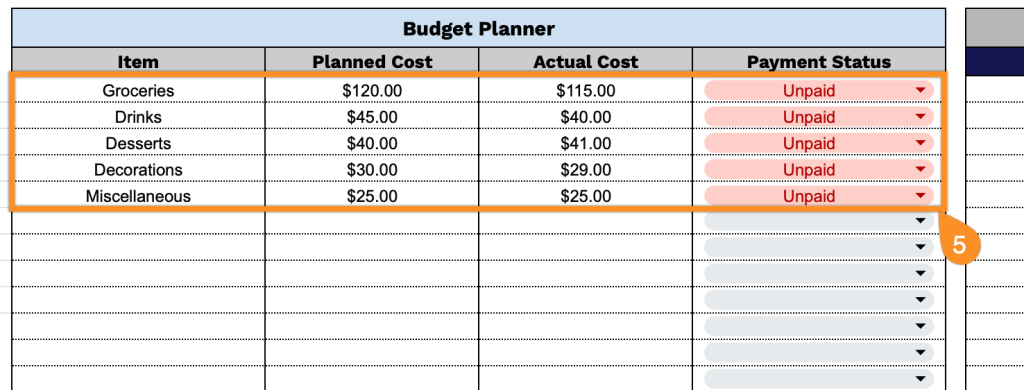
- Budget planner with cost reconciliation: The budget planning area includes separate fields for Item, Planned Cost, Actual Cost, and Payment Status, helping you set spending expectations upfront and track real expenses as they occur, ensuring you stay within budget while documenting who has paid for shared expenses.
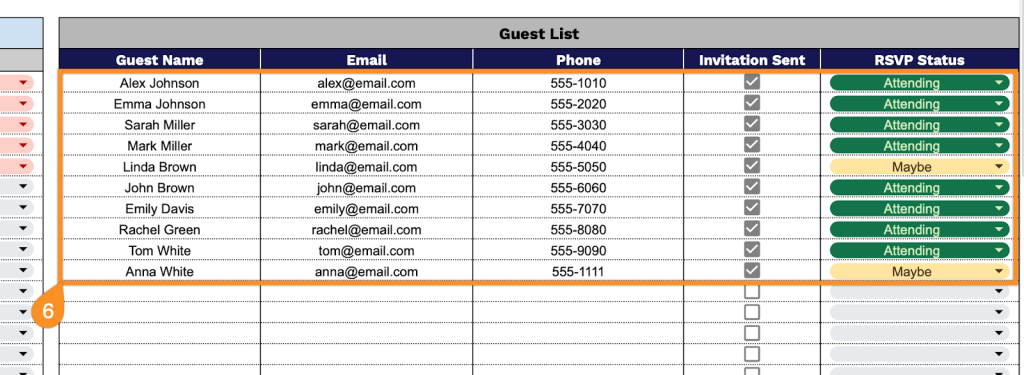
- Guest management system: A complete guest list section contains columns for Guest Name, Email, Phone, Invitation Sent status, and RSVP Status, allowing you to maintain contact information, track invitation delivery, monitor responses, and get an accurate headcount for food preparation and seating arrangements.
- Event details customization: The header includes editable fields for Location, Date, and Time, providing clear event information at a glance that can be shared with guests or used as your personal planning reference for the Thanksgiving celebration.
All information is neatly organized in a spreadsheet, which you can customize by adding or removing columns based on your specific needs.
Choose your preferred format and download a free Thanksgiving Template using the links below:
How to Use Our Thanksgiving Template
1. Access the Thanksgiving template by saving it in Excel or PDF, or duplicating it directly in Google Sheets.
2. Enter the location, date, and start time for your Thanksgiving gathering.

3. Provide comprehensive details in the Meal Planning section to organize your Thanksgiving menu:
- Dish Name: Enter the specific name of each recipe you plan to prepare for the celebration.
- Category: Classify the dish by type (appetizer, main course, side dish, dessert, or beverage).
- Assigned To: Designate which family member or guest will be responsible for preparing this item.
- Servings: Indicate the number of portions each dish will yield.
- Special Notes: Record any dietary restrictions, ingredient substitutions, or preparation reminders.
4. Document all necessary items in the Shopping List section to ensure nothing is forgotten:
- Item Name: List each ingredient or supply needed for your Thanksgiving preparations.
- Quantity Needed: Specify the required amount (e.g., 1 cup, 2 pounds, or 1 unit).
- Store: Note which grocery store or market you plan to purchase the item from.
- Estimated Cost: Project the anticipated price for budgeting purposes.
- Purchased?: Mark whether you’ve already acquired this item.
5. Track all expenses in the Budget Planner section to maintain financial oversight:
- Item: Identify each cost category (groceries, decorations, supplies, or entertainment).
- Planned Cost: Set your initial budget allocation for this expense category.
- Actual Cost: Record the real amount spent after making purchases.
- Payment Status: Update whether this expense has been paid, is pending, or remains outstanding.
6. Organize attendee information in the Guest List section to manage your gathering:
- Guest Name: Write the full name of each person invited to your Thanksgiving celebration.
- Email: Include their email address for sending digital invitations and updates.
- Phone: Add their contact number for last-minute coordination or confirmations.
- Invitation Sent: Check off once you’ve delivered the invitation to this guest.
- RSVP Status: Update their response.