Need a reliable way to track rent payments without building a spreadsheet yourself?
Our free Rental Ledger Template is ready to use in Google Sheets, Excel, or PDF.
Easily log rent due dates, payments received, late fees, and outstanding balances to keep your rental records organized and accurate.
What Is a Rental Ledger Template?
A rental ledger template is a standardized document used to track and record all financial transactions between a landlord and tenant throughout a tenancy.
This template serves as an essential record-keeping tool for both parties, helping to prevent disputes and simplify tax preparation or legal proceedings if needed.
Download Spreadsheet Daddy’s Free Rental Ledger Template
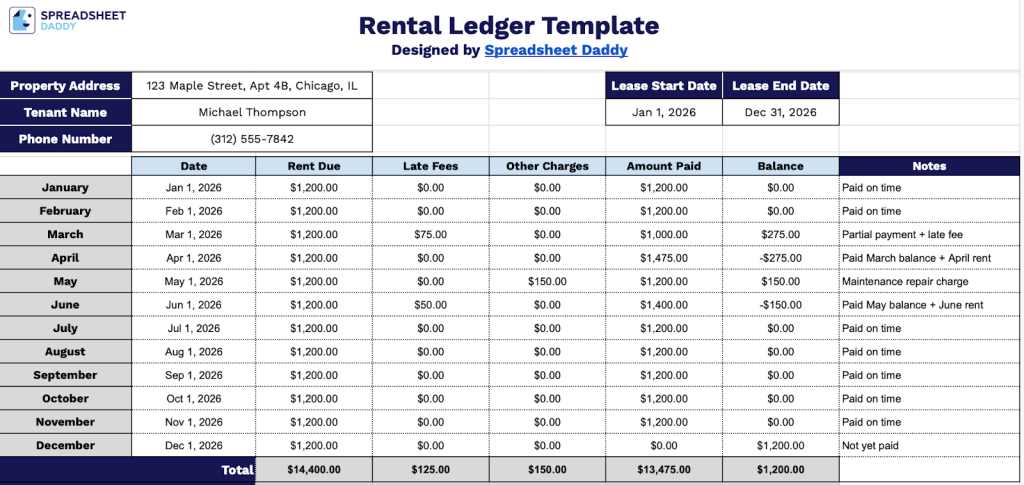
Our Rental Ledger Template helps landlords and property managers keep a clear, organized record of tenant payments, fees, and balances throughout the lease period.
What’s included
- Tenant and property information fields: The header section includes dedicated input fields for property address, tenant name, phone number, lease start date, and lease end date, allowing landlords to enter key identifying details for professional, organized record-keeping quickly.
- Month-by-month payment-tracking rows: The ledger body is structured with one row per month, spanning January through December, giving landlords a clear, chronological breakdown of rental activity across a full calendar year in a single view.
- Multi-column financial breakdown: Each monthly row includes dedicated columns for Date, Rent Due, Late Fees, Other Charges, Amount Paid, and Balance, enabling granular tracking of every financial component of the tenancy, from standard rent to penalty fees and miscellaneous charges.
- Automatic running balance and totals row: The Balance column calculates what is owed month by month, while a bold Total row at the bottom of the ledger summarizes all columns, Rent Due, Late Fees, Other Charges, Amount Paid, and Balance, providing an at-a-glance annual financial summary.
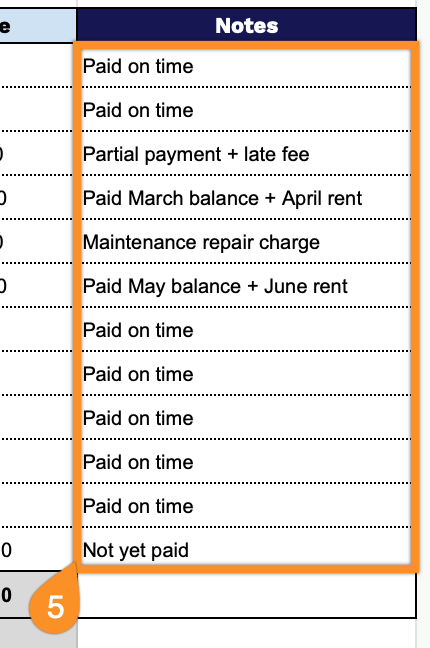
- Notes column for additional context: A dedicated Notes column on the far right of each monthly row allows landlords to log relevant details such as payment method, partial payment explanations, maintenance deductions, or any tenant communication, keeping all records consolidated in one document.
You can easily add or remove columns to fit your specific needs and tracking preferences.
Choose your desired format and download a free, ready-to-use Rental Ledger Template using the links provided:
How to Use Our Rental Ledger Template
1. Download the Rental Ledger Template in Excel or PDF format, or save your own editable copy in Google Sheets.
2. At the top of the sheet, enter the key lease details, including the property address, tenant name, phone number, and the lease start and end dates. This information helps you clearly identify the rental agreement the ledger refers to.

3. For each month, record the date, rent due, any late fees, additional charges (such as utilities or maintenance), and the amount paid by the tenant. The template will automatically calculate the remaining balance for each month.
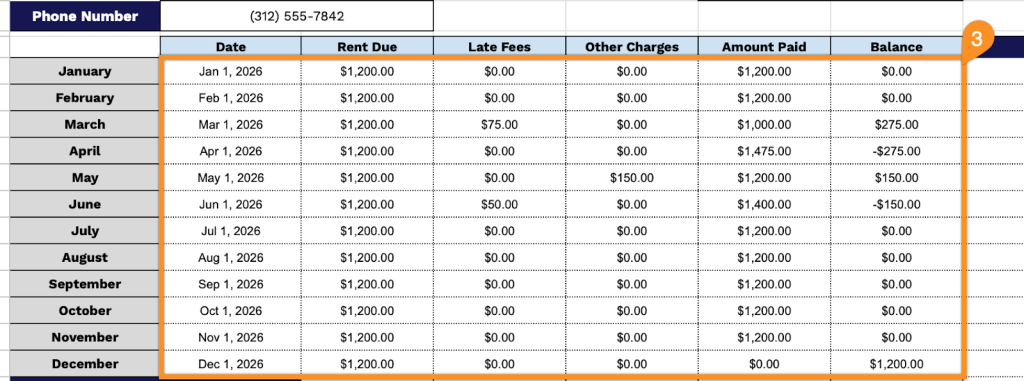
4. At the bottom of the ledger, you’ll find automatically calculated totals for rent due, late fees, other charges, total payments received, and the overall outstanding balance, giving you a clear summary of the tenant’s payment history.

5. Use the Notes section to record important details such as partial payments, payment method (cash, bank transfer, check), reminders sent, lease changes, or any special agreements with the tenant.