Planning resources doesn’t have to be complicated.
Grab our free Resource Planning Template, ready to use in Google Sheets, Excel, or PDF.
Quickly assign tasks, track availability, and manage project resources without starting from scratch.
What Is a Resource Planning Template?
A resource planning template is a structured document used to organize, allocate, and track the resources needed for a project or business operation.
These templates streamline the planning process by providing a standardized framework that ensures all necessary resources are accounted for and efficiently distributed across tasks and timelines.
Download Spreadsheet Daddy’s Free Resource Planning Template
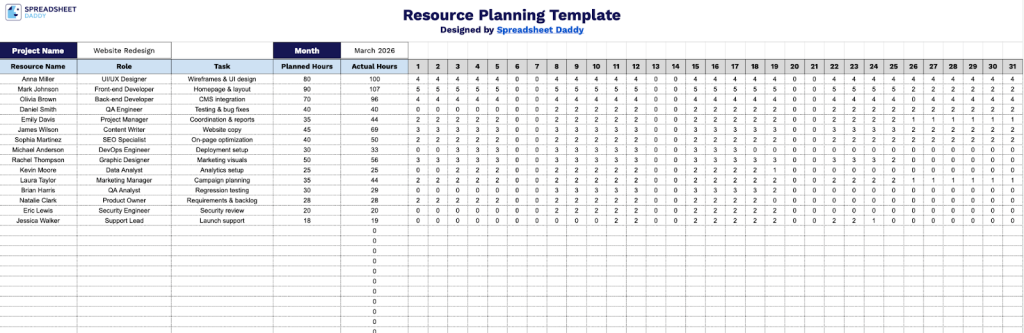
Our Resource Planning Template helps you track team member assignments, tasks, and hours across your project timeline.
What’s included
- Comprehensive resource tracking columns: The template includes dedicated columns for Resource Name, Role, Task, Planned Hours, and Actual Hours, enabling you to document team member assignments, responsibilities, and time allocation for complete project oversight and accountability.
- Daily calendar grid (days 1-31): A full-month view with individual day columns (numbered 1 through 31) lets you visualize and plan resource allocation across the entire month, making it easy to identify scheduling conflicts, peak workload periods, and resource availability at a glance.
- Project and timeframe identification fields: The header section features editable fields for Project Name and Month, allowing you to clearly label and organize separate planning documents for different projects or time periods while maintaining a consistent tracking methodology.
- Hours calculation system: Built-in numerical fields provide a framework for tracking and totaling hours, enabling you to compare planned versus actual time expenditure and monitor resource utilization throughout the project lifecycle.
You can customize it by adding or removing columns to match your specific project needs.
The daily breakdown format allows you to monitor planned versus actual hours and ensure optimal resource allocation throughout the month.
Choose your preferred format below to download a free blank Resource Planning Template:
How to Use Our Resource Planning Template
1. Access the template in Excel or PDF format, or create a personal copy in Google Sheets.
2. At the top of the sheet, enter the project name and the month you are planning for.

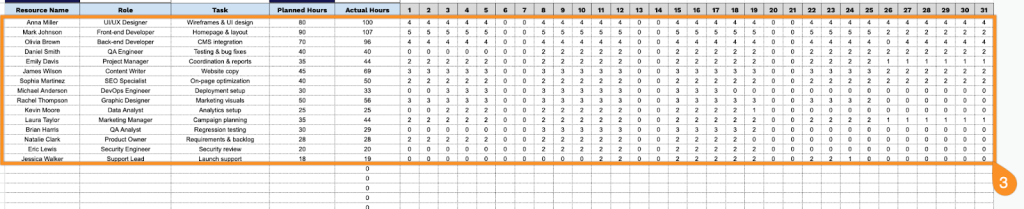
3. Add each team member with their role, assigned tasks, and total planned hours. Then enter the hours worked for each day of the month for every resource. The sheet will automatically calculate the total actual hours.